Introduction
In today's fast-paced digital landscape, the ability to react to data in real-time is no longer a luxury but a necessity. From fraud detection and personalized recommendations to real-time analytics and microservice synchronization, immediate access to data changes drives critical business decisions and enhances user experiences. Traditional batch processing, while still relevant for certain use cases, often falls short when milliseconds matter.
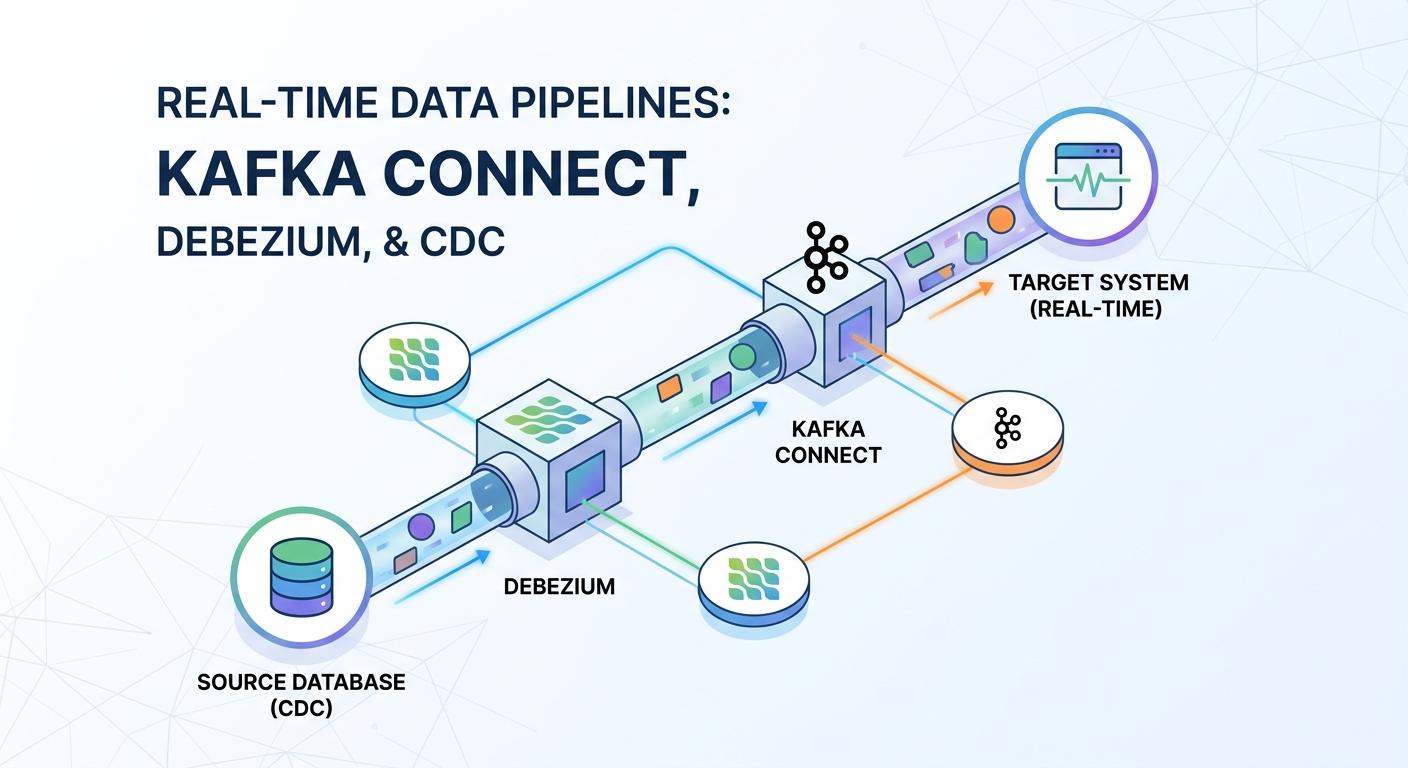
This is where Real-Time Data Pipelines come into play, enabling organizations to capture, process, and react to data as it happens. At the heart of many modern real-time architectures lies Change Data Capture (CDC), a technique for identifying and capturing data changes in a database and delivering them to other systems. When combined with the distributed streaming power of Apache Kafka and the robust integration capabilities of Kafka Connect and Debezium, you gain an incredibly powerful and flexible platform for building event-driven systems.
This comprehensive guide will walk you through the intricacies of CDC, how Kafka Connect acts as the data integration backbone, and how Debezium serves as the intelligent CDC connector, transforming your static databases into dynamic event streams. We'll cover everything from fundamental concepts to practical implementation with code examples, best practices, and common pitfalls.
Prerequisites
To get the most out of this guide, a basic understanding of the following concepts will be beneficial:
- Apache Kafka: Core concepts like topics, producers, consumers, and brokers.
- Relational Databases: Familiarity with SQL and transactional concepts.
- Docker and Docker Compose: For setting up a local development environment.
- JSON: For understanding configurations and data formats.
1. Understanding Change Data Capture (CDC)
Change Data Capture (CDC) is a set of software design patterns used to determine and track the data that has changed within a database. The goal is to ensure that all changes (inserts, updates, deletes) made to a source database are captured and propagated to downstream systems in near real-time.
Why CDC?
- Data Synchronization: Keeping multiple databases or data warehouses consistent.
- Auditing: Maintaining a historical log of all data modifications.
- Event Sourcing: Reconstructing the state of an application by replaying events.
- Real-time Analytics: Powering dashboards and reports with up-to-the-minute data.
- Microservice Integration: Propagating data changes across loosely coupled services without direct database access.
CDC Approaches
There are several ways to implement CDC, each with its own trade-offs:
- Timestamp-based CDC: Periodically query tables for rows modified after a certain timestamp. Simple but can miss deletes and updates on non-timestamped columns, and is inefficient for large tables.
- Trigger-based CDC: Database triggers (e.g.,
AFTER INSERT,AFTER UPDATE,AFTER DELETE) write changes to a separate "change log" table. This is real-time but adds overhead to the source database and requires schema modifications. - Log-based CDC: This is the most robust and widely preferred method. It involves reading the database's transaction log (e.g., PostgreSQL's WAL, MySQL's binlog, Oracle's Redo Logs). This method is non-intrusive, highly performant, captures all changes, and preserves the order of operations. Debezium primarily uses this approach.
Log-based CDC is superior because it leverages the database's internal mechanisms, ensuring atomicity and consistency without impacting application performance or requiring schema changes.
2. Introducing Apache Kafka: The Central Nervous System
Apache Kafka is a distributed streaming platform designed for building real-time data pipelines and streaming applications. It acts as a highly scalable, fault-tolerant, and durable message broker that sits at the core of many modern data architectures.
Key Kafka Concepts
- Producers: Applications that publish (write) data to Kafka topics.
- Consumers: Applications that subscribe to (read) data from Kafka topics.
- Topics: Categories or feeds to which records are published. Topics are partitioned, and each partition is an ordered, immutable sequence of records.
- Brokers: Kafka servers that store the published data. A Kafka cluster consists of multiple brokers.
- Zookeeper: (Historically) Used by Kafka for managing cluster state, controller election, and topic configurations. Modern Kafka versions are moving away from Zookeeper dependency.
In our real-time data pipeline, Kafka will serve as the central nervous system, receiving all captured change events from our source databases and making them available to any number of downstream consumers.
3. Kafka Connect: The Data Integration Framework
Kafka Connect is an open-source framework for connecting Kafka with external systems such as databases, key-value stores, search indexes, and file systems. It simplifies the process of integrating data into and out of Kafka, providing a robust, scalable, and fault-tolerant way to move large datasets.
Kafka Connect Architecture
- Connectors: The core logical components that define where data should be copied from and to. There are two types:
- Source Connectors: Ingest data from external systems into Kafka (e.g., Debezium reading database changes).
- Sink Connectors: Deliver data from Kafka topics to external systems (e.g., writing Kafka events to Elasticsearch or a data warehouse).
- Workers: Processes that run the connectors and tasks. They can be deployed in standalone mode (for development/testing) or distributed mode (for production, providing scalability and fault tolerance).
- Tasks: The actual units of work within a connector. A single connector can have multiple tasks, allowing for parallel data processing.
- Converters: Define how data is serialized and deserialized between Kafka Connect and Kafka (e.g., JSON, Avro).
- Transforms (Single Message Transforms - SMTs): Lightweight logic that can be applied to individual messages as they flow through a connector, useful for minor data manipulations without writing custom code.
Kafka Connect provides a REST API for managing connectors, making it easy to deploy, monitor, and scale your data integration pipelines.
4. Debezium: The CDC Powerhouse for Kafka Connect
Debezium is an open-source distributed platform for Change Data Capture. It provides a set of Kafka Connect source connectors that monitor specific database management systems (DBMSs) and stream all row-level changes to Kafka topics. Debezium focuses on log-based CDC, making it highly reliable and non-intrusive.
Debezium's Key Features
- Non-Intrusive: Reads transaction logs, avoiding performance impact on the source database.
- Real-Time: Streams changes with very low latency.
- Robust: Handles schema changes, network outages, and connector restarts gracefully.
- Database Support: Supports a wide range of popular databases, including PostgreSQL, MySQL, SQL Server, Oracle, MongoDB, and more.
- Detailed Event Structure: Provides rich metadata about each change event, including
beforeandafterstates, operation type (cfor create,ufor update,dfor delete), timestamp, and source information.
Debezium effectively turns your database into an event stream, allowing you to build reactive, event-driven applications on top of your existing data infrastructure.
5. Setting Up the Environment (Docker Compose Example)
Let's set up a local environment using Docker Compose. We'll include ZooKeeper, Kafka, Kafka Connect, and a PostgreSQL database as our source.
Create a docker-compose.yml file:
version: '3.8'

services:
  zookeeper:
    image: confluentinc/cp-zookeeper:7.5.0
    hostname: zookeeper
    container_name: zookeeper
    ports:
      - "2181:2181"
    environment:
      ZOOKEEPER_CLIENT_PORT: 2181
      ZOOKEEPER_TICK_TIME: 2000

  kafka:
    image: confluentinc/cp-kafka:7.5.0
    hostname: kafka
    container_name: kafka
    ports:
      - "9092:9092"
    environment:
      KAFKA_BROKER_ID: 1
      KAFKA_ZOOKEEPER_CONNECT: zookeeper:2181
      KAFKA_ADVERTISED_LISTENERS: PLAINTEXT://kafka:29092,PLAINTEXT_HOST://localhost:9092
      KAFKA_LISTENER_SECURITY_PROTOCOL_MAP: PLAINTEXT:PLAINTEXT,PLAINTEXT_HOST:PLAINTEXT
      KAFKA_INTER_BROKER_LISTENER_NAME: PLAINTEXT
      KAFKA_OFFSETS_TOPIC_REPLICATION_FACTOR: 1
      KAFKA_GROUP_INITIAL_REBALANCE_DELAY_MS: 0
      KAFKA_TRANSACTION_STATE_LOG_MIN_ISR: 1
      KAFKA_TRANSACTION_STATE_LOG_REPLICATION_FACTOR: 1
    depends_on:
      - zookeeper

  kafka-connect:
    image: debezium/connect:2.3
    hostname: kafka-connect
    container_name: kafka-connect
    ports:
      - "8083:8083"
    environment:
      BOOTSTRAP_SERVERS: kafka:29092
      GROUP_ID: 1
      CONFIG_STORAGE_TOPIC: connect-configs
      OFFSET_STORAGE_TOPIC: connect-offsets
      STATUS_STORAGE_TOPIC: connect-statuses
      OFFSET_STORAGE_REPLICATION_FACTOR: 1
      CONFIG_STORAGE_REPLICATION_FACTOR: 1
      STATUS_STORAGE_REPLICATION_FACTOR: 1
      # For PostgreSQL logical decoding
      CONNECT_PLUGIN_PATH: /kafka/connect/debezium-connector-postgresql
    depends_on:
      - kafka

  postgres:
    image: postgres:15
    hostname: postgres
    container_name: postgres
    ports:
      - "5432:5432"
    environment:
      POSTGRES_DB: cdc_db
      POSTGRES_USER: cdc_user
      POSTGRES_PASSWORD: cdc_password
    volumes:
      - ./init.sql:/docker-entrypoint-initdb.d/init.sql
    command: postgres -c wal_level=logical -c max_replication_slots=10 -c max_wal_senders=10
Create an init.sql file for our PostgreSQL database:
CREATE TABLE IF NOT EXISTS products (
    id SERIAL PRIMARY KEY,
    name VARCHAR(255) NOT NULL,
    description TEXT,
    price DECIMAL(10, 2) NOT NULL,
    created_at TIMESTAMP DEFAULT CURRENT_TIMESTAMP,
    updated_at TIMESTAMP DEFAULT CURRENT_TIMESTAMP
);

INSERT INTO products (name, description, price) VALUES
('Laptop', 'Powerful laptop for everyday use', 1200.00),
('Mouse', 'Wireless ergonomic mouse', 25.50),
('Keyboard', 'Mechanical gaming keyboard', 75.99);

-- Create a user for Debezium with replication privileges
CREATE USER debezium_user WITH PASSWORD 'debezium_password';
GRANT SELECT ON ALL TABLES IN SCHEMA public TO debezium_user;
ALTER DEFAULT PRIVILEGES IN SCHEMA public GRANT SELECT ON TABLES TO debezium_user;
ALTER USER debezium_user WITH REPLICATION;

-- Grant specific privileges required for logical decoding
-- For PostgreSQL 10+, this is sufficient
-- For older versions, you might need superuser or specific 'replication' role.
Start the services:
docker-compose up -dVerify Kafka Connect is running by accessing http://localhost:8083 in your browser. You should see a blank page or a 404, but it indicates the service is up.
6. Configuring a Debezium Source Connector (PostgreSQL Example)
Now, let's configure the Debezium PostgreSQL connector. We'll use Kafka Connect's REST API to register the connector.
First, ensure the debezium/connect image has the PostgreSQL connector plugin. The debezium/connect:2.3 image typically includes it. If not, you'd need to extend the image or mount the plugin.
Send a POST request to Kafka Connect's REST API (http://localhost:8083/connectors) with the following JSON payload:
{
  "name": "product-postgres-connector",
  "config": {
    "connector.class": "io.debezium.connector.postgresql.PostgresConnector",
    "tasks.max": "1",
    "database.hostname": "postgres",
    "database.port": "5432",
    "database.user": "debezium_user",
    "database.password": "debezium_password",
    "database.dbname": "cdc_db",
    "database.server.name": "product_server",
    "schema.include": "public",
    "table.include.list": "public.products",
    "plugin.name": "pgoutput",
    "publication.autocreate.mode": "all_tables",
    "slot.name": "debezium_slot",
    "topic.prefix": "dbserver",
    "value.converter": "org.apache.kafka.connect.json.JsonConverter",
    "value.converter.schemas.enable": "false",
    "key.converter": "org.apache.kafka.connect.json.JsonConverter",
    "key.converter.schemas.enable": "false",
    "snapshot.mode": "initial"
  }
}
Let's break down the key configuration properties:
connector.class: Specifies the Debezium PostgreSQL connector class.tasks.max: Number of tasks to run for this connector. For PostgreSQL, typically 1.database.hostname,database.port,database.user,database.password,database.dbname: Connection details for your PostgreSQL database.database.server.name: A logical name for the database server. This will be used as a prefix for Kafka topics (e.g.,product_server.public.products).schema.include,table.include.list: Filters to specify which schemas and tables Debezium should monitor.plugin.name: Specifies the PostgreSQL logical decoding plugin to use.pgoutputis the recommended choice for modern PostgreSQL versions.publication.autocreate.mode: Debezium can automatically create a PostgreSQL publication for the tables it needs to monitor.all_tablesis convenient for getting started.slot.name: The name of the logical replication slot Debezium will use. This is crucial for tracking changes and ensuring no data is lost.topic.prefix: An alternative todatabase.server.namefor prefixing Kafka topics. In this example, we usedatabase.server.namefor the full topic name.value.converter,key.converter: Specifies the Kafka Connect converters for serializing message keys and values.JsonConverteris common for human-readable output.value.converter.schemas.enable,key.converter.schemas.enable: Set tofalsefor simpler JSON output without Avro schemas.snapshot.mode: Defines how the connector should behave on its initial start.initialmeans it will first perform a consistent snapshot of existing data and then switch to streaming changes. Other modes includeinitial_only,never,when_needed.
To register the connector, use curl:
curl -X POST -H "Content-Type: application/json" --data @connector-config.json http://localhost:8083/connectors(Assuming you saved the JSON above to connector-config.json)
Verify the connector status:
curl -X GET http://localhost:8083/connectors/product-postgres-connector/statusYou should see "connector": {"state": "RUNNING"}.
7. Consuming CDC Events
Once the Debezium connector is running, it will start streaming changes to Kafka topics. For our products table in the cdc_db database with database.server.name as product_server, the topic name will be product_server.public.products.
Let's make some changes to the PostgreSQL database to generate events. You can connect to the postgres container:
docker exec -it postgres psql -U cdc_user -d cdc_dbThen, execute some SQL commands:
INSERT INTO products (name, description, price) VALUES ('Tablet', 'Portable tablet with high-resolution screen', 450.00);
UPDATE products SET price = 1250.00 WHERE name = 'Laptop';
DELETE FROM products WHERE name = 'Mouse';
Now, let's consume these events from Kafka. We can use the Kafka console consumer:
docker exec -it kafka kafka-console-consumer --bootstrap-server kafka:29092 --topic product_server.public.products --from-beginningYou will see JSON messages similar to this (simplified for brevity):
Insert Event Example:
{
  "before": null,
  "after": {
    "id": 4,
    "name": "Tablet",
    "description": "Portable tablet with high-resolution screen",
    "price": 450.00,
    "created_at": "2023-10-27T10:00:00Z",
    "updated_at": "2023-10-27T10:00:00Z"
  },
  "source": {
    "version": "2.3.0.Final",
    "connector": "postgresql",
    "name": "product_server",
    "ts_ms": 1678886400000,
    "snapshot": "false",
    "db": "cdc_db",
    "schema": "public",
    "table": "products",
    "txId": 12345,
    "lsn": 12345678
  },
  "op": "c",
  "ts_ms": 1678886400000
}
Update Event Example:
{
  "before": {
    "id": 1,
    "name": "Laptop",
    "description": "Powerful laptop for everyday use",
    "price": 1200.00,
    "created_at": "2023-10-27T09:00:00Z",
    "updated_at": "2023-10-27T09:00:00Z"
  },
  "after": {
    "id": 1,
    "name": "Laptop",
    "description": "Powerful laptop for everyday use",
    "price": 1250.00,
    "created_at": "2023-10-27T09:00:00Z",
    "updated_at": "2023-10-27T10:05:00Z"
  },
  "source": {
    "version": "2.3.0.Final",
    "connector": "postgresql",
    "name": "product_server",
    "ts_ms": 1678886700000,
    "snapshot": "false",
    "db": "cdc_db",
    "schema": "public",
    "table": "products",
    "txId": 12346,
    "lsn": 12345700
  },
  "op": "u",
  "ts_ms": 1678886700000
}
Delete Event Example:
{
  "before": {
    "id": 2,
    "name": "Mouse",
    "description": "Wireless ergonomic mouse",
    "price": 25.50,
    "created_at": "2023-10-27T09:15:00Z",
    "updated_at": "2023-10-27T09:15:00Z"
  },
  "after": null,
  "source": {
    "version": "2.3.0.Final",
    "connector": "postgresql",
    "name": "product_server",
    "ts_ms": 1678887000000,
    "snapshot": "false",
    "db": "cdc_db",
    "schema": "public",
    "table": "products",
    "txId": 12347,
    "lsn": 12345720
  },
  "op": "d",
  "ts_ms": 1678887000000
}
Understanding Debezium Event Structure
before: The state of the row before the change. Null for inserts.after: The state of the row after the change. Null for deletes.source: Metadata about the source of the change, including the database, schema, table, transaction ID, and the LSN (Log Sequence Number) for PostgreSQL.op: The type of operation:c: Create (insert)u: Updated: Deleter: Read (for initial snapshot)
ts_ms: The timestamp (in milliseconds) when the connector processed the event.
This rich event structure allows downstream applications to accurately reconstruct the state of the data or react to specific changes.
8. Real-World Use Cases
Real-time data pipelines built with Kafka Connect and Debezium unlock numerous possibilities:
8.1. Data Synchronization and Replication
Problem: Keeping multiple data stores (e.g., a transactional database and an analytical database, or different microservice databases) in sync. Solution: Debezium captures changes from the primary database, streams them to Kafka, and then Kafka Connect sink connectors (e.g., JDBC Sink, Elasticsearch Sink, HDFS Sink) can propagate these changes to other systems. This is ideal for data warehousing, caching, or read replicas.
8.2. Auditing and Compliance
Problem: Maintaining a complete, immutable history of all data changes for regulatory compliance or internal auditing.
Solution: Every change event captured by Debezium contains before and after states, along with a timestamp and operation type. These events can be stored durably in Kafka and then archived to long-term storage (e.g., S3, HDFS) for an immutable audit trail, often without modifying the original application.
8.3. Materialized Views and Read Models
Problem: Denormalizing data for faster queries or creating specialized views for specific application needs, without complex joins on the primary database. Solution: Consumers (e.g., Kafka Streams applications or custom microservices) can subscribe to CDC topics, process the events, and update dedicated read models or materialized views in specialized databases (e.g., Elasticsearch for search, Cassandra for high-volume reads, Redis for caching). This offloads read traffic from the transactional database.
8.4. Event Sourcing and Command Query Responsibility Segregation (CQRS)
Problem: Building highly scalable, event-driven microservices where the system's state is derived from a sequence of events. Solution: While Debezium isn't a direct event sourcing tool (it captures database state changes, not application domain events), it can be a bridge. For legacy applications, Debezium can convert database changes into events that drive new microservices following an event-driven architecture. This allows for a gradual migration to event sourcing or CQRS patterns.
8.5. Real-time Analytics and Dashboards
Problem: Providing up-to-the-minute insights and operational dashboards. Solution: CDC events can feed into real-time analytical engines (e.g., Apache Flink, Kafka Streams, Spark Streaming) to process data on the fly. Aggregated results or transformed data can then be pushed to dashboarding tools (e.g., Grafana, Tableau) or specialized analytical databases, enabling immediate reactions to business trends or anomalies.
9. Best Practices for Production Deployments
Deploying real-time data pipelines in production requires careful consideration. Here are some best practices:
9.1. Monitoring and Alerting
- Kafka: Monitor broker health, topic lag, consumer group lag, disk usage, and network I/O.
- Kafka Connect: Monitor connector status (RUNNING, FAILED, PAUSED), task status, offset commits, and processing rates. Debezium also exposes JMX metrics.
- Debezium: Monitor for logical replication slot issues (e.g., unconsumed WAL segments leading to disk bloat in PostgreSQL), database connection stability, and snapshot progress.
- Source Database: Monitor CPU, memory, I/O, and especially transaction log growth and replication slot usage.
9.2. Error Handling and Dead Letter Queues (DLQs)
- Configure Kafka Connect with a Dead Letter Queue (DLQ) for messages that fail processing (e.g., due to schema mismatches, malformed data). This prevents connector failures and allows for manual inspection and reprocessing of problematic messages.
json
"errors.tolerance": "all", "errors.deadletterqueue.topic.name": "my-connector-dlq", "errors.deadletterqueue.topic.replication.factor": "3" - Implement robust error handling in your downstream consumers to gracefully manage invalid or unexpected events.
9.3. Schema Evolution
- Avro: For production, consider using Avro with Schema Registry. It provides robust schema evolution capabilities, ensuring compatibility between producers and consumers as your data schema changes.
- Debezium's Schema Handling: Debezium includes the schema in its message format when
schemas.enableis true, which helps consumers understand the data structure. However, managing schema changes (e.g., adding a column) requires careful planning for downstream systems. - Backward Compatibility: Always strive for backward-compatible schema changes (e.g., adding nullable columns, adding optional fields). Avoid breaking changes like renaming or removing columns without a migration strategy.
9.4. Scaling Kafka Connect
- Run Kafka Connect in distributed mode for high availability and scalability. Multiple workers form a cluster, sharing connector and task assignments.
- Horizontal Scaling: Add more Kafka Connect worker instances to handle increased load or more connectors.
- Task Parallelism: While Debezium for relational databases often uses
tasks.max=1per table/database to preserve order, for multiple tables or databases, you can run multiple Debezium connectors, each potentially withtasks.max=1.
9.5. Idempotency in Consumers
- Kafka's "at-least-once" delivery guarantee means consumers might process duplicate messages. Design your consumers to be idempotent, meaning processing the same message multiple times has the same effect as processing it once.
- Use the
source.txIdandsource.lsn(or equivalent for other databases) from Debezium events to uniquely identify and order changes for idempotent updates in downstream systems.
10. Common Pitfalls and Troubleshooting
Even with the best practices, you might encounter issues. Here are some common pitfalls:
10.1. Initial Snapshot Issues
- Large Tables: Initial snapshots of very large tables can take a long time and consume significant resources on both the source database and Kafka Connect.
- Concurrent Writes: If the
snapshot.modeis not chosen carefully, concurrent writes during the initial snapshot might lead to data inconsistencies.initialmode is generally safe as it uses a consistent point-in-time snapshot. - Solutions: For extremely large tables, consider
snapshot.mode=schema_onlyand manually backfilling historical data, or usingsnapshot.mode=initial_onlywith a separate process for streaming changes.
10.2. Database Log Retention and Disk Bloat
- PostgreSQL WAL: If Debezium's logical replication slot is not consumed (e.g., connector is down or paused), PostgreSQL will retain WAL segments, leading to excessive disk usage on the database server.
- MySQL Binlog: Similar issues can occur with MySQL's binlog. Ensure
binlog_expire_logs_secondsis configured appropriately, but not too aggressively that Debezium misses logs. - Solutions: Monitor replication slot status (e.g.,
pg_replication_slotsin PostgreSQL). Set up alerts for disk space and unconsumed log segments. Ensure your Kafka Connect cluster is resilient.
10.3. Network Latency and Connectivity
- Ensure stable network connectivity between Kafka Connect workers and the source database. Intermittent network issues can cause connectors to rebalance or fail.
- Configure appropriate timeouts and retries in your connector configuration.
10.4. Connector Configuration Errors
- Typographical errors in JSON configuration, incorrect database credentials, or wrong topic names are common.
- Solutions: Always check Kafka Connect worker logs (
docker logs kafka-connect) for detailed error messages. Use the Kafka Connect REST API to validate configurations (GET /connectors/{name}/status).
10.5. Consumer Lag
- If downstream consumers cannot keep up with the rate of change events, consumer lag will build up, leading to increased latency and potential resource exhaustion.
- Solutions: Scale up consumer instances, optimize consumer processing logic, or consider using Kafka Streams for stream processing which offers better scaling capabilities.
Conclusion
Real-time data pipelines built with Kafka Connect and Debezium represent a powerful paradigm shift in how organizations manage and react to their data. By leveraging Change Data Capture, you transform static relational databases into dynamic, event-driven streams, enabling a myriad of use cases from data synchronization and auditing to real-time analytics and event-driven microservices.
We've covered the fundamental concepts of CDC, the architectural roles of Apache Kafka and Kafka Connect, and the specific capabilities of Debezium. Through practical Docker Compose setups and connector configurations, you've seen how to get a robust real-time pipeline up and running. By adhering to best practices and understanding common pitfalls, you can build resilient, scalable, and high-performance data pipelines that fuel your real-time applications.
The journey into real-time data is continuous. As your needs evolve, explore advanced features like Kafka Streams for complex event processing, custom SMTs for sophisticated data transformations, and integrating with other Kafka Connect sink connectors to extend your real-time data flow to various destinations. The power to react instantaneously to your data is now within reach.

Written by
CodewithYohaFull-Stack Software Engineer with 7+ years of experience in Java, Spring Boot, and cloud architecture across AWS, Azure, and GCP. Writing production-grade engineering patterns for developers who ship real software.