Introduction
PostgreSQL is a robust and feature-rich open-source relational database, loved by developers and DBAs alike. However, as applications scale, the database often becomes the bottleneck. Two common challenges emerge: managing a large number of concurrent client connections and handling an ever-increasing volume of read queries. Direct connections to PostgreSQL can be resource-intensive, and a single database instance can quickly be overwhelmed by read traffic.
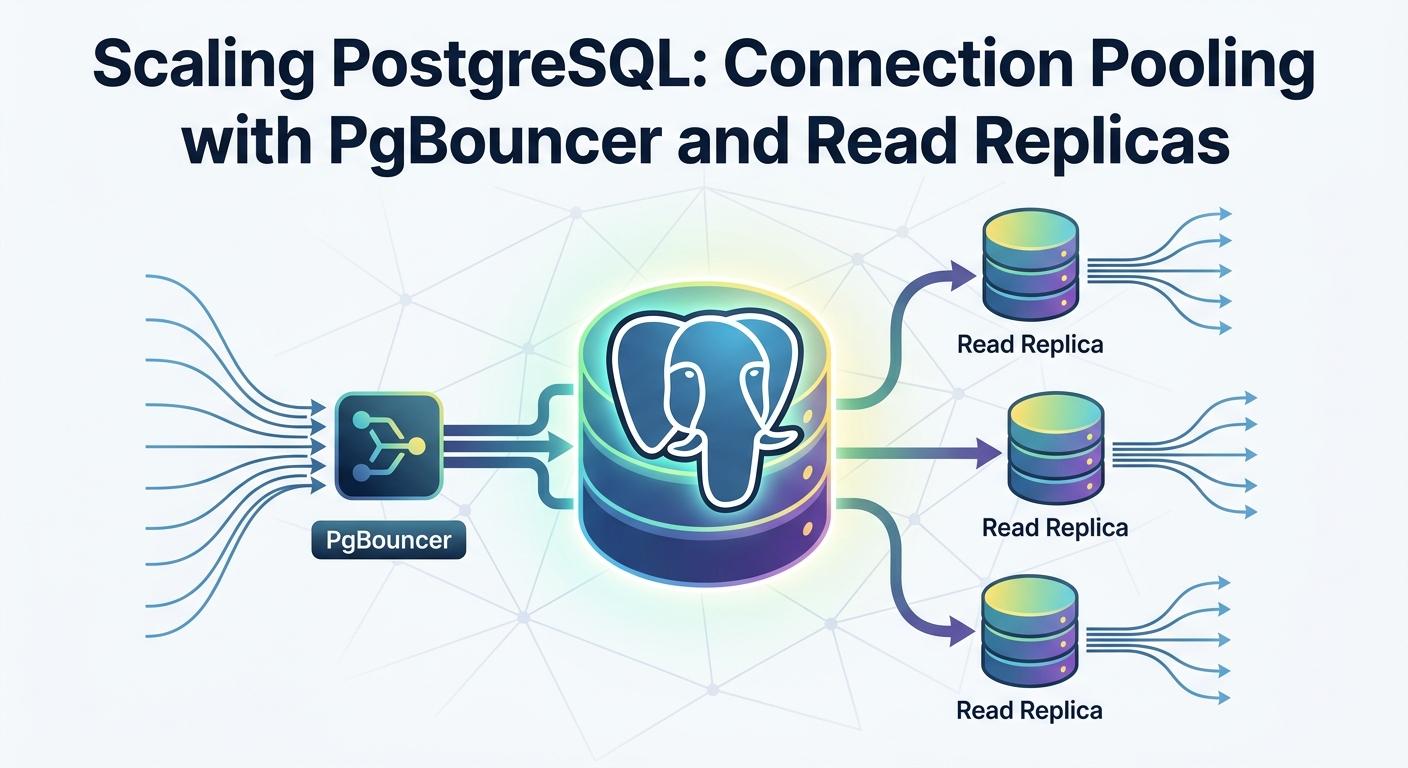
This comprehensive guide tackles these scaling challenges head-on by introducing two powerful techniques: PgBouncer for efficient connection pooling and Read Replicas for distributing read workloads and enhancing availability. By combining these strategies, you can significantly improve your PostgreSQL database's performance, stability, and scalability, ensuring your application remains responsive even under heavy load.
We'll dive deep into the 'how' and 'why' of each component, providing practical setup instructions, configuration examples, best practices, and common pitfalls to avoid. By the end of this article, you'll have a solid understanding of how to implement these solutions in your own environment.
Prerequisites
To follow along with the practical examples in this guide, you should have:
- Basic familiarity with PostgreSQL concepts and SQL.
- A Linux environment (e.g., Ubuntu, Debian, CentOS) with
sudoprivileges. - Access to two separate servers or virtual machines for setting up a master and a replica, plus a third for PgBouncer (or combine PgBouncer with the application server).
- An existing PostgreSQL installation (or the ability to install it).
The Challenge of PostgreSQL Connections
PostgreSQL's architecture is process-based. For every client connection, PostgreSQL forks a new backend process. While robust, this model incurs significant overhead:
- Memory Consumption: Each backend process consumes memory. A large number of idle connections, even if not actively querying, can exhaust server memory, leading to swapping and performance degradation.
- CPU Overhead: Creating and tearing down processes for each connection has a CPU cost. In high-transaction environments, this overhead can become substantial.
- Connection Limits: PostgreSQL has a
max_connectionsparameter, which defaults to 100. While configurable, increasing it too high can lead to the aforementioned resource exhaustion. Applications with many concurrent users or microservices architectures often exceed this limit quickly. - Slow Connection Establishment: Establishing a new TCP connection, authenticating, and initializing a backend process takes time. For applications with short-lived connections, this latency can add up.
These challenges highlight the need for an intelligent layer that can manage and reuse database connections, preventing the database from being overwhelmed.
Introducing PgBouncer: The Connection Pooler
PgBouncer is a lightweight, open-source connection pooler for PostgreSQL. It acts as a proxy between your application and the PostgreSQL server, maintaining a pool of ready-to-use connections to the database. When a client requests a connection, PgBouncer either hands out an existing idle connection from its pool or establishes a new one to the PostgreSQL server if none are available and within limits.
How PgBouncer Works
Instead of direct connections, applications connect to PgBouncer. PgBouncer then maintains its own set of connections to the actual PostgreSQL server. When an application disconnects from PgBouncer, the server connection is not closed but returned to PgBouncer's pool, ready for the next client.
Benefits of PgBouncer
- Reduced Overhead: Eliminates the overhead of establishing new connections to PostgreSQL for every client request.
- Connection Multiplexing: Allows many client connections to share a smaller, fixed number of server connections, dramatically reducing PostgreSQL server resource usage.
- Improved Performance: Faster connection establishment and reduced resource contention on the database server lead to better overall application performance.
- Increased Scalability: Enables applications to support a far greater number of concurrent users than direct connections would allow.
- Graceful Restarts/Failovers: PgBouncer can buffer client connections during a brief database restart or failover, making these operations transparent to the application.
Setting Up PgBouncer
Let's walk through the basic setup of PgBouncer on a Linux server (e.g., Ubuntu).
1. Installation
sudo apt update
sudo apt install pgbouncer
2. Configuration (pgbouncer.ini)
The main configuration file for PgBouncer is typically located at /etc/pgbouncer/pgbouncer.ini. We'll configure it to listen on a specific port, define authentication, and point to our PostgreSQL server.
; /etc/pgbouncer/pgbouncer.ini

[databases]
mydatabase = host=127.0.0.1 port=5432 dbname=mydatabase user=pgbouncer_user

[pgbouncer]
listen_addr = 0.0.0.0             ; Listen on all interfaces
listen_port = 6432                ; Default PgBouncer port
auth_type = md5                   ; Authentication method
auth_file = /etc/pgbouncer/userlist.txt ; File for user authentication
admin_users = pgbouncer_admin     ; Users allowed to connect to the 'pgbouncer' database for admin commands

pool_mode = transaction           ; See next section for modes
default_pool_size = 20            ; Number of server connections per database per user
min_pool_size = 5                 ; Minimum connections to keep in pool
reserve_pool_size = 5             ; Connections to keep in reserve for new clients
max_client_conn = 1000            ; Max client connections PgBouncer will accept
max_db_connections = 0            ; Max connections to a database (0 means unlimited)
max_user_connections = 0          ; Max connections per user (0 means unlimited)

server_lifetime = 3600            ; Close server conn after this many seconds of inactivity
server_idle_timeout = 60          ; Close server conn if idle for this many seconds

log_connections = 1
log_disconnections = 1
log_pooler_errors = 1

; Recommended for production
server_reset_query = DISCARD ALL
Key parameters explained:
[databases]: Defines the databases PgBouncer will manage.mydatabaseis the alias clients will use.host,port,dbname,userpoint to your actual PostgreSQL server.listen_addr,listen_port: Where PgBouncer will listen for client connections.auth_type,auth_file: How PgBouncer authenticates clients.md5is common, using auserlist.txtfile.admin_users: Users who can connect to the specialpgbouncerdatabase for administration.pool_mode: Crucial setting, discussed in the next section.default_pool_size: The number of connections PgBouncer will maintain to the PostgreSQL server for each database/user combination.max_client_conn: The maximum number of client connections PgBouncer will accept. This can be much higher than PostgreSQL'smax_connections.server_reset_query: Important fortransactionmode to ensure clean connection state.
3. User Authentication (userlist.txt)
Create the userlist.txt file as specified in pgbouncer.ini. This file contains the username and the MD5 hash of the password for users connecting to PgBouncer. You'll need to generate the MD5 hash of your PostgreSQL user's password.
# Generate MD5 hash for 'pgbouncer_user' with password 'mysecretpassword'
# This is a common way, but ensure your actual password is used.
echo -n 'mysecretpassword' | md5sum
# Example output: d7d8e6c7c0f1a2b3d4e5f6a7b8c9d0e1

# Create the file
sudo nano /etc/pgbouncer/userlist.txt
Add your users in the format "username" "md5hash":
; /etc/pgbouncer/userlist.txt
"pgbouncer_user" "md5d7d8e6c7c0f1a2b3d4e5f6a7b8c9d0e1"
"pgbouncer_admin" "md5a1b2c3d4e5f6a7b8c9d0e1f2a3b4c5d"Important: The md5 prefix is required in userlist.txt.
4. Adjust PostgreSQL pg_hba.conf
Ensure your PostgreSQL server allows connections from the PgBouncer host for pgbouncer_user. Add an entry like this to pg_hba.conf (and reload PostgreSQL):
# /etc/postgresql/14/main/pg_hba.conf (example path)

# TYPE  DATABASE        USER            ADDRESS                 METHOD
host    mydatabase      pgbouncer_user  10.0.0.1/32             md5
Replace 10.0.0.1 with the actual IP address of your PgBouncer server.
5. Start/Restart PgBouncer
sudo systemctl restart pgbouncer
sudo systemctl enable pgbouncer
sudo systemctl status pgbouncer
6. Test Connection
From your application server or client machine, connect to PgBouncer's port:
psql -h <pgbouncer_ip> -p 6432 -U pgbouncer_user -d mydatabaseThis should connect you to your database through PgBouncer.
Understanding PgBouncer Pooling Modes
PgBouncer offers three main pooling modes, each suitable for different application behaviors:
-
SESSIONPooling (Default):- Behavior: A server connection is assigned to a client for the entire duration of the client's session. When the client disconnects, the server connection is returned to the pool.
- Use Case: Ideal for applications that maintain a persistent connection to the database and perform multiple transactions or queries within that session. This is the safest mode as it preserves the connection's state (e.g.,
SETcommands, temporary tables). - Trade-offs: Less efficient in terms of connection reuse than
TRANSACTIONmode because a server connection is held for a longer period.
-
TRANSACTIONPooling (Most Common for Web Apps):- Behavior: A server connection is assigned to a client only for the duration of a single transaction. As soon as the transaction (
COMMITorROLLBACK) finishes, the server connection is immediately returned to the pool. - Use Case: Highly efficient for web applications or microservices where database interactions are typically short-lived, self-contained transactions. This allows a small pool of server connections to serve a very large number of client connections.
- Trade-offs: Requires applications to be well-behaved, meaning all database operations must be wrapped in explicit transactions. Any session-level changes (e.g.,
SET search_path,PREPAREstatements outside a transaction) will leak between clients, leading to unexpected behavior.server_reset_query = DISCARD ALLis crucial here.
- Behavior: A server connection is assigned to a client only for the duration of a single transaction. As soon as the transaction (
-
STATEMENTPooling (Rare):- Behavior: A server connection is returned to the pool after every statement. This is the most aggressive pooling mode.
- Use Case: Extremely rare. Only suitable for applications that execute single statements and do not use transactions at all. It's generally discouraged due to the high risk of breaking application logic.
- Trade-offs: Breaks transactions, prepared statements, and any session-level state. Highly likely to cause issues in most modern applications.
For most modern web applications, TRANSACTION pooling offers the best balance of performance and efficiency, provided your application adheres to transactional boundaries. For legacy applications or those with complex session management, SESSION pooling is a safer choice.
Monitoring PgBouncer
PgBouncer provides a special administrative database named pgbouncer (or whatever you configure admin_users to use) that you can connect to for monitoring and managing the pooler. You'll need to connect as an admin_user specified in pgbouncer.ini.
psql -h <pgbouncer_ip> -p 6432 -U pgbouncer_admin -d pgbouncerOnce connected, you can use various SHOW commands:
SHOW STATS;: Displays aggregated statistics about traffic, queries, and bytes.SHOW POOLS;: Shows the current state of each database pool (active, waiting, idle client/server connections).SHOW CLIENTS;: Lists all currently connected clients to PgBouncer.SHOW SERVERS;: Lists all connections PgBouncer has established to the PostgreSQL server.SHOW DATABASES;: Shows configured databases and their pool settings.SHOW HELP;: Lists all available commands.
Example Output (SHOW POOLS;):
pool_name | database | cl_active | cl_waiting | sv_active | sv_idle | sv_used | sv_tested | sv_login | max_wait | pool_mode
----------+----------+-----------+------------+-----------+---------+---------+-----------+----------+----------+-----------
mydatabase| mydatabase| 5         | 0          | 2         | 3       | 0       | 0         | 0        | 0        | transaction
This output helps you understand how many client connections are active (cl_active), how many are waiting (cl_waiting), and how many server connections PgBouncer is actively using (sv_active) or keeping idle (sv_idle).
Introduction to PostgreSQL Read Replicas
While connection pooling optimizes how your application connects to the database, it doesn't solve the problem of a single database server being overwhelmed by a high volume of read queries. This is where Read Replicas come into play.
A PostgreSQL read replica (also known as a standby server) is a copy of your primary (master) database that continuously receives changes from the master. This process, called streaming replication, ensures that the replica remains up-to-date with the master. Once synchronized, the replica can serve read-only queries, offloading the read burden from the primary server.
Benefits of Read Replicas
- Read Scaling: Distributes read queries across multiple servers, significantly increasing the total read throughput your database cluster can handle.
- High Availability: In case the primary server fails, a read replica can be promoted to become the new primary, minimizing downtime.
- Backup Offloading: You can perform backups on a replica, reducing the load on your primary database.
- Analytics/Reporting: Complex analytical queries or reporting jobs can be run on replicas without impacting the performance of your production primary.
How Streaming Replication Works
PostgreSQL uses Write-Ahead Log (WAL) records for durability. All changes to the database are first written to the WAL. In streaming replication, the primary server continuously ships its WAL records to the replica(s). The replica then applies these WAL records to its own data files, keeping it in sync with the primary. This is a physical replication method, meaning the replica is byte-for-byte identical to the primary at any given point (minus replication lag).
Setting Up a Basic Read Replica
Setting up a read replica involves configuring both the primary and the standby servers. We'll assume two servers: primary.example.com and replica.example.com.
1. Primary Server Configuration
Edit postgresql.conf on the primary server:
# /etc/postgresql/14/main/postgresql.conf (on primary)

wal_level = replica               ; Minimal level for replication
archive_mode = on                 ; Enable archiving of WAL segments
archive_command = 'cp %p /var/lib/postgresql/14/main/archive/%f' ; Example: copy WAL to a local archive directory
max_wal_senders = 10              ; Max number of concurrent WAL sender processes
hot_standby = on                  ; Allow queries on standby
listen_addresses = '*'            ; Allow connections from anywhere (or specific IP)
Create the archive directory:
sudo mkdir -p /var/lib/postgresql/14/main/archive
sudo chown postgres:postgres /var/lib/postgresql/14/main/archive
Edit pg_hba.conf on the primary server to allow replication connections from the replica:
# /etc/postgresql/14/main/pg_hba.conf (on primary)

# TYPE  DATABASE        USER            ADDRESS                 METHOD
host    replication     replication_user  replica.example.com/32  md5
Create a dedicated replication user (e.g., replication_user) with a strong password on the primary database:
CREATE USER replication_user WITH REPLICATION ENCRYPTED PASSWORD 'your_replication_password';Reload PostgreSQL on the primary to apply changes:
sudo systemctl reload postgresql2. Replica Server Setup
Stop PostgreSQL on the replica (if running):
sudo systemctl stop postgresqlClear existing data directory (if any):
sudo rm -rf /var/lib/postgresql/14/main/*Take a base backup from the primary:
Run this command from the replica server, ensuring the replication_user can connect to the primary's IP/hostname.
PGPASSWORD='your_replication_password' pg_basebackup -h primary.example.com -p 5432 -U replication_user -D /var/lib/postgresql/14/main -F p -Xs stream -R -c fast-h: Primary host.-p: Primary port.-U: Replication user.-D: Data directory on the replica.-F p: Plain format.-Xs stream: Enable streaming replication.-R: Createsstandby.signalandprimary_conninfoinpostgresql.confautomatically.-c fast: Checkpoint quickly on the primary.
Configure postgresql.conf on the replica:
The -R flag from pg_basebackup should have created standby.signal and added primary_conninfo to postgresql.conf. Verify these. You might also want to set hot_standby = on explicitly if it's not already there.
# /var/lib/postgresql/14/main/postgresql.conf (on replica)

# Ensure these lines are present and correct:
primary_conninfo = 'host=primary.example.com port=5432 user=replication_user password=your_replication_password application_name=replica1'
hot_standby = on
listen_addresses = '*' ; Allow connections for read queries
Start PostgreSQL on the replica:
sudo systemctl start postgresql3. Verify Replication
On the primary, check replication status:
SELECT client_addr, state, sync_state FROM pg_stat_replication;On the replica, check if it's in recovery mode:
SELECT pg_is_in_recovery();This should return t (true). You can now connect to the replica and run read-only queries.
Integrating PgBouncer with Read Replicas for Read Scaling
To leverage read replicas for scaling, you need a strategy to direct read traffic to them while keeping write traffic on the primary. There are several approaches:
1. Application-Level Read-Write Splitting
This is the most common and robust method. Your application maintains two database connection strings:
- One pointing to the primary (via PgBouncer) for all write operations.
- One pointing to a read replica (or a PgBouncer instance in front of a replica) for all read operations.
Your application logic decides which connection to use based on the query type. Many ORMs and database frameworks offer features to facilitate this. For example, in a Rails application, you might configure different database URLs for reads and writes.
2. PgBouncer for Read Replicas
You can set up one or more PgBouncer instances specifically for your read replicas. Each PgBouncer instance would point to a different read replica. Your application would then connect to these PgBouncer instances for read queries.
Example pgbouncer.ini for a Read Replica Pooler:
; /etc/pgbouncer/replica_pgbouncer.ini

[databases]
read_db = host=replica.example.com port=5432 dbname=mydatabase user=app_read_user

[pgbouncer]
listen_addr = 0.0.0.0
listen_port = 6433                ; Different port for replica PgBouncer
auth_type = md5
auth_file = /etc/pgbouncer/userlist.txt
admin_users = pgbouncer_admin

pool_mode = transaction
default_pool_size = 20
max_client_conn = 1000

server_reset_query = DISCARD ALL
In this setup, your application would connect to pgbouncer_ip:6432 for writes and pgbouncer_ip:6433 (or replica_pgbouncer_ip:6432 if PgBouncer is on the replica server) for reads.
3. Load Balancing PgBouncer Instances (for Reads)
If you have multiple read replicas and multiple PgBouncer instances, you can place a load balancer (e.g., HAProxy, Nginx, or even DNS round-robin) in front of the PgBouncer instances dedicated to reads. The application connects to a single logical endpoint for reads, and the load balancer distributes traffic among the PgBouncers, which in turn connect to the replicas.
This architecture provides a highly scalable and resilient read path:
+-----------------------+
| Application Servers   |
+-----------+-----------+
            | (Writes)  |
            | (Reads)   |
            v           v
+-----------+-----------+
| PgBouncer (Primary)   |   +-----------------------+
| (Port 6432)           |---| PgBouncer (Replica 1) |
+-----------+-----------+   | (Port 6433)           |
            |               +-----------------------+
            |                   |
            v                   v
+-----------+-----------+   +-----------+-----------+
| PostgreSQL Primary    |   | PostgreSQL Replica 1  |
+-----------------------+   +-----------------------+
                                |
                                v
                            +-----------------------+
                            | PostgreSQL Replica 2  |
                            +-----------------------+
This setup allows you to scale reads horizontally by adding more replicas and PgBouncer instances, distributing the load effectively.
Best Practices for PgBouncer and Read Replicas
- Dedicated Users: Use dedicated PostgreSQL users for PgBouncer (
pgbouncer_user) and replication (replication_user). Avoid using superuser accounts for these purposes. - Appropriate Pooling Mode: Carefully choose the PgBouncer
pool_mode.TRANSACTIONmode is excellent for stateless web applications, but ensure your application logic respects transactional boundaries. UseSESSIONmode if your application relies on session-specific settings or prepared statements that persist across transactions. - Monitor Everything: Monitor PgBouncer (using
SHOW STATS;,SHOW POOLS;), PostgreSQL primary, and replicas. Pay attention to connection counts, query performance, and replication lag (pg_stat_replicationon primary,pg_last_wal_receive_lsn()andpg_last_wal_replay_lsn()on replica). - Security: Secure PgBouncer with strong passwords and restrict
listen_addrto only the necessary network interfaces. Use firewalls to limit access to PgBouncer and PostgreSQL ports. server_reset_query: Always setserver_reset_query = DISCARD ALLintransactionandstatementpooling modes to prevent connection state from leaking between clients. This clears session variables, prepared statements, etc.- Network Latency: Ideally, PgBouncer should be co-located with your application servers or in the same low-latency network segment as your PostgreSQL servers.
- Application Read-Write Splitting: Implement read-write splitting at the application layer. This provides the most control and flexibility in routing queries. Many frameworks (e.g., Django, Ruby on Rails with specific gems) have patterns for this.
- Replica Lag Awareness: Design your application to be tolerant of potential replication lag. For operations where immediate read-after-write consistency is critical, route those reads to the primary. For most other reads, replicas are fine.
- Connection Limits: Configure
max_client_connin PgBouncer to be significantly higher thandefault_pool_size(ormax_db_connectionsif set) to absorb connection bursts. Setmax_connectionson your PostgreSQL server to a reasonable value (e.g., 200-500) that can handle thedefault_pool_sizefrom PgBouncer plus any direct admin connections.
Common Pitfalls and Troubleshooting
- Transaction Pooling Leaks: If
pool_mode = transactionis used withoutserver_reset_query = DISCARD ALL, or if the application implicitly relies on session-level state that's not reset, you can encounter strange bugs as connections are reused with unexpected settings. - Incorrect
auth_filePermissions: PgBouncer will fail to start ifuserlist.txthas incorrect permissions (e.g., readable by others). Ensure it's owned bypgbouncerand has600or400permissions (-rw-------). - Replication Lag: If
pg_stat_replicationshows a growingreplay_lagorpg_is_in_recovery()is true but queries are slow on the replica, check network connectivity between primary and replica, replica disk I/O, and replica CPU. Heavy queries on the replica can also cause lag. - Not Enough Server Connections: If
SHOW POOLS;showscl_waitingis consistently high, it means clients are waiting for server connections. Increasedefault_pool_sizeinpgbouncer.ini. max_connectionson PostgreSQL: Ensure your PostgreSQL primary'smax_connectionsis sufficient to handle alldefault_pool_sizeconnections from PgBouncer instances, plus any direct connections for monitoring or administration.- Read-Write Errors on Replicas: Attempting to write to a read replica will result in an error like
ERROR: cannot execute INSERT/UPDATE/DELETE in a read-only transaction. This indicates your application is incorrectly routing write queries to a replica. Double-check your application's read-write splitting logic. - Firewall Issues: Ensure the PgBouncer server can reach the PostgreSQL server on port 5432, and client applications can reach PgBouncer on its
listen_port(e.g., 6432).
Conclusion
Scaling PostgreSQL effectively is crucial for high-performance applications. By implementing PgBouncer for connection pooling and leveraging read replicas, you can significantly enhance your database's capacity, responsiveness, and resilience. PgBouncer addresses the overhead of numerous client connections, while read replicas offload read-heavy workloads, allowing your primary database to focus on writes and ensuring high availability.
This guide has provided a deep dive into the architecture, setup, and best practices for both components. Remember that successful implementation requires careful planning, thorough testing, and continuous monitoring. As your application grows, you might explore more advanced topics like automated failover solutions (e.g., Patroni, Repmgr), more sophisticated load balancing, and connection routing intelligence within your application or proxy layer.
Embrace these powerful tools, and your PostgreSQL database will be well-equipped to handle the demands of your growing application. Happy scaling!

Written by
CodewithYohaFull-Stack Software Engineer with 7+ years of experience in Java, Spring Boot, and cloud architecture across AWS, Azure, and GCP. Writing production-grade engineering patterns for developers who ship real software.