Gateway API Migration: From NGINX Ingress to Envoy Gateway & Cilium

Introduction
For years, Kubernetes Ingress has been the de-facto standard for exposing services to external traffic. While effective for basic HTTP/HTTPS routing, its limitations—such as a lack of extensibility, reliance on provider-specific annotations, and challenges with multi-tenancy—have become increasingly apparent as Kubernetes deployments grow in complexity. Enter the Kubernetes Gateway API, a robust, role-oriented, and highly extensible successor designed to address these very challenges.
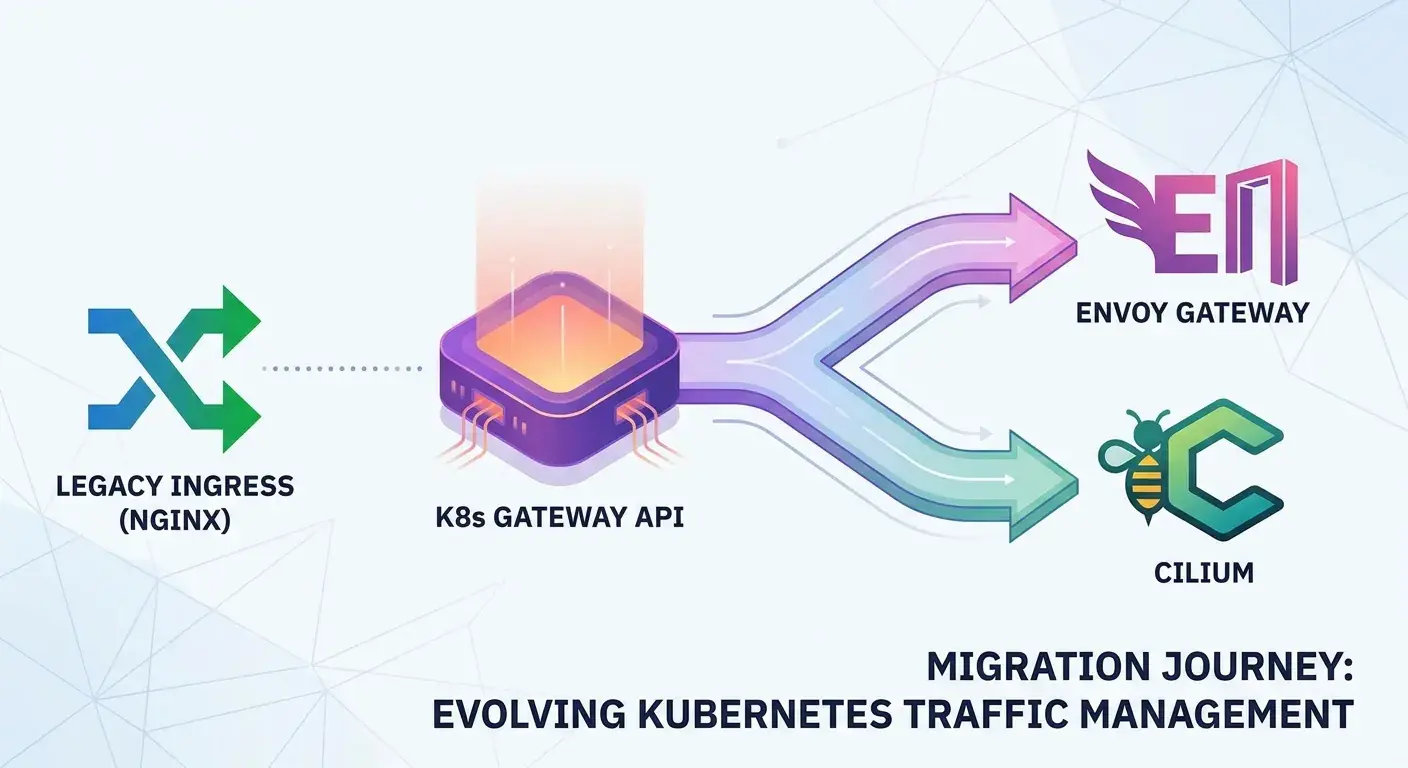
This comprehensive guide will walk you through the journey of migrating your traffic management from the familiar Ingress NGINX controller to a modern, powerful stack built on the Kubernetes Gateway API. We will leverage Envoy Gateway as a specific implementation of the Gateway API, providing a managed control plane for the high-performance Envoy proxy, and integrate Cilium to enhance network policies, observability, and overall cluster networking with the power of eBPF. By the end of this article, you'll understand the "how" and "why" of this transition, equipped with practical examples and best practices to modernize your Kubernetes traffic management.
Prerequisites
To follow along with this guide, you should have:
- Basic understanding of Kubernetes concepts (Pods, Services, Deployments, Ingress).
kubectlinstalled and configured.helminstalled.- A Kubernetes cluster (e.g., Kind, minikube, or a cloud-managed cluster like GKE, EKS, AKS).
- Basic familiarity with YAML for Kubernetes resource definitions.
1. The Evolution of Kubernetes Traffic Management: From Ingress to Gateway API
Kubernetes Ingress was introduced to provide a declarative way to route external HTTP/HTTPS traffic to services within a cluster. It offered a simple resource model: Ingress objects defined rules, and an Ingress Controller (like NGINX, HAProxy, or Traefik) implemented those rules by configuring an underlying proxy.
While functional, Ingress suffered from several key drawbacks:
- Limited Extensibility: Extending Ingress often required provider-specific annotations, leading to non-portable configurations.
- Lack of Role Separation: The Ingress resource merged responsibilities, making it hard to separate concerns between infrastructure providers, cluster operators, and application developers.
- HTTP-Only: Primarily focused on HTTP/HTTPS, lacking native support for other protocols like TCP, UDP, or TLS passthrough.
- Ambiguous Status: The
Ingressstatus field was often insufficient for detailed feedback.
Enter the Gateway API
The Kubernetes Gateway API is a set of API resources that offer a more expressive, extensible, and role-oriented approach to traffic management. It introduces a hierarchical structure and clear separation of concerns:
GatewayClass: Defines a class of Gateways, similar toStorageClassorIngressClass. Managed by infrastructure providers.Gateway: Represents a specific instance of a load balancer or proxy, configured by cluster operators. It defines listeners (ports, protocols) and referencesGatewayClass.HTTPRoute,TCPRoute,TLSRoute,UDPRoute: Define specific routing rules for different protocols, managed by application developers. These attach toGatewayresources.ReferenceGrant: A security mechanism allowing resources in one namespace to reference resources in another, crucial for multi-tenancy.
This new model provides greater flexibility, better multi-tenancy support, and a more robust foundation for advanced traffic routing scenarios.
2. Understanding Envoy Gateway: A Gateway API Implementation
Envoy Proxy is a high-performance open-source edge and service proxy, often used as a core component in service meshes and API gateways. However, managing Envoy's complex configuration directly can be challenging.
Envoy Gateway simplifies this by acting as a Kubernetes-native control plane specifically designed to implement the Gateway API specification using Envoy Proxy. It automates the deployment and configuration of Envoy instances based on Gateway and Route resources, abstracting away the complexities of Envoy's xDS API.
Why choose Envoy Gateway?
- Native Gateway API Support: Directly implements the Gateway API, ensuring compliance and portability.
- Powered by Envoy: Leverages Envoy's battle-tested performance, rich feature set (load balancing, circuit breaking, retries, rate limiting, traffic shadowing, advanced observability).
- Simplicity: Provides a simpler, opinionated way to deploy and manage Envoy as an API Gateway compared to full-blown service meshes like Istio (which can also implement Gateway API but are significantly more complex).
- Kubernetes-Native: Integrates seamlessly with Kubernetes, using CRDs and standard deployment patterns.
3. Cilium's Role in Modern Kubernetes Networking
Cilium is a powerful open-source Container Network Interface (CNI) that brings the power of eBPF to Kubernetes networking. It provides network connectivity, load balancing, and security policies at a granular level, directly within the Linux kernel.
How Cilium enhances your Gateway API setup:
- High-Performance Networking: eBPF allows Cilium to perform packet filtering, routing, and load balancing with extreme efficiency, often outperforming traditional iptables-based solutions.
- Advanced Network Policies: Beyond basic IP/port policies, Cilium can enforce L7 policies based on HTTP, Kafka, DNS, and more, protecting your backend services from unauthorized access even behind your Gateway.
- Service Mesh Capabilities: Cilium Service Mesh offers sidecar-less service mesh functionality, providing mTLS, traffic management, and observability without injecting sidecar containers, further streamlining your data plane.
- Observability with Hubble: Cilium's Hubble provides deep visibility into network flows, DNS queries, and security policy enforcement, crucial for troubleshooting and understanding traffic patterns.
While Envoy Gateway handles L7 routing to your services, Cilium ensures the network between your services and enforces fine-grained security policies on that traffic, providing a robust and secure foundation for your application landscape.
4. Setting Up Your Environment: Kubernetes, Cilium, and Envoy Gateway
Let's prepare our Kubernetes cluster.
First, create a Kind cluster (or use your existing cluster):
kind create cluster --name gateway-api-demoNext, install Cilium as your CNI. We'll enable Hubble for observability:
helm repo add cilium https://helm.cilium.io/
helm install cilium cilium/cilium --version 1.14.5 \ # Use a stable version
  --namespace kube-system \n  --set ipam.mode=kubernetes \n  --set hubble.enabled=true \n  --set hubble.ui.enabled=true \n  --set hubble.relay.enabled=true

# Wait for Cilium pods to be ready
kubectl wait --for=condition=ready pod -l k8s-app=cilium -n kube-system --timeout=300s
kubectl wait --for=condition=ready pod -l k8s-app=hubble-relay -n kube-system --timeout=300s
kubectl wait --for=condition=ready pod -l k8s-app=hubble-ui -n kube-system --timeout=300s
Now, install Envoy Gateway. This will deploy the Envoy Gateway controller and a default GatewayClass.
helm repo add envoy-gateway https://envoyproxy.github.io/gateway-helm/
helm install eg envoy-gateway/envoy-gateway --version 0.0.16 \ # Use a stable version
  --namespace envoy-gateway-system --create-namespace

# Wait for Envoy Gateway pods to be ready
kubectl wait --for=condition=ready pod -l app.kubernetes.io/name=envoy-gateway -n envoy-gateway-system --timeout=300s
Verify that the GatewayClass is available:
kubectl get gatewayclassesYou should see eg-standard (or similar) as the default GatewayClass provided by Envoy Gateway.
5. Migrating Basic Ingress NGINX Rules to Gateway API HTTPRoute
Let's start with a simple Ingress NGINX example that routes traffic for example.com/foo to foo-service and example.com/bar to bar-service.
Original Ingress NGINX (nginx-ingress.yaml)
First, deploy some sample services:
apiVersion: apps/v1
kind: Deployment
metadata:
  name: foo-deployment
spec:
  replicas: 1
  selector:
    matchLabels:
      app: foo
  template:
    metadata:
      labels:
        app: foo
    spec:
      containers:
      - name: foo-app
        image: nginxdemos/hello:plain-text
        ports:
        - containerPort: 80
---
apiVersion: v1
kind: Service
metadata:
  name: foo-service
spec:
  selector:
    app: foo
  ports:
    - protocol: TCP
      port: 80
      targetPort: 80
---
apiVersion: apps/v1
kind: Deployment
metadata:
  name: bar-deployment
spec:
  replicas: 1
  selector:
    matchLabels:
      app: bar
  template:
    metadata:
      labels:
        app: bar
    spec:
      containers:
      - name: bar-app
        image: nginxdemos/hello:plain-text
        ports:
        - containerPort: 80
---
apiVersion: v1
kind: Service
metadata:
  name: bar-service
spec:
  selector:
    app: bar
  ports:
    - protocol: TCP
      port: 80
targetPort: 80kubectl apply -f services.yamlNow, the NGINX Ingress:
# nginx-ingress.yaml
apiVersion: networking.k8s.io/v1
kind: Ingress
metadata:
  name: example-ingress
  annotations:
    nginx.ingress.kubernetes.io/rewrite-target: /
spec:
  ingressClassName: nginx # Assuming you have an NGINX Ingress Controller installed
  rules:
  - host: example.com
    http:
      paths:
      - path: /foo
        pathType: Prefix
        backend:
          service:
            name: foo-service
            port:
              number: 80
      - path: /bar
        pathType: Prefix
        backend:
          service:
            name: bar-service
            port:
              number: 80
Migrating to Gateway API
We need two resources: a Gateway and an HTTPRoute.
First, define a Gateway that listens on port 80 for HTTP traffic. This Gateway will be implemented by Envoy Gateway, thanks to the gatewayClassName.
# gateway.yaml
apiVersion: gateway.networking.k8s.io/v1
kind: Gateway
metadata:
  name: example-gateway
  namespace: default
spec:
  gatewayClassName: eg-standard # This references the Envoy Gateway's GatewayClass
  listeners:
  - name: http
    port: 80
    protocol: HTTP
    allowedRoutes:
      namespaces:
        from: Same
Next, define the HTTPRoute to replicate the path-based routing:
# httproute.yaml
apiVersion: gateway.networking.k8s.io/v1
kind: HTTPRoute
metadata:
  name: example-httproute
  namespace: default
spec:
  parentRefs:
  - name: example-gateway # Attaches this route to our Gateway
  hostnames:
  - "example.com"
  rules:
  - matches:
    - path:
        type: PathPrefix
        value: /foo
    backendRefs:
    - name: foo-service
      port: 80
  - matches:
    - path:
        type: PathPrefix
        value: /bar
    backendRefs:
    - name: bar-service
      port: 80
Apply these resources:
kubectl apply -f gateway.yaml
kubectl apply -f httproute.yaml
Verify that the Gateway is ready and has an address:
kubectl get gateway example-gateway -o wideYou should see an ADDRESS assigned. This is the IP address of the Envoy proxy. You can test by curling this IP with the Host header set:
GATEWAY_IP=$(kubectl get gateway example-gateway -o jsonpath='{.status.addresses[0].value}')
curl -H "Host: example.com" http://$GATEWAY_IP/foo
curl -H "Host: example.com" http://$GATEWAY_IP/bar
6. Advanced Routing: Rewrites, Redirects, and Header Manipulation
Ingress NGINX often relies on annotations for advanced features like URL rewrites (nginx.ingress.kubernetes.io/rewrite-target) or redirects. The Gateway API, with its rich HTTPRoute filters, provides native, portable ways to achieve these.
URL Rewrites
Let's say you want /old-path to be rewritten to /new-path before reaching the backend service.
# httproute-rewrite.yaml
apiVersion: gateway.networking.k8s.io/v1
kind: HTTPRoute
metadata:
  name: rewrite-route
  namespace: default
spec:
  parentRefs:
  - name: example-gateway
  hostnames:
  - "rewrite.example.com"
  rules:
  - matches:
    - path:
        type: PathPrefix
        value: /old-path
    filters:
    - type: URLRewrite
      urlRewrite:
        path:
          type: ReplacePrefixMatch
          replacePrefixMatch: /new-path
    backendRefs:
    - name: foo-service
      port: 80
Redirects
To redirect traffic from /legacy to https://new.example.com/new-path:
# httproute-redirect.yaml
apiVersion: gateway.networking.k8s.io/v1
kind: HTTPRoute
metadata:
  name: redirect-route
  namespace: default
spec:
  parentRefs:
  - name: example-gateway
  hostnames:
  - "redirect.example.com"
  rules:
  - matches:
    - path:
        type: PathPrefix
        value: /legacy
    filters:
    - type: RequestRedirect
      requestRedirect:
        statusCode: 301 # Permanent Redirect
        hostname: new.example.com
        path:
          type: ReplacePrefixMatch
          replacePrefixMatch: /new-path
        scheme: https
    backendRefs:
    - name: foo-service # BackendRef is still required, but traffic will be redirected before reaching it
      port: 80
Header Manipulation
Adding or removing headers can be done with RequestHeaderModifier and ResponseHeaderModifier filters.
# httproute-headers.yaml
apiVersion: gateway.networking.k8s.io/v1
kind: HTTPRoute
metadata:
  name: header-route
  namespace: default
spec:
  parentRefs:
  - name: example-gateway
  hostnames:
  - "headers.example.com"
  rules:
  - matches:
    - path:
        type: PathPrefix
        value: /headers
    filters:
    - type: RequestHeaderModifier
      requestHeaderModifier:
        add:
        - name: X-Request-ID
          value: "{{ uuid }}" # Envoy Gateway supports dynamic values
        set:
        - name: X-Custom-Header
          value: "MyValue"
        remove:
        - Old-Header
    - type: ResponseHeaderModifier
      responseHeaderModifier:
        add:
        - name: X-Powered-By
          value: "Envoy Gateway"
    backendRefs:
    - name: foo-service
      port: 80
Apply these and test with curl.
kubectl apply -f httproute-rewrite.yaml
kubectl apply -f httproute-redirect.yaml
kubectl apply -f httproute-headers.yaml
7. Implementing TLS/SSL Termination with Gateway API
Securing traffic with TLS is a fundamental requirement. In Ingress NGINX, you'd typically define a tls block in your Ingress resource, referencing a Kubernetes Secret containing your certificate and key.
With Gateway API, TLS termination is configured directly on the Gateway listener. This provides a clear separation: the operator configures the TLS listener, and application developers attach routes to it.
First, create a TLS secret. For demonstration, we'll use a self-signed certificate:
openssl req -x509 -newkey rsa:2048 -nodes -keyout tls.key -out tls.crt -days 365 -subj "/CN=secure.example.com"
kubectl create secret tls secure-example-com-tls --key tls.key --cert tls.crt
Now, modify your Gateway to include an HTTPS listener:
# secure-gateway.yaml
apiVersion: gateway.networking.k8s.io/v1
kind: Gateway
metadata:
  name: secure-example-gateway
  namespace: default
spec:
  gatewayClassName: eg-standard
  listeners:
  - name: http
    port: 80
    protocol: HTTP
    allowedRoutes:
      namespaces:
        from: Same
  - name: https
    port: 443
    protocol: HTTPS
    tls:
      mode: Terminate
      certificateRefs:
      - kind: Secret
        name: secure-example-com-tls
    allowedRoutes:
      namespaces:
        from: Same
And an HTTPRoute that attaches to this secure Gateway listener:
# secure-httproute.yaml
apiVersion: gateway.networking.k8s.io/v1
kind: HTTPRoute
metadata:
  name: secure-httproute
  namespace: default
spec:
  parentRefs:
  - name: secure-example-gateway
    sectionName: https # Attach to the HTTPS listener
  hostnames:
  - "secure.example.com"
  rules:
  - matches:
    - path:
        type: PathPrefix
        value: /secure
    backendRefs:
    - name: foo-service
      port: 80
Apply these resources:
kubectl apply -f secure-gateway.yaml
kubectl apply -f secure-httproute.yaml
Test with curl -k (to ignore self-signed cert warning):
SECURE_GATEWAY_IP=$(kubectl get gateway secure-example-gateway -o jsonpath='{.status.addresses[0].value}')
curl -k -H "Host: secure.example.com" https://$SECURE_GATEWAY_IP/secure
8. Multi-Tenancy and Role Separation with Gateway API
One of Gateway API's strongest features is its explicit support for role separation. This is critical in multi-tenant environments where different teams manage different aspects of traffic. The ReferenceGrant resource is key here.
- Infrastructure Provider: Manages
GatewayClass. - Cluster Operator: Deploys and manages
Gatewayresources (e.g., defining listeners, TLS). - Application Developer: Creates
HTTPRoute(or otherRoutetypes) to define traffic rules for their applications.
Consider a scenario where the Gateway is managed in an infra namespace, but application teams deploy their HTTPRoute resources in their respective application namespaces (e.g., app-team-a, app-team-b).
- Create application namespaces:
bash
kubectl create namespace app-team-a kubectl create namespace infra
2.  **Move the `Gateway` to the `infra` namespace**:
```yaml
# infra/gateway.yaml
apiVersion: gateway.networking.k8s.io/v1
kind: Gateway
metadata:
name: shared-gateway
namespace: infra # Gateway in infra namespace
spec:
gatewayClassName: eg-standard
listeners:
- name: http
port: 80
protocol: HTTP
allowedRoutes:
  namespaces:
    from: Selector # Allow routes from selected namespaces
    selector:
      matchLabels:
        gateway-access: "true"
- Define an
HTTPRouteinapp-team-a:yaml
app-team-a/httproute.yaml
apiVersion: gateway.networking.k8s.io/v1 kind: HTTPRoute metadata: name: app-a-route namespace: app-team-a # Route in app-team-a namespace labels: gateway-access: "true" spec: parentRefs:
- name: shared-gateway namespace: infra # Reference Gateway in infra namespace hostnames:
- "app-a.example.com" rules:
- matches:
- path: type: PathPrefix value: /app-a backendRefs:
- name: foo-service # Assuming foo-service is in app-team-a or accessible port: 80
4.  **Create `ReferenceGrant`**: Without this, the `HTTPRoute` in `app-team-a` cannot reference the `Gateway` in `infra` for security reasons. `ReferenceGrant` explicitly allows this cross-namespace reference.

    ```yaml
# infra/referencegrant.yaml
apiVersion: gateway.networking.k8s.io/v1beta1
kind: ReferenceGrant
metadata:
  name: allow-app-team-a-to-gateway
  namespace: infra # ReferenceGrant must be in the namespace of the referred object (Gateway)
spec:
  from:
    - group: gateway.networking.k8s.io
      kind: HTTPRoute
      namespaces:
        - app-team-a # Allow HTTPRoutes from app-team-a namespace
  to:
    - group: gateway.networking.k8s.io
      kind: Gateway
      name: shared-gateway
Apply these resources. Make sure foo-service is deployed in app-team-a or adjust backendRefs accordingly.
kubectl label namespace app-team-a gateway-access="true"
kubectl apply -f infra/gateway.yaml
kubectl apply -f infra/referencegrant.yaml
kubectl apply -f app-team-a/httproute.yaml
This setup clearly delineates responsibilities, enhancing security and manageability in complex environments.
9. Integrating Cilium Network Policies with Gateway API
While Envoy Gateway handles ingress traffic routing, Cilium ensures that traffic within your cluster, particularly to your backend services, adheres to strict security policies. This provides defense-in-depth.
Let's assume our foo-service is in the default namespace, and we want to allow traffic to it only from the Envoy proxy (which is managed by Envoy Gateway) and deny all other ingress traffic.
First, identify the labels of your Envoy proxy pods. These are typically managed by Envoy Gateway's deployment.
kubectl get pods -n envoy-gateway-system -l app.kubernetes.io/name=envoy-gateway-proxy -o custom-columns="NAME:.metadata.name,LABELS:.metadata.labels"You'll likely see labels like app.kubernetes.io/name: envoy-gateway-proxy, gateway.envoyproxy.io/gateway-name: example-gateway (if you used example-gateway), and gateway.envoyproxy.io/gateway-namespace: default.
We'll create a CiliumNetworkPolicy to allow ingress to foo-service only from pods with specific Envoy Gateway labels.
# cilium-policy-foo.yaml
apiVersion: cilium.io/v2
kind: CiliumNetworkPolicy
metadata:
  name: allow-from-envoy-gateway-to-foo
  namespace: default # Policy applies to pods in this namespace
spec:
  endpointSelector:
    matchLabels:
      app: foo # Applies to pods with label app: foo
  ingress:
  - fromEndpoints:
    - matchLabels:
        k8s-app: envoy-gateway-proxy # Or more specific labels from your Envoy deployment
        gateway.envoyproxy.io/gateway-name: example-gateway # Match the specific Gateway instance
        gateway.envoyproxy.io/gateway-namespace: default # Match the Gateway's namespace
    toPorts:
    - ports:
      - port: "80"
        protocol: TCP
Apply this policy:
kubectl apply -f cilium-policy-foo.yamlNow, only traffic originating from the Envoy proxy pods that are part of example-gateway will be allowed to reach foo-service on port 80. Any direct access attempts or traffic from other pods will be blocked by Cilium.
10. Observability and Troubleshooting
Observability is crucial for understanding traffic flow and diagnosing issues. Both Envoy Gateway and Cilium provide excellent tools.
Envoy Gateway Observability
Envoy Proxy, and by extension Envoy Gateway, exposes a rich set of metrics via Prometheus. Envoy Gateway automatically configures Prometheus scraping for the Envoy proxy instances it manages.
- Metrics: You can typically access Envoy's metrics endpoint on port
10000of the Envoy proxy pods (e.g.,http://<envoy-proxy-ip>:10000/stats). These metrics cover HTTP requests, connections, upstream health, and more. - Logging: Envoy Gateway controller and Envoy proxy pods emit logs that can be collected by a centralized logging solution (e.g., ELK stack, Loki).
To inspect Envoy proxy logs:
kubectl logs -l app.kubernetes.io/name=envoy-gateway-proxy -n envoy-gateway-systemCilium Observability with Hubble
Cilium's Hubble provides unparalleled visibility into network flows within your cluster, leveraging eBPF.
- Hubble CLI: You can use
hubble observeto see real-time network flows, including L7 protocol visibility.bash
hubble observe --follow
*   **Hubble UI**: The Hubble UI provides a graphical interface to visualize network flows, policy enforcement, and service dependencies. To access it:
```bash
kubectl port-forward -n kube-system svc/hubble-ui 8080:80
Then navigate to http://localhost:8080 in your browser.
Hubble is invaluable for troubleshooting connectivity issues, verifying network policies, and understanding how traffic moves between your Envoy Gateway and backend services.
11. Best Practices for Gateway API Migration
- Phased Migration: Don't rip and replace. Start by migrating a small, non-critical application or a specific hostname/path. Run Ingress NGINX and Gateway API side-by-side during the transition.
- Test Thoroughly: Use automated tests for all migrated routes, including edge cases, rewrites, redirects, and TLS configurations.
- Leverage Role Separation: Design your
GatewayandRouteresources with clear ownership in mind. UseReferenceGrantto enable secure cross-namespace routing. - Standardize
GatewayClass: Define a clearGatewayClass(or use the defaulteg-standard) and ensure allGatewayresources adhere to it for consistency. - GitOps for Configuration: Store all Gateway API resources in Git and use a GitOps tool (like Argo CD or Flux) for deployment to ensure declarative, auditable, and repeatable configurations.
- Monitor and Observe: Set up robust monitoring (Prometheus/Grafana) and logging, and utilize Hubble for deep network visibility to quickly identify and resolve issues.
- Understand
allowedRoutes: Carefully configureallowedRoutesin yourGatewaylisteners to control which namespaces can attachRouteresources, enhancing security.
12. Common Pitfalls and How to Avoid Them
- Incorrect
ReferenceGrantConfiguration: This is a common source of confusion in multi-tenant setups. Ensure theReferenceGrantis in the referred-to namespace (e.g.,Gateway's namespace) and correctly specifies thefromandtoresources. - Service Selector Issues: Double-check that your
backendRefsinHTTPRoutecorrectly point to existingServiceresources in the appropriate namespaces. Gateway API will report status errors if a service is not found. - TLS Secret Misconfigurations: Ensure your
Secretis oftype: kubernetes.io/tlsand containstls.crtandtls.key. TheGatewaylistener must correctly reference this secret. - Namespace Permissions: Ensure the service account used by Envoy Gateway (or its controller) has the necessary permissions to read
Secretresources if they are in different namespaces than theGateway. - Not Understanding
GatewayClassParameters: If you create a customGatewayClass, ensure its parameters are correctly configured for your environment, especially if it points to a specific controller deployment. - Path Matching Logic:
PathPrefixin Gateway API is similar to NGINX's prefix match. Be mindful of the order of rules inHTTPRouteif you have overlapping paths, as the most specific match usually takes precedence.
Conclusion
The Kubernetes Gateway API represents a significant leap forward in Kubernetes traffic management, offering a more expressive, extensible, and role-oriented approach than traditional Ingress. By migrating from Ingress NGINX to a stack built on Envoy Gateway and Cilium, you unlock a powerful combination of high-performance routing, advanced security policies, and deep network observability.
This migration empowers cluster operators and application developers with greater control, enhanced security, and a clearer separation of concerns, paving the way for more robust and scalable Kubernetes deployments. While the initial learning curve for Gateway API might seem steeper, the long-term benefits in flexibility, portability, and manageability are well worth the investment. Embrace the future of Kubernetes networking, and start your migration today!
Next Steps:
- Explore advanced Gateway API features like
GRPCRoute,TLSRoute, andUDPRoute. - Integrate Envoy Gateway with external certificate managers like cert-manager.
- Dive deeper into Cilium Service Mesh for sidecar-less mTLS and advanced traffic control within your cluster.
Enjoyed this deep dive? Buy me a coffee!
Every article on CodeWithYoha is 100% free, independent, and sponsor-free. If this guide saved you hours of debugging or helped you architect better software, consider supporting future guides with a coffee ($5, $10, or any amount of your choice).
Written by
CodewithYohaFull-Stack Software Engineer with 7+ years of experience in Java, Spring Boot, and cloud architecture across AWS, Azure, and GCP. Writing production-grade engineering patterns for developers who ship real software.