Introduction
In the realm of modern data management, distributed systems are the backbone of applications that demand high availability, fault tolerance, and the ability to process vast amounts of data at lightning speed. OpenSearch, a powerful, open-source search and analytics suite, stands at the forefront of these capabilities. However, harnessing its full potential, especially when dealing with petabytes of data and millions of queries per second, requires a deep understanding of its core architectural principles: sharding and routing.
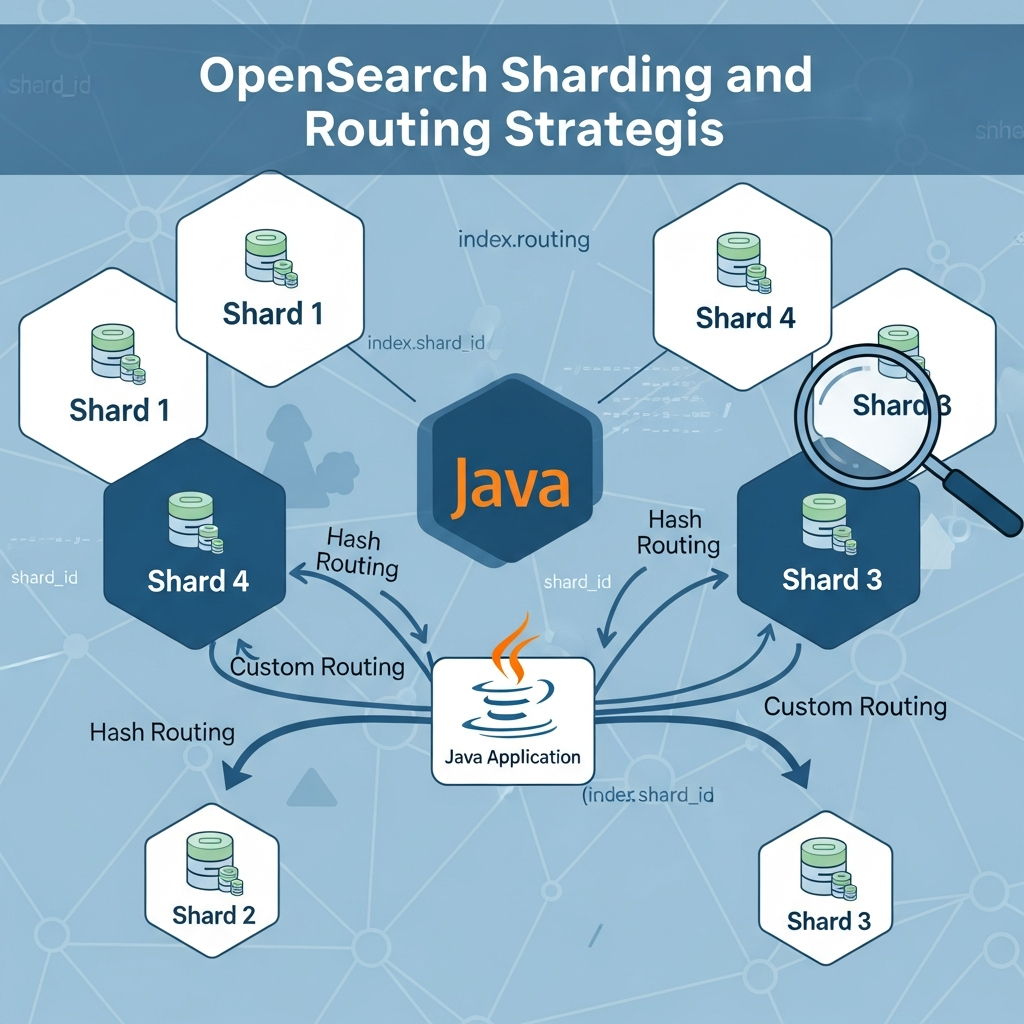
Sharding is OpenSearch's mechanism for distributing data across multiple nodes, enabling horizontal scalability. Routing, on the other hand, dictates how specific documents are assigned to these shards. Together, they are critical for optimizing performance, managing data locality, and ensuring your OpenSearch cluster can grow seamlessly with your application's demands. Misconfigurations or a lack of understanding in these areas can lead to performance bottlenecks, uneven data distribution, and operational headaches.
This comprehensive guide will demystify OpenSearch sharding and routing, focusing specifically on how to implement and manage these strategies effectively using the OpenSearch Java High-Level REST Client. We'll delve into the 'how' and 'why,' provide practical Java code examples, discuss real-world use cases, and highlight best practices and common pitfalls to ensure your OpenSearch implementation is robust and efficient.
Prerequisites
Before diving into the intricacies of sharding and routing, ensure you have the following:
-
Basic Understanding of OpenSearch: Familiarity with core concepts like indices, documents, types, and clusters.
-
Java Development Environment: JDK 11 or higher installed.
-
Build Tool: Maven or Gradle for dependency management.
-
OpenSearch Instance: Access to a running OpenSearch cluster (local, Docker, or cloud-based).
-
OpenSearch Java Client: The OpenSearch Java High-Level REST Client configured in your project. You can add it via Maven:
xml<dependency> <groupId>org.opensearch.client</groupId> <artifactId>opensearch-java</artifactId> <version>2.x.x</version> </dependency> <dependency> <groupId>org.opensearch.client</groupId> <artifactId>opensearch-rest-client</artifactId> <version>2.x.x</version> </dependency>(Replace
2.x.xwith the latest stable version compatible with your OpenSearch cluster.)
Understanding OpenSearch Sharding
At its core, sharding is how OpenSearch distributes data. When you create an index in OpenSearch, it's divided into one or more primary shards. Each primary shard is a self-contained Lucene index, capable of holding a portion of your index's data. These shards can be distributed across different nodes in your cluster.
Why is sharding crucial?
- Scalability: By distributing data, OpenSearch can handle larger datasets than a single node could. You can add more nodes to your cluster, and OpenSearch will automatically rebalance shards, allowing for horizontal scaling.
- Performance: Operations (indexing and search) can be executed in parallel across multiple shards. A search query, for instance, is sent to all relevant shards, and their individual results are then combined.
- Fault Tolerance: OpenSearch provides replica shards. A replica shard is an exact copy of a primary shard. If a node hosting a primary shard fails, a replica can be promoted to a primary, ensuring data availability and preventing data loss. Replicas also serve read requests, further enhancing search performance.
When you create an index, you specify the number of primary shards and replica shards. For example, an index with 5 primary shards and 1 replica will result in 5 primary shards and 5 replica shards (one replica for each primary), totaling 10 shards.
Choosing the right number of shards is critical. Too few shards can limit scalability, while too many can introduce overhead due to increased management and communication between shards.
OpenSearch Routing: The Basics
While sharding distributes data, routing determines which specific shard a document will reside on. Every document in OpenSearch has a unique ID (_id). By default, OpenSearch uses a hash of the document's _id to determine the target primary shard. The formula is typically hash(_id) % number_of_primary_shards.
This default routing mechanism ensures an even distribution of documents across all primary shards, assuming your document IDs are sufficiently diverse. When you later try to retrieve, update, or delete a document by its _id, OpenSearch performs the same hash calculation to efficiently locate the specific shard where the document is stored, avoiding a costly scan of all shards.
Consistent routing is paramount. If a document is indexed with a specific routing logic, it must be retrieved, updated, or deleted using the exact same routing logic. Otherwise, OpenSearch won't know which shard to look for the document on, leading to "document not found" errors or inefficient scatter-gather searches across all shards.
Custom Routing Strategies
While default routing is excellent for general-purpose use cases, there are scenarios where you might want more control over document placement. This is where custom routing comes into play. By specifying a custom _routing value during indexing, you can override OpenSearch's default _id hashing mechanism.
When to use custom routing?
- Co-locating related data: If you frequently query for documents that share a common attribute (e.g., all documents belonging to a specific user or tenant), you can route them to the same shard using that attribute as the routing key. This means queries for that attribute only need to hit a single shard, drastically improving performance by avoiding "scatter-gather" operations across all shards.
- Multi-tenancy: In a multi-tenant application, you might want to route all data for a specific tenant to a dedicated set of shards. This can simplify data isolation, backup, and restoration processes for individual tenants.
- Performance Optimization: For specific, high-volume queries that always filter on a certain field, routing by that field can turn a potentially broad search into a targeted, single-shard operation.
Drawbacks of custom routing:
- Hot Spots: If your chosen routing key doesn't distribute data evenly, some shards might become disproportionately large or receive more traffic than others, leading to performance bottlenecks ("hot shards").
- Increased Complexity: Managing custom routing keys adds another layer of complexity to your application logic.
- Shard Rebalancing: Changing the number of primary shards becomes more complicated with custom routing, often requiring re-indexing.
It's crucial to select a routing key that naturally distributes your data as evenly as possible and aligns with your most critical query patterns.
Implementing Custom Routing with OpenSearch Java Client
Let's see how to apply custom routing when indexing and retrieving documents using the OpenSearch Java client.
First, set up your OpenSearch client:
import org.apache.http.HttpHost;
import org.opensearch.client.opensearch.OpenSearchClient;
import org.opensearch.client.opensearch.indices.CreateIndexRequest;
import org.opensearch.client.opensearch.indices.CreateIndexResponse;
import org.opensearch.client.opensearch.indices.DeleteIndexRequest;
import org.opensearch.client.opensearch.indices.DeleteIndexResponse;
import org.opensearch.client.opensearch.core.IndexRequest;
import org.opensearch.client.opensearch.core.IndexResponse;
import org.opensearch.client.opensearch.core.GetResponse;
import org.opensearch.client.opensearch.core.SearchRequest;
import org.opensearch.client.opensearch.core.SearchResponse;
import org.opensearch.client.opensearch.core.bulk.BulkRequest;
import org.opensearch.client.opensearch.core.bulk.BulkResponse;
import org.opensearch.client.opensearch.core.bulk.BulkOperation;
import org.opensearch.client.opensearch.core.bulk.IndexOperation;
import org.opensearch.client.opensearch.core.search.HitsMetadata;
import org.opensearch.client.opensearch.core.search.Hit;
import org.opensearch.client.opensearch.indices.ExistsRequest;
import org.opensearch.client.json.jackson.JacksonJsonpMapper;
import org.opensearch.client.transport.OpenSearchTransport;
import org.opensearch.client.transport.rest.RestClientTransport;
import org.opensearch.client.RestClient;

import java.io.IOException;
import java.util.Collections;
import java.util.HashMap;
import java.util.Map;

public class OpenSearchRoutingExample {

    private static OpenSearchClient client;
    private static final String INDEX_NAME = "products_by_tenant";

    public static void main(String[] args) throws IOException {
        // Initialize the client
        RestClient restClient = RestClient.builder(
                new HttpHost("localhost", 9200, "http"))
                .build();
        OpenSearchTransport transport = new RestClientTransport(
                restClient, new JacksonJsonpMapper());
        client = new OpenSearchClient(transport);

        // --- Example Usage ---
        createIndex();

        // Indexing documents with custom routing
        indexDocumentWithCustomRouting("product_1", "Electronics", "tenant_A", "Laptop");
        indexDocumentWithCustomRouting("product_2", "Electronics", "tenant_A", "Mouse");
        indexDocumentWithCustomRouting("product_3", "Books", "tenant_B", "Novel");
        indexDocumentWithCustomRouting("product_4", "Books", "tenant_B", "Textbook");
        indexDocumentWithCustomRouting("product_5", "Electronics", "tenant_C", "Keyboard");

        // Retrieve documents with custom routing
        getDocumentWithCustomRouting("product_1", "tenant_A");
        getDocumentWithCustomRouting("product_3", "tenant_B");
        getDocumentWithCustomRouting("product_5", "tenant_C");
        // Attempt to retrieve with incorrect routing (will fail)
        // getDocumentWithCustomRouting("product_1", "tenant_B");

        // Search documents with custom routing
        searchDocumentsWithCustomRouting("tenant_A", "Laptop");
        searchDocumentsWithCustomRouting("tenant_B", "Novel");

        // Bulk index with custom routing
        bulkIndexDocumentsWithCustomRouting();

        // Clean up
        deleteIndex();

        // Close the client
        transport.close();
        restClient.close();
    }

    // ... (methods will be added below)
}
Indexing a Document with a Custom Routing Key
When indexing, you use the routing parameter in the IndexRequest to specify your custom key. This key will be used to determine the target shard instead of the document's _id.
    private static void indexDocumentWithCustomRouting(String id, String category, String tenantId, String name) throws IOException {
        Map<String, String> product = new HashMap<>();
        product.put("category", category);
        product.put("name", name);
        product.put("tenantId", tenantId); // Store tenantId in document as well

        IndexRequest<Map<String, String>> request = IndexRequest.of(i -> i
                .index(INDEX_NAME)
                .id(id)
                .document(product)
                .routing(tenantId) // THIS IS THE CUSTOM ROUTING KEY
        );

        IndexResponse response = client.index(request);
        System.out.println(String.format("Indexed document '%s' for tenant '%s' (routing: %s). Result: %s",
                id, tenantId, response.routing(), response.result()));
    }
Retrieving a Document with a Custom Routing Key
When retrieving a document by its _id, if it was indexed with a custom routing key, you must provide that same key in the GetRequest. If you don't, OpenSearch won't know which shard to look on and will return a "not found" response.
    private static void getDocumentWithCustomRouting(String id, String tenantId) throws IOException {
        GetResponse<Map> response = client.get(
                g -> g.index(INDEX_NAME).id(id).routing(tenantId), // Provide the same routing key
                Map.class
        );

        if (response.found()) {
            System.out.println(String.format("Retrieved document '%s' for tenant '%s': %s",
                    id, tenantId, response.source()));
        } else {
            System.out.println(String.format("Document '%s' not found for tenant '%s' (or incorrect routing key).",
                    id, tenantId));
        }
    }
Routing for Search Queries
Custom routing isn't just for single document operations; it's profoundly impactful for search queries. If you know that all documents relevant to a specific query are co-located on a particular shard (or a subset of shards) due to your routing strategy, you can explicitly target those shards in your SearchRequest.
By passing the routing parameter to a SearchRequest, OpenSearch will only execute the search on the shards associated with that routing key, rather than fanning out the request to all shards. This dramatically reduces the search load on your cluster and can significantly improve query performance.
    private static void searchDocumentsWithCustomRouting(String tenantId, String searchKeyword) throws IOException {
        SearchRequest searchRequest = SearchRequest.of(s -> s
                .index(INDEX_NAME)
                .routing(tenantId) // Target specific shards based on tenantId
                .query(q -> q
                        .match(m -> m
                                .field("name")
                                .query(searchKeyword)
                        )
                )
        );

        SearchResponse<Map> response = client.search(searchRequest, Map.class);
        HitsMetadata<Map> hits = response.hits();

        System.out.println(String.format("\nSearch results for tenant '%s' and keyword '%s':", tenantId, searchKeyword));
        if (hits.total().value() > 0) {
            for (Hit<Map> hit : hits.hits()) {
                System.out.println("  -> " + hit.source());
            }
        } else {
            System.out.println("  No results found.");
        }
    }
Routing in Bulk Operations
For high-throughput indexing, bulk operations are indispensable. When performing bulk indexing, you can specify a custom routing key for each individual document within the BulkRequest. This allows you to efficiently index many documents, each potentially routed to a different shard based on its specific routing key.
    private static void bulkIndexDocumentsWithCustomRouting() throws IOException {
        BulkRequest.Builder br = new BulkRequest.Builder();

        // Document 1 for tenant_A
        br.operations(op -> op
                .index(idx -> idx
                        .index(INDEX_NAME)
                        .id("product_bulk_1")
                        .document(Map.of("category", "Clothing", "name", "T-Shirt", "tenantId", "tenant_A"))
                        .routing("tenant_A")
                )
        );

        // Document 2 for tenant_B
        br.operations(op -> op
                .index(idx -> idx
                        .index(INDEX_NAME)
                        .id("product_bulk_2")
                        .document(Map.of("category", "Electronics", "name", "Webcam", "tenantId", "tenant_B"))
                        .routing("tenant_B")
                )
        );

        // Document 3 for tenant_A
        br.operations(op -> op
                .index(idx -> idx
                        .index(INDEX_NAME)
                        .id("product_bulk_3")
                        .document(Map.of("category", "Clothing", "name", "Jeans", "tenantId", "tenant_A"))
                        .routing("tenant_A")
                )
        );

        BulkResponse result = client.bulk(br.build());

        if (result.errors()) {
            System.out.println("\nBulk indexing with custom routing had errors:");
            result.items().forEach(item -> {
                if (item.error() != null) {
                    System.out.println("  -> " + item.error().reason());
                }
            });
        } else {
            System.out.println("\nBulk indexing with custom routing completed successfully.");
        }
    }
Real-world Use Cases for Custom Routing
Custom routing isn't just a theoretical concept; it solves tangible problems in various application architectures:
-
Multi-Tenancy: This is perhaps the most common and powerful use case. In SaaS applications, data from different tenants needs to be isolated. By using
tenant_idas the routing key, all documents belonging totenant_Xare guaranteed to reside on the same shard or a specific subset of shards. This simplifies tenant-specific operations (e.g., retrieving all data for a tenant, backing up a tenant's data, or performing tenant-level aggregations) and prevents "noisy neighbor" issues.Example: An e-commerce platform where each merchant is a tenant. Routing by
merchant_idensures that a merchant's product catalog and orders are co-located. -
Time-Series Data with User/Device Context: For applications collecting logs, metrics, or IoT sensor data, you often query data for a specific user, device, or sensor within a given time range. While time-based indices are common (e.g.,
logs-2023-10-26), you can further optimize by routing within those indices usinguser_idordevice_id.Example: An IoT platform where sensor data is indexed daily. Routing by
device_idallows rapid retrieval of all data for a specific device on a given day without hitting all shards for that day's index. -
Customer-Specific Data: Similar to multi-tenancy but perhaps within a single application instance, routing by
customer_idfor customer-specific documents (e.g., support tickets, order history, user preferences) can greatly enhance the performance of customer-facing dashboards and reports. -
Geospatial Data (Advanced): While OpenSearch has strong native geospatial capabilities, in highly specific scenarios where you frequently query by a fixed geographic region (e.g., a specific city or postal code boundary), you could derive a routing key from that region. However, this is less common as OpenSearch's geo-point and geo-shape types often provide sufficient performance without custom routing.
Best Practices for Sharding and Routing
To build a robust and performant OpenSearch cluster, adhere to these best practices:
- Choose Shard Count Wisely: This is a critical decision. Aim for a primary shard size between 10GB and 50GB. Too many small shards lead to overhead, while too few large shards can hinder scalability and recovery. Plan for future data growth. OpenSearch recommends keeping the total number of shards per node below 1000, ideally much lower.
- Consistent Routing is Key: If you use custom routing for indexing, always use the exact same routing key for
get,update,delete, andsearchoperations that target those documents. Inconsistencies will lead to "document not found" errors or inefficient full-index scans. - Distribute Routing Keys Evenly: The chosen routing key must distribute documents as uniformly as possible across your primary shards. A routing key with low cardinality or highly skewed data will create "hot shards," leading to performance bottlenecks and uneven resource utilization.
- Monitor Your Cluster: Regularly monitor shard sizes, indexing rates, search latencies, and CPU/memory usage of your nodes. Use OpenSearch's built-in monitoring tools (e.g., OpenSearch Dashboards, API calls like
_cat/shards,_cat/allocation) to identify hot spots or uneven shard distribution. - Plan for Re-indexing: If your data volume grows significantly, or if your initial shard count proves inadequate, you might need to re-index your data into a new index with a different shard configuration. This is a common operational task in OpenSearch. Custom routing can make this more complex if the routing strategy itself needs to change.
- Understand Trade-offs: Custom routing offers performance benefits for specific query patterns but adds complexity. Weigh the performance gains against the increased operational overhead.
- Use Aliases: For indices with custom routing, especially if you anticipate re-indexing, use an index alias. Your application interacts with the alias, allowing you to seamlessly switch the alias to a new, re-indexed index without changing application code.
Common Pitfalls and How to Avoid Them
Even with the best intentions, developers can fall into common traps when dealing with sharding and routing:
-
Incorrect Routing Key Usage: This is the most frequent pitfall. Forgetting to provide the routing key during a
GETrequest, or using a different key than what was used during indexing, will result in the document not being found. Avoid: Encapsulate routing logic in helper methods or a dedicated service layer to ensure consistency. -
Hot Shards: Uneven distribution of documents due to a poorly chosen or naturally skewed routing key. One shard ends up with significantly more data or more requests than others, becoming a bottleneck. Avoid: Choose high-cardinality routing keys that are naturally distributed. Monitor shard sizes and request loads. If hot spots occur, consider re-indexing with a more suitable routing strategy or a larger number of shards.
-
Changing Routing Strategy Mid-Flight: Once an index is created, its primary shard count cannot be changed directly. Similarly, changing the logic of your custom routing key for existing documents requires re-indexing all affected documents. Avoid: Plan your sharding and routing strategy carefully from the outset, considering future growth and query patterns. Use aliases to facilitate seamless transitions during re-indexing.
-
Over-sharding or Under-sharding:
- Over-sharding: Creating too many small shards. Each shard consumes resources (memory, CPU) and introduces overhead for management and inter-shard communication. It can lead to slower recovery times and increased cluster instability.
- Under-sharding: Creating too few large shards. This limits the ability to scale horizontally and can lead to long search times and slow indexing as each shard becomes a bottleneck. Avoid: Follow the 10-50GB per primary shard guideline. Start with a reasonable number of shards and monitor. It's generally easier to scale up (re-index with more shards) than to scale down.
-
Ignoring Replica Shards: Forgetting to configure replica shards means your cluster has a single point of failure and cannot serve read requests if a primary shard's node goes down. Avoid: Always configure at least one replica shard per primary shard for production environments. Replicas provide fault tolerance and can improve read throughput.
Conclusion
Sharding and routing are fundamental concepts for achieving scalability, performance, and fault tolerance in OpenSearch. By understanding how OpenSearch distributes data and how you can influence that distribution with custom routing keys, you gain immense power to optimize your cluster for specific workloads and use cases.
With the OpenSearch Java High-Level REST Client, implementing these strategies is straightforward, allowing you to build sophisticated data architectures. Remember to plan your sharding strategy carefully, choose routing keys that ensure even data distribution, and consistently apply those keys across all your operations. Continuous monitoring will be your best friend in identifying and resolving potential issues.
By mastering these techniques, you'll be well-equipped to build OpenSearch applications that can handle massive datasets and high query volumes, ensuring your users always experience fast and reliable search and analytics capabilities. Experiment with these concepts in your development environment, observe their impact, and tailor them to the unique demands of your application.
    // Helper method to create the index
    private static void createIndex() throws IOException {
        boolean exists = client.indices().exists(new ExistsRequest.Builder().index(INDEX_NAME).build()).value();
        if (!exists) {
            CreateIndexResponse createResponse = client.indices().create(new CreateIndexRequest.Builder()
                    .index(INDEX_NAME)
                    .settings(s -> s
                            .numberOfShards("3") // Example: 3 primary shards
                            .numberOfReplicas("1") // Example: 1 replica per primary
                    )
                    .build()
            );
            System.out.println("\nCreated index: " + createResponse.index());
        } else {
            System.out.println("\nIndex '" + INDEX_NAME + "' already exists.");
        }
    }

    // Helper method to delete the index
    private static void deleteIndex() throws IOException {
        DeleteIndexResponse deleteResponse = client.indices().delete(new DeleteIndexRequest.Builder()
                .index(INDEX_NAME)
                .build()
        );
        System.out.println("\nDeleted index: " + INDEX_NAME + ", Acknowledged: " + deleteResponse.acknowledged());
    }
Written by
CodewithYohaFull-Stack Software Engineer with 7+ years of experience in Java, Spring Boot, and cloud architecture across AWS, Azure, and GCP. Writing production-grade engineering patterns for developers who ship real software.