Intelligent Data Storage Optimization: AWS S3 & GCP Cloud Storage Lifecycle Mastery

Introduction
In today's data-driven world, organizations are generating and storing unprecedented volumes of information. From application logs and user-generated content to backups and analytics datasets, the sheer scale of data presents significant challenges. While cloud storage services like AWS S3 and GCP Cloud Storage offer unparalleled scalability and durability, managing the associated costs and ensuring optimal performance across diverse access patterns can be complex. Storing all data in a high-performance, frequently accessed storage class is often economically unfeasible, leading to inflated cloud bills.
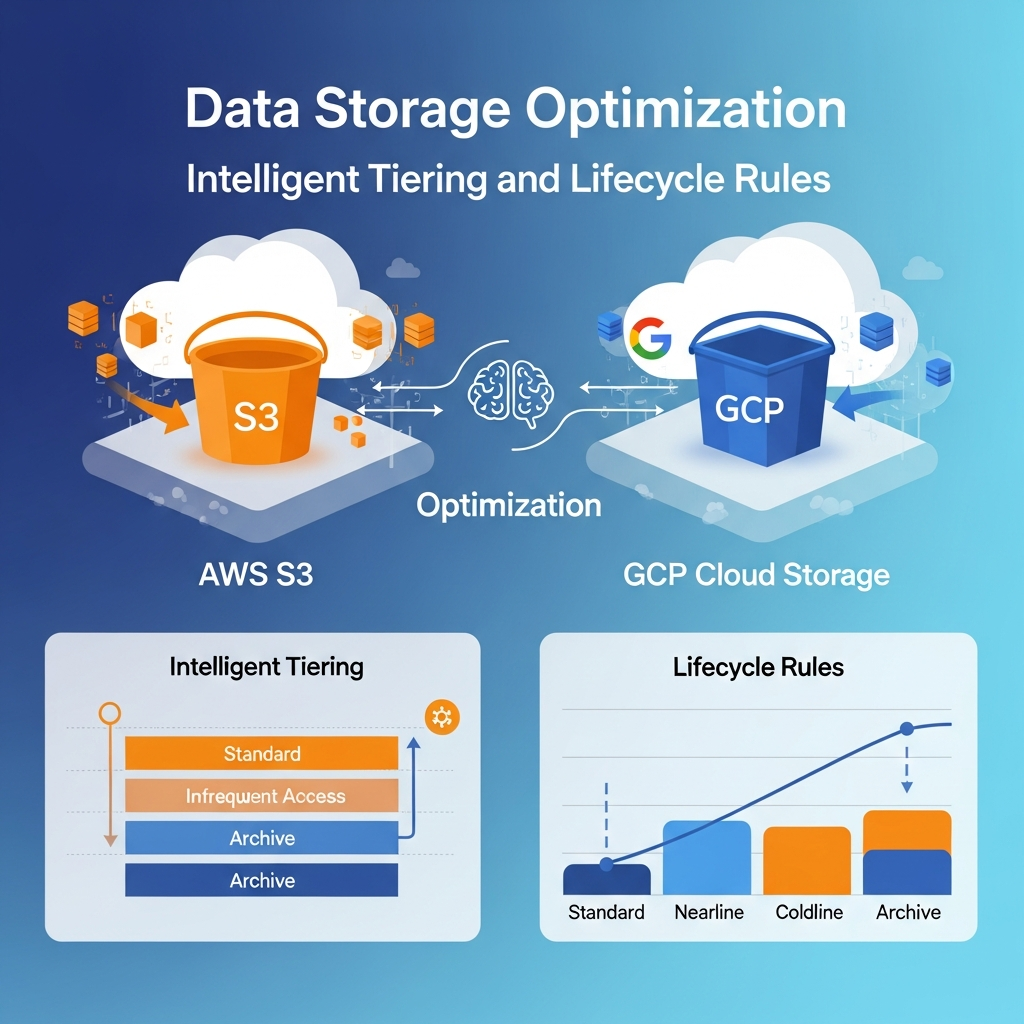
This comprehensive guide will demystify intelligent data storage optimization strategies. We'll explore how AWS S3 Intelligent-Tiering and GCP Cloud Storage Autoclass automatically adapt storage classes based on access patterns, and how powerful lifecycle management rules can further reduce costs by transitioning or expiring data over time. By mastering these techniques, you can achieve a delicate balance between cost-effectiveness, performance, and compliance for your cloud-based data.
Prerequisites
To get the most out of this guide, a basic understanding of the following concepts is recommended:
- AWS S3: Familiarity with S3 buckets, objects, and fundamental operations.
- GCP Cloud Storage: Familiarity with Cloud Storage buckets, objects, and fundamental operations.
- Cloud IAM: Basic knowledge of identity and access management in AWS and GCP for setting permissions.
- AWS CLI / GCP
gsutil: Command-line tools for interacting with cloud services.
Understanding Data Storage Challenges
The primary challenges in managing large-scale cloud data storage revolve around three core pillars:
- Cost Management: Data storage costs can quickly spiral out of control as data volumes grow. Storing infrequently accessed or archival data in expensive, high-performance tiers leads to unnecessary expenditure.
- Performance Optimization: While cost is crucial, performance cannot be sacrificed for frequently accessed data. Different applications have varying latency and throughput requirements.
- Compliance and Retention: Regulatory requirements often dictate how long certain types of data must be retained. Manually tracking and managing retention policies for vast datasets is prone to error and inefficiency.
Addressing these challenges requires a sophisticated approach that dynamically aligns data with the most appropriate storage class throughout its lifecycle. This is where intelligent tiering and lifecycle rules become indispensable.
Introduction to Storage Tiers
Both AWS S3 and GCP Cloud Storage offer a spectrum of storage classes, each optimized for different access patterns, durability, availability, and cost points. Understanding these tiers is foundational to optimization:
AWS S3 Storage Classes:
- S3 Standard: For frequently accessed data with high throughput and low latency. Most expensive.
- S3 Intelligent-Tiering: Automatically moves data between two or three access tiers based on access patterns. Ideal for data with unknown or changing access patterns.
- S3 Standard-IA (Infrequent Access): For long-lived, less frequently accessed data that requires rapid access when needed. Cheaper than Standard, but with retrieval fees.
- S3 One Zone-IA: Similar to Standard-IA but stores data in a single Availability Zone, offering lower cost but less resilience.
- S3 Glacier Instant Retrieval: For archival data that needs immediate access (milliseconds retrieval) when requested, at a lower cost than IA.
- S3 Glacier Flexible Retrieval: For archives where data is accessed infrequently, and retrieval times of minutes to hours are acceptable. Even lower cost.
- S3 Glacier Deep Archive: The lowest-cost storage for long-term archival and digital preservation, with retrieval times of hours.
GCP Cloud Storage Classes:
- Standard: For frequently accessed data, equivalent to S3 Standard. Highest cost.
- Nearline: For data accessed less than once a month, similar to S3 Standard-IA. Lower cost, retrieval fees.
- Coldline: For data accessed less than once a quarter, similar to S3 Glacier Instant Retrieval. Even lower cost, higher retrieval fees.
- Archive: For long-term archiving, similar to S3 Glacier Flexible Retrieval or Deep Archive. Lowest cost, highest retrieval fees and minimum storage duration.
AWS S3 Intelligent-Tiering Deep Dive
S3 Intelligent-Tiering is a game-changer for data with unpredictable or evolving access patterns. Instead of manually moving data, S3 Intelligent-Tiering automatically stores objects in three access tiers:
- Frequent Access Tier: For objects accessed at least once in 30 days. Uses S3 Standard pricing.
- Infrequent Access Tier: For objects not accessed for 30 consecutive days. Uses S3 Standard-IA pricing.
- Archive Instant Access Tier (Optional): For objects not accessed for 90 consecutive days. Uses S3 Glacier Instant Retrieval pricing. This tier needs to be explicitly enabled.
S3 Intelligent-Tiering continuously monitors access patterns and moves objects between these tiers without performance impact, retrieval fees, or operational overhead. It's ideal for data lakes, user-generated content, and applications where access patterns are unknown or change over time. There's a small monitoring and automation charge per object.
Implementing AWS S3 Intelligent-Tiering
Enabling S3 Intelligent-Tiering is straightforward. You can configure it at the bucket level, or for specific prefixes or object tags using the S3 console, CLI, or SDK.
Example: Enabling Intelligent-Tiering via AWS CLI
To enable Intelligent-Tiering for new objects uploaded to a bucket, you simply specify the storage class during the upload:
aws s3 cp my-local-file.txt s3://your-bucket-name/path/to/my-file.txt --storage-class INTELLIGENT_TIERINGExample: Configuring Intelligent-Tiering as a default for a bucket (via S3 PUT Bucket Intelligent-Tiering Configuration API or CloudFormation)
You can also set a bucket-level configuration to automatically transition objects to Intelligent-Tiering. This is typically done via an S3 PUT Bucket Intelligent-Tiering Configuration API call or CloudFormation. Here's a CloudFormation example to apply it to a specific prefix:
{
  "AWSTemplateFormatVersion": "2010-09-09",
  "Resources": {
    "MyS3Bucket": {
      "Type": "AWS::S3::Bucket",
      "Properties": {
        "BucketName": "my-intelligent-tiering-bucket",
        "IntelligentTieringConfigurations": [
          {
            "Id": "MyIntelligentTieringRule",
            "Prefix": "data/",
            "Status": "Enabled",
            "TieringConfigurations": [
              {
                "AccessTier": "ARCHIVE_INSTANT_ACCESS",
                "Days": 90
              }
            ]
          }
        ]
      }
    }
  }
}
In this CloudFormation snippet, we're creating a bucket and configuring an Intelligent-Tiering rule. Objects with the prefix data/ will automatically be moved to the ARCHIVE_INSTANT_ACCESS tier after 90 days of no access, in addition to the default frequent and infrequent access tiers.
AWS S3 Lifecycle Rules Explained
S3 Lifecycle rules allow you to define actions that S3 should take on objects automatically at specific points in their lifecycle. These rules are powerful for managing costs and meeting compliance requirements. The two primary actions are:
- Transition actions: Move objects to a different, typically cheaper, storage class after a specified number of days or at a specific date. You can transition objects to Standard-IA, One Zone-IA, Glacier Instant Retrieval, Glacier Flexible Retrieval, or Glacier Deep Archive.
- Expiration actions: Permanently delete objects after a specified number of days or at a specific date. This is crucial for compliance and cleaning up old data.
Lifecycle rules can be applied to an entire bucket, to objects with a specific prefix (e.g., logs/), or to objects with specific tags. You can also manage object versions (current and noncurrent) separately.
Configuring AWS S3 Lifecycle Rules
Lifecycle rules can be configured via the AWS Management Console, AWS CLI, AWS SDKs, or CloudFormation.
Example: Configuring Lifecycle Rules via AWS CLI (JSON Configuration)
First, create a JSON file (e.g., lifecycle-config.json) defining your rules:
{
  "Rules": [
    {
      "ID": "ArchiveOldLogs",
      "Prefix": "logs/",
      "Status": "Enabled",
      "Transitions": [
        {
          "Days": 30,
          "StorageClass": "STANDARD_IA"
        },
        {
          "Days": 90,
          "StorageClass": "GLACIER"
        }
      ],
      "Expiration": {
        "Days": 365
      }
    },
    {
      "ID": "DeleteTemporaryFiles",
      "Prefix": "temp/",
      "Status": "Enabled",
      "Expiration": {
        "Days": 7
      }
    }
  ]
}
This configuration defines two rules:
- ArchiveOldLogs: For objects under the
logs/prefix:- Transition to
STANDARD_IAafter 30 days. - Transition to
GLACIER(Flexible Retrieval) after 90 days. - Expire (delete) after 365 days.
- Transition to
- DeleteTemporaryFiles: For objects under the
temp/prefix:- Expire (delete) after 7 days.
Apply the configuration to your S3 bucket using the CLI:
aws s3api put-bucket-lifecycle-configuration \
  --bucket your-bucket-name \
  --lifecycle-configuration file://lifecycle-config.json
GCP Cloud Storage Autoclass Deep Dive
Google Cloud Storage Autoclass is GCP's answer to S3 Intelligent-Tiering. It's a bucket-level feature that automatically transitions objects between Standard, Nearline, Coldline, and Archive storage classes based on their last access time. When Autoclass is enabled on a bucket, objects that haven't been accessed for 30 consecutive days are transitioned to the next colder tier (e.g., Standard to Nearline, Nearline to Coldline). If an object in a colder tier is accessed, it's immediately moved back to the Standard tier.
Autoclass simplifies cost optimization by eliminating the need for manual lifecycle rule configuration for data with changing access patterns. It incurs a small monitoring fee, similar to S3 Intelligent-Tiering. It's particularly useful for data lakes, analytics datasets, and any scenario where data access patterns are unpredictable.
Implementing GCP Cloud Storage Autoclass
Enabling Autoclass is a simple bucket-level operation using gsutil or the Google Cloud Console.
Example: Enabling Autoclass via gsutil
To enable Autoclass on an existing bucket:
gsutil autoclass enable gs://your-gcp-bucket-nameTo disable Autoclass:
gsutil autoclass disable gs://your-gcp-bucket-nameWhen creating a new bucket, you can also enable Autoclass:
gsutil mb -l us-central1 --autoclass gs://new-autoclass-bucketGCP Cloud Storage Lifecycle Management Explained
Similar to AWS S3, GCP Cloud Storage offers Object Lifecycle Management rules that allow you to automate actions on objects based on their age, creation date, or other criteria. These rules help manage storage costs and ensure compliance by performing two main actions:
- Transition storage class: Move objects to a colder (cheaper) storage class (Nearline, Coldline, Archive) after a specified number of days since creation or based on the number of newer versions.
- Delete objects: Permanently delete objects after a specified number of days since creation, or by keeping only a certain number of the newest versions.
Lifecycle rules are defined at the bucket level and can apply to all objects or objects matching specific prefixes and/or object metadata. You can specify conditions like age, isLive (for versioning), numNewerVersions, matchesStorageClass, and matchesPrefix.
Configuring GCP Cloud Storage Lifecycle Management
You can configure lifecycle rules using the Google Cloud Console, gsutil, or the Cloud Storage client libraries.
Example: Configuring Lifecycle Rules via gsutil (JSON Configuration)
First, create a JSON file (e.g., gcp-lifecycle-config.json) defining your rules:
{
  "lifecycle": {
    "rule": [
      {
        "action": {
          "type": "SetStorageClass",
          "storageClass": "NEARLINE"
        },
        "condition": {
          "age": 30,
          "matchesPrefix": "logs/"
        }
      },
      {
        "action": {
          "type": "SetStorageClass",
          "storageClass": "ARCHIVE"
        },
        "condition": {
          "age": 90,
          "matchesPrefix": "logs/"
        }
      },
      {
        "action": {
          "type": "Delete"
        },
        "condition": {
          "age": 365,
          "matchesPrefix": "logs/"
        }
      },
      {
        "action": {
          "type": "Delete"
        },
        "condition": {
          "age": 7,
          "matchesPrefix": "temp/"
        }
      }
    ]
  }
}
This configuration defines similar rules to the S3 example:
- For objects under the
logs/prefix:- Transition to
NEARLINEafter 30 days. - Transition to
ARCHIVEafter 90 days. - Delete after 365 days.
- Transition to
- For objects under the
temp/prefix:- Delete after 7 days.
Apply the configuration to your Cloud Storage bucket using gsutil:
gsutil lifecycle set gcp-lifecycle-config.json gs://your-gcp-bucket-nameReal-world Use Cases & Best Practices
Applying intelligent tiering and lifecycle rules effectively can lead to significant cost savings and operational efficiencies across various scenarios:
Use Cases:
- Log Data Archiving: Application, server, and network logs are often frequently accessed for a short period (e.g., 7-30 days) for troubleshooting, then rarely accessed but needed for compliance for much longer. Lifecycle rules are perfect here: move to IA/Nearline after 30 days, then to Glacier/Archive after 90 days, and finally delete after 1-5 years.
- User-Generated Content (UGC): Photos, videos, and documents uploaded by users might be hot initially, then become infrequently accessed over time. S3 Intelligent-Tiering or GCP Autoclass is ideal, as access patterns are highly unpredictable.
- Backup and Disaster Recovery: Older backups can be moved to cheaper storage tiers. For instance, daily backups might be kept in Standard for 7 days, then moved to IA/Nearline for 30 days, and finally to Glacier/Archive for long-term retention.
- Data Lakes and Analytics: Raw data ingested into a data lake might be processed immediately and then accessed sporadically for historical analysis. Intelligent tiering can optimize these fluctuating access patterns.
- Media Archives: Large media files (e.g., raw video footage) that are rarely accessed but must be preserved indefinitely for future use are perfect candidates for Glacier Deep Archive or Cloud Storage Archive.
Best Practices:
- Understand Your Data: Before implementing any rules, analyze your data's access patterns, retention requirements, and compliance needs. Use cloud provider monitoring tools (AWS Cost Explorer, GCP Billing Reports) to identify storage cost drivers.
- Start Simple, Iterate: Begin with broad lifecycle rules and refine them over time. Don't over-complicate rules initially.
- Use Intelligent Tiering/Autoclass for Unpredictable Data: For datasets where access patterns are unknown or frequently change, leverage S3 Intelligent-Tiering or GCP Autoclass to automatically optimize costs without manual intervention.
- Leverage Prefixes and Tags: Use object prefixes or tags to apply granular lifecycle rules to specific subsets of data within a bucket.
- Monitor and Audit: Regularly review your storage costs and object access patterns. Cloud providers offer tools to monitor storage class transitions and analyze access logs. Ensure your rules are working as expected and not causing unintended data loss or performance bottlenecks.
- Account for Minimum Storage Durations: Be aware that colder storage classes often have minimum storage durations (e.g., 30 days for S3 Standard-IA, 90 days for Glacier). Deleting or transitioning an object before this duration incurs a pro-rated charge for the remaining days.
- Consider Retrieval Costs: While colder tiers are cheaper to store data, they often have retrieval fees and higher latency. Ensure your chosen tier aligns with your application's retrieval performance requirements and budget.
- Enable Versioning with Lifecycle Rules: If you have object versioning enabled, lifecycle rules can be configured for both current and noncurrent versions, which is crucial for managing costs associated with old versions.
Common Pitfalls & Considerations
Despite their benefits, misconfiguring intelligent tiering or lifecycle rules can lead to issues:
- Accidental Data Loss: Incorrectly configured expiration rules can permanently delete critical data. Always double-check rules, especially those involving deletion, and test in non-production environments.
- Unexpected Retrieval Costs: Transitioning data to very cold tiers (like Glacier Deep Archive) can result in high retrieval costs and long retrieval times if that data is unexpectedly needed quickly. Understand the trade-offs.
- Minimum Storage Charges: As mentioned, objects moved to colder tiers often have a minimum billing duration. If an object is deleted or moved out of a cold tier before this duration, you'll still be charged for the minimum period. This can negate some cost savings if objects are frequently moved in and out of cold tiers.
- Over-optimization: Creating overly complex or too many lifecycle rules can become difficult to manage and audit. Aim for simplicity and clarity.
- Ignoring Monitoring: Failing to monitor storage costs and access patterns after implementing rules can mean missing out on further optimization opportunities or not catching misconfigurations.
- Permissions Issues: Ensure the IAM role or user configuring the rules has the necessary permissions (e.g.,
s3:PutLifecycleConfiguration,storage.buckets.updatefor GCP).
Conclusion
Intelligent tiering (AWS S3 Intelligent-Tiering, GCP Cloud Storage Autoclass) and robust lifecycle management rules are indispensable tools for optimizing cloud storage costs and performance. By automating the movement and deletion of data across various storage classes, organizations can significantly reduce their cloud bills, ensure compliance, and free up valuable engineering time.
Both AWS and GCP provide powerful, flexible mechanisms to achieve these goals. The key to success lies in understanding your data's lifecycle, carefully planning your rules, and continuously monitoring their effectiveness. Embrace these strategies to transform your cloud storage from a significant expense into a well-managed, cost-efficient asset.
Start by analyzing your current storage usage and identify datasets that are prime candidates for optimization. With careful planning and execution, you can unlock substantial savings and build a more resilient and cost-effective cloud infrastructure.
Enjoyed this deep dive? Buy me a coffee!
Every article on CodeWithYoha is 100% free, independent, and sponsor-free. If this guide saved you hours of debugging or helped you architect better software, consider supporting future guides with a coffee ($5, $10, or any amount of your choice).
Written by
CodewithYohaFull-Stack Software Engineer with 7+ years of experience in Java, Spring Boot, and cloud architecture across AWS, Azure, and GCP. Writing production-grade engineering patterns for developers who ship real software.