Zero-Downtime Database Refactoring: Expand-Contract with Liquibase & Flyway

Introduction
In the fast-paced world of modern software development, continuous delivery and deployment are paramount. Applications are constantly evolving, and so too must their underlying data models. However, database schema changes often pose a significant challenge: how do you modify your database structure without introducing downtime, breaking existing application functionality, or corrupting data?
The traditional approach of taking an application offline, running a migration script, and then bringing it back up is no longer acceptable for high-availability systems. Even a few minutes of downtime can translate into substantial financial losses and user dissatisfaction. This is where the Expand-Contract pattern emerges as a powerful solution, enabling truly zero-downtime database refactoring.
This comprehensive guide will delve deep into the Expand-Contract pattern, explaining its principles, phases, and practical application. We will then explore how to implement this pattern effectively using two of the most popular database migration tools: Liquibase and Flyway. By the end, you'll have a robust understanding of how to evolve your database schemas safely and continuously, even in the most demanding production environments.
The Peril of Direct Database Changes
Before diving into solutions, let's understand the problem. Imagine you need to rename a column, change a column's data type, or split a table. A direct ALTER TABLE statement run against a live production database can lead to several catastrophic outcomes:
- Downtime: Locking tables during schema modifications can block reads and writes, bringing your application to a halt.
- Application Errors: If the application code expects the old schema while the new schema is in place (or vice-versa during a brief window), it will throw errors, leading to degraded service.
- Data Loss/Corruption: Incorrectly applied changes or failed migrations can lead to irreversible data loss or inconsistencies.
- Complex Rollbacks: If a migration fails midway, rolling back to a stable state can be incredibly complex, time-consuming, and risky, often requiring manual intervention and further downtime.
These risks make direct, in-place schema changes a significant bottleneck in continuous delivery pipelines and a constant source of anxiety for development and operations teams.
Understanding the Expand-Contract Pattern
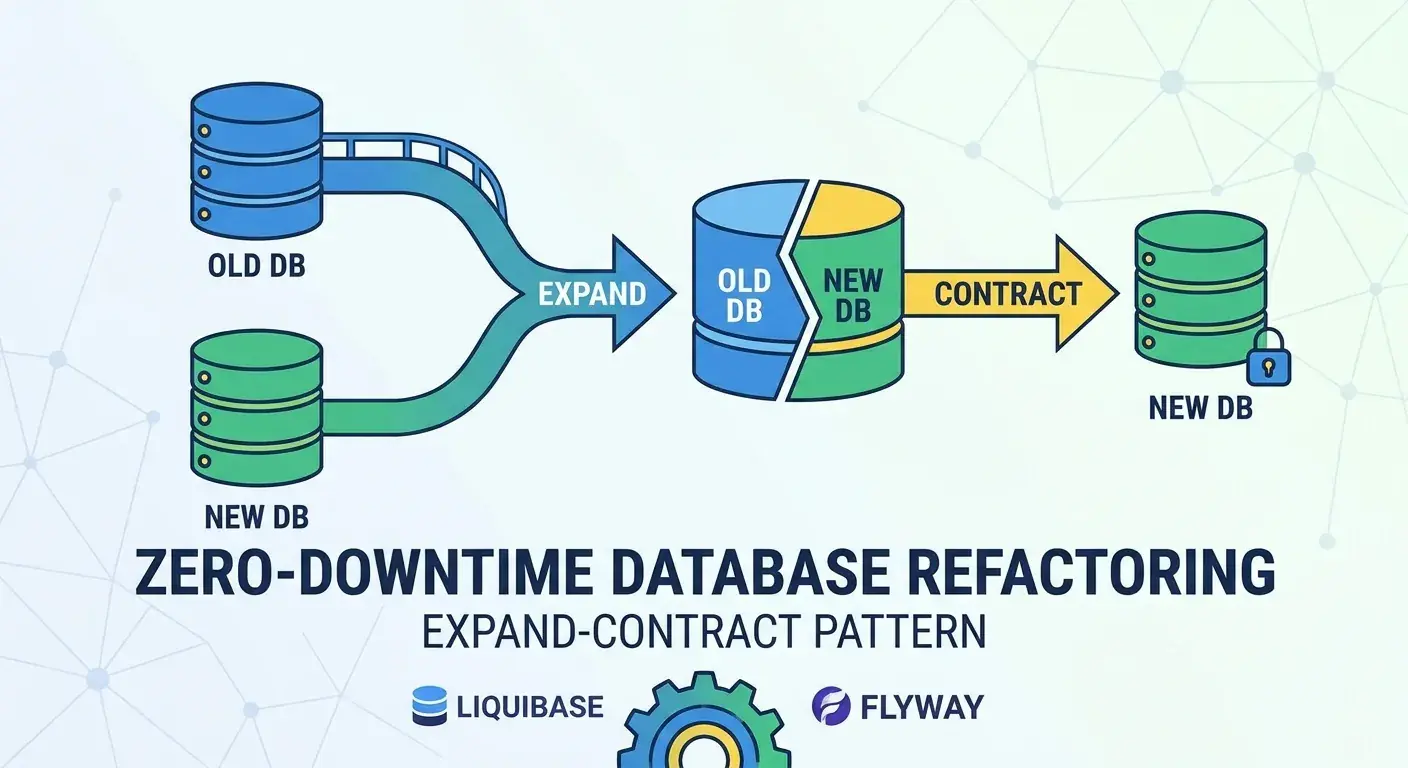
The Expand-Contract pattern is a strategy for making backward-compatible database schema changes over a series of small, isolated steps, ensuring that the application remains fully functional throughout the entire process. It's built on the principle of gradual evolution and redundancy.
The pattern consists of three distinct phases:
- Expand: Introduce the new schema elements (e.g., new columns, tables, or views) alongside the old ones. The application code is updated to write to both the old and new structures (dual-writing) but still primarily reads from the old.
- Migrate/Refactor: Copy data from the old structures to the new. Once data is synchronized, the application code is updated to read from the new structures. The application might still write to both for a period, or switch entirely to the new structure for writes.
- Contract: Once confidence is established that the new structures are stable and fully adopted by the application, the old, redundant schema elements are safely removed.
This phased approach ensures that at no point is the application left in a state where it cannot function due to a schema mismatch. It allows for testing and verification at each stage, significantly reducing risk.
Phase 1: Expand - Making Changes Backward-Compatible
The Expand phase is all about introducing new database elements without impacting existing functionality. The core idea is to add, not modify or delete, during this stage.
Common Scenarios:
- Renaming a Column: Add a new column with the desired name and type, leaving the old column intact.
- Changing a Column's Data Type: Add a new column with the desired type, keeping the old column.
- Splitting a Column: Add one or more new columns to hold the split data, keeping the original column.
- Splitting a Table: Create a new table with the desired structure, leaving the old table untouched.
During this phase, the application code needs to be updated to perform dual-writes. This means that whenever data is inserted or updated, it is written to both the old and the new schema elements. For reads, the application continues to read from the old schema elements. This ensures backward compatibility for all currently deployed application versions.
Example: Renaming first_name to given_name
Let's say you have a users table with a first_name column. You want to rename it to given_name for better semantic clarity.
Database Change (Expand): Add the new given_name column, making it nullable initially.
Application Change (Expand): Modify your application's data access layer to write to both first_name and given_name whenever a user's name is created or updated. Continue reading from first_name.
// Pseudo-code for application layer during Expand phase
class User {
    String firstName; // Old field
    String givenName; // New field
}

void saveUser(User user) {
    // Write to both old and new columns in the database
    database.update("INSERT INTO users (first_name, given_name) VALUES (?, ?)", user.firstName, user.firstName);
    // Or for an update:
    database.update("UPDATE users SET first_name = ?, given_name = ? WHERE id = ?", user.firstName, user.firstName, user.id);
}

User getUser(long id) {
    // Continue reading from the old column
    return database.query("SELECT id, first_name FROM users WHERE id = ?", id);
}
Phase 2: Migrate - Data Synchronization and Application Switchover
Once the new schema elements are in place and the application is dual-writing, the next step is to synchronize existing data and then switch the application to use the new structures.
Steps in the Migrate Phase:
- Backfill Existing Data: Copy all existing data from the old schema elements to the newly created ones. This is typically a one-time operation for historical data.
- Verify Data Integrity: Crucially, verify that the data has been correctly copied and that the new structures contain accurate information. This might involve running comparison queries or automated tests.
- Application Switchover: Update the application code to start reading from the new schema elements. For a period, it might still dual-write, but the primary source for reads is now the new column/table.
Example: Renaming first_name to given_name (continued)
Database Change (Migrate): Copy data from first_name to given_name. Then, if given_name is intended to be non-nullable, alter the column.
-- SQL for backfilling data
UPDATE users SET given_name = first_name WHERE given_name IS NULL;

-- If given_name should be NOT NULL, apply this AFTER backfill
ALTER TABLE users ALTER COLUMN given_name SET NOT NULL;
Application Change (Migrate): Modify your application's data access layer to now read from given_name. Continue dual-writing to first_name and given_name for safety, or switch entirely to writing only to given_name if you're confident.
// Pseudo-code for application layer during Migrate phase
void saveUser(User user) {
    // Continue dual-writing, or switch to writing only to givenName
    database.update("UPDATE users SET first_name = ?, given_name = ? WHERE id = ?", user.givenName, user.givenName, user.id);
}

User getUser(long id) {
    // NOW read from the new column
    return database.query("SELECT id, given_name FROM users WHERE id = ?", id);
}
This phase is critical. The application is now fully functional with the new schema, but the old schema elements still exist as a safety net. This allows for a grace period to monitor the system and ensure stability before proceeding to the final cleanup.
Phase 3: Contract - Removing Old Structures
The Contract phase is the cleanup step. Once the new schema elements are fully adopted by the application and have proven stable in production, the old, redundant structures can be safely removed.
Key Considerations:
- Confidence: Ensure all application versions (including older ones that might still be running in some environments, though ideally not production) are no longer referencing the old schema.
- Monitoring: Have adequate monitoring in place to quickly detect any issues after the old structures are dropped.
- Irreversibility: This step is generally irreversible without a full database restore, so proceed with caution and after thorough validation.
Example: Renaming first_name to given_name (continued)
Database Change (Contract): Drop the old first_name column.
-- SQL for dropping the old column
ALTER TABLE users DROP COLUMN first_name;
Application Change (Contract): Remove any remaining references to first_name from your application code, including the dual-write logic if it was still in place.
// Pseudo-code for application layer during Contract phase
void saveUser(User user) {
    // Now only write to the new column
    database.update("UPDATE users SET given_name = ? WHERE id = ?", user.givenName, user.id);
}

// The User class might also be refactored to remove firstName
By completing the Contract phase, you've successfully refactored your database schema with zero downtime, cleaned up technical debt, and ensured your data model is aligned with your application's current needs.
Introducing Liquibase for Database Migrations
Liquibase is an open-source, database-independent library for tracking, managing, and applying database schema changes. It uses a concept called "changelogs" which are a series of "changesets" that define the database modifications. Liquibase supports various formats for changelogs, including XML, YAML, JSON, and raw SQL.
Key Features for Expand-Contract:
- Changelogs and Changesets: Organize changes into atomic units.
- Database-agnostic: Works with nearly all relational databases.
- Preconditions: Define conditions that must be met before a changeset is applied (e.g.,
columnExists,tableExists). This is crucial for controlling the Expand-Contract flow. - Contexts and Labels: Apply changesets conditionally based on environment or purpose.
- Rollback Capabilities: Though Expand-Contract aims to prevent rollbacks, Liquibase offers
rollbackcommands for specific changesets or to a point in time.
Liquibase Workflow
- Define changesets in a changelog file.
- Run
liquibase updateto apply changes to the database. - Liquibase tracks applied changes in
DATABASECHANGELOGandDATABASECHANGELOGLOCKtables.
Practical Example with Liquibase (Renaming a Column)
Let's apply the first_name to given_name renaming scenario using Liquibase.
Phase 1: Expand - Add given_name column
We'll add a new column given_name to the users table. Note the nullable="true" as we'll backfill data later.
<!-- db.changelog-1.0.xml -->
<databaseChangeLog
    xmlns="http://www.liquibase.org/xml/ns/dbchangelog"
    xmlns:xsi="http://www.w3.org/2001/XMLSchema-instance"
    xsi:schemaLocation="http://www.liquibase.org/xml/ns/dbchangelog
                        http://www.liquibase.org/xml/ns/dbchangelog/dbchangelog-4.9.xsd">

    <changeSet id="1" author="yourname">
        <comment>Expand: Add given_name column to users table</comment>
        <addColumn tableName="users">
            <column name="given_name" type="VARCHAR(255)" remarks="New column for user's given name" nullable="true"/>
        </addColumn>
        <rollback>
            <dropColumn tableName="users" columnName="given_name"/>
        </rollback>
    </changeSet>

</databaseChangeLog>
After applying this, deploy your application code with dual-write logic (writing to both first_name and given_name, reading from first_name). Monitor for stability.
Phase 2: Migrate - Backfill Data and Make given_name NOT NULL
Once the application is dual-writing and stable, we backfill the data and then make the new column non-nullable.
<!-- db.changelog-1.1.xml -->
<databaseChangeLog
    xmlns="http://www.liquibase.org/xml/ns/dbchangelog"
    xmlns:xsi="http://www.w3.org/2001/XMLSchema-instance"
    xsi:schemaLocation="http://www.liquibase.org/xml/ns/dbchangelog
                        http://www.liquibase.org/xml/ns/dbchangelog/dbchangelog-4.9.xsd">

    <include file="db.changelog-1.0.xml" relativeToChangelogFile="true"/>

    <changeSet id="2" author="yourname">
        <comment>Migrate: Backfill data from first_name to given_name</comment>
        <sql>
            UPDATE users SET given_name = first_name WHERE given_name IS NULL;
        </sql>
        <rollback>
            <!-- This rollback might be complex depending on business rules -->
            <!-- For simplicity, we'll assume a point-in-time restore for complex data rollbacks -->
            -- UPDATE users SET given_name = NULL; -- Or specific logic
        </rollback>
    </changeSet>

    <changeSet id="3" author="yourname">
        <comment>Migrate: Make given_name column NOT NULL</comment>
        <preconditions onFail="MARK_RAN">
            <sqlCheck expectedResult="0">
                SELECT COUNT(*) FROM users WHERE given_name IS NULL;
            </sqlCheck>
        </preconditions>
        <addNotNullConstraint tableName="users" columnName="given_name" columnDataType="VARCHAR(255)"/>
        <rollback>
            <dropNotNullConstraint tableName="users" columnName="given_name" columnDataType="VARCHAR(255)"/>
        </rollback>
    </changeSet>

</databaseChangeLog>
Notice the preconditions in changeset 3. It ensures that the NOT NULL constraint is only applied if there are no NULL values in given_name, preventing failures. After this, deploy your application code to read from given_name.
Phase 3: Contract - Drop first_name column
Once the application is reading from given_name and has been stable for a sufficient period, we can drop the old column.
<!-- db.changelog-1.2.xml -->
<databaseChangeLog
    xmlns="http://www.liquibase.org/xml/ns/dbchangelog"
    xmlns:xsi="http://www.w3.org/2001/XMLSchema-instance"
    xsi:schemaLocation="http://www.liquibase.org/xml/ns/dbchangelog
                        http://www.liquibase.org/xml/ns/dbchangelog/dbchangelog-4.9.xsd">

    <include file="db.changelog-1.1.xml" relativeToChangelogFile="true"/>

    <changeSet id="4" author="yourname">
        <comment>Contract: Drop old first_name column</comment>
        <preconditions onFail="MARK_RAN">
            <columnExists tableName="users" columnName="first_name"/>
            <!-- Additional precondition: Ensure no application code relies on first_name -->
            <!-- This is harder to check programmatically, relies on dev process -->
        </preconditions>
        <dropColumn tableName="users" columnName="first_name"/>
        <rollback>
            <!-- Re-adding the column might be possible, but data would be lost -->
            <!-- <addColumn tableName="users" columnName="first_name" type="VARCHAR(255)"/> -->
        </rollback>
    </changeSet>

</databaseChangeLog>
After this, remove any remaining first_name references from your application code.
Introducing Flyway for Database Migrations
Flyway is another popular open-source database migration tool. It takes a convention-over-configuration approach, primarily using versioned SQL scripts for migrations. Its simplicity and reliability are its main strengths.
Key Features for Expand-Contract:
- Versioned SQL Scripts: Migrations are simple
.sqlfiles namedV<version>__<description>.sql. - Ordered Execution: Flyway applies scripts in version order, ensuring a predictable schema evolution.
- Callbacks: Hooks to execute custom logic before or after migrations.
- Checksum Validation: Ensures that applied scripts haven't been tampered with.
Flyway Workflow
- Place SQL migration scripts in a designated folder (e.g.,
src/main/resources/db/migration). - Run
flyway migrateto apply changes to the database. - Flyway tracks applied changes in the
flyway_schema_historytable.
Practical Example with Flyway (Renaming a Column)
Let's implement the first_name to given_name renaming using Flyway.
Phase 1: Expand - Add given_name column
Create a SQL script to add the new column. Note that Flyway scripts are plain SQL, so NULL is implicit if not specified as NOT NULL.
-- src/main/resources/db/migration/V1_1__add_given_name_column.sql

ALTER TABLE users
ADD COLUMN given_name VARCHAR(255);

-- Comment: Application code should now dual-write to both first_name and given_name
-- while continuing to read from first_name.
Deploy this migration, then deploy your application code with dual-write logic.
Phase 2: Migrate - Backfill Data and Make given_name NOT NULL
Create a new script for data backfill, and another for making the column non-nullable.
-- src/main/resources/db/migration/V1_2__backfill_given_name_data.sql

UPDATE users
SET given_name = first_name
WHERE given_name IS NULL;

-- Comment: Ensure data is consistent. Application should continue dual-writing
-- and now switch to reading from given_name.-- src/main/resources/db/migration/V1_3__make_given_name_not_null.sql
-- IMPORTANT: Ensure V1_2 has run and all given_name values are populated before this.
-- Flyway does not have built-in preconditions like Liquibase, so this relies on script order
-- and proper testing.
ALTER TABLE users
ALTER COLUMN given_name SET NOT NULL;
-- Comment: Application should now be fully reading from given_name. Dual-writing can be phased out.Deploy these migrations sequentially, then deploy your application code to read from given_name.
Phase 3: Contract - Drop first_name column
Create the final script to remove the old column.
-- src/main/resources/db/migration/V1_4__drop_first_name_column.sql

ALTER TABLE users
DROP COLUMN first_name;

-- Comment: All application code should now be refactored to use only given_name.
-- Remove any remaining references to first_name from the application.
Deploy this migration, then remove any remaining first_name references from your application code.
Best Practices for Expand-Contract with Migration Tools
Implementing Expand-Contract effectively requires more than just knowing the tools; it demands disciplined development practices.
- Small, Incremental Changes: Break down large refactorings into the smallest possible steps. Each phase (Expand, Migrate, Contract) should be a separate, deployable unit.
- Version Control Everything: Database migration scripts and application code changes must be managed under version control and deployed together as a cohesive unit.
- Feature Flags: Utilize feature flags in your application code to control the switchover from old to new schema logic. This allows for instant toggling and reduces risk during the Migrate phase.
- Automated Testing: Implement robust automated tests for each phase. Test both the old and new application logic against the evolving schema. Ensure read/write operations work correctly at every step.
- Monitoring and Alerting: Closely monitor your application and database performance during and after each deployment phase. Set up alerts for any anomalies that might indicate issues with the new schema or application logic.
- Backward Compatibility: Always ensure that newly deployed application versions can still work with the old schema, and older application versions can still work with the new schema (during the transition). This is the core principle of Expand-Contract.
- Plan for Rollback (Even if Unlikely): While Expand-Contract minimizes the need for rollbacks, understand the implications. For data-level changes, a full point-in-time restore might be the only safe option if something goes terribly wrong during data migration.
- Communication: Ensure clear communication between development, QA, and operations teams about the state of the database refactoring.
- Consider Performance: Adding redundant columns or tables can temporarily increase storage and potentially slight overhead for dual-writes. Monitor performance metrics.
Common Pitfalls and How to Avoid Them
Even with a solid pattern and powerful tools, mistakes can happen. Be aware of these common pitfalls:
- Forgetting to Dual-Write/Read: This is the most critical mistake. If the application doesn't correctly write to both old and new columns during Expand, or doesn't switch reads correctly during Migrate, data inconsistencies or application errors will occur.
- Avoid: Thorough unit and integration testing of data access layers, and code reviews focused on dual-write/read logic.
- Skipping the Contract Phase: Leaving old, redundant schema elements in place introduces technical debt, clutters the database, and can lead to confusion. It also consumes unnecessary storage and potentially impacts performance.
- Avoid: Treat the Contract phase as an essential part of the refactoring. Schedule it, monitor its completion, and ensure it's part of your definition of "done."
- Inadequate Testing: Relying solely on manual testing or skipping certain test scenarios can lead to production issues. Edge cases, high load, and concurrent operations must be tested.
- Avoid: Implement comprehensive automated tests, including integration tests, end-to-end tests, and performance tests for each phase.
- Complex Changes: Some highly complex changes (e.g., merging multiple tables with intricate relationships) might be challenging to fit perfectly into a simple Expand-Contract model without significant intermediate complexity.
- Avoid: Break down complex changes into smaller, manageable Expand-Contract cycles. Consider if a full data migration with planned downtime might be less risky for extremely rare, highly complex transformations (though this should be a last resort).
- Ignoring Performance Implications: Temporarily having redundant data or dual-write operations can have minor performance impacts. Ignoring these, especially under high load, can lead to degraded user experience.
- Avoid: Monitor database and application performance closely during the Expand and Migrate phases. Optimize queries and potentially scale resources if needed.
Conclusion
Zero-downtime database refactoring using the Expand-Contract pattern is not just a best practice; it's a necessity for modern, continuously delivered applications. It transforms database schema evolution from a high-risk, downtime-inducing event into a series of safe, incremental steps.
Tools like Liquibase and Flyway provide the essential scaffolding to manage and apply these changes systematically. Liquibase offers rich features like preconditions and change types, suitable for complex, database-agnostic scenarios. Flyway, with its simple SQL-centric approach, excels in environments prioritizing speed and direct SQL control.
By embracing the Expand-Contract pattern, coupled with disciplined development practices, rigorous testing, and robust migration tools, you can ensure your database schema evolves gracefully and reliably, keeping your applications online and your users happy. This approach empowers teams to deliver value faster and with greater confidence, truly embodying the spirit of DevOps and continuous delivery.
Enjoyed this deep dive? Buy me a coffee!
Every article on CodeWithYoha is 100% free, independent, and sponsor-free. If this guide saved you hours of debugging or helped you architect better software, consider supporting future guides with a coffee ($5, $10, or any amount of your choice).
Written by
CodewithYohaFull-Stack Software Engineer with 7+ years of experience in Java, Spring Boot, and cloud architecture across AWS, Azure, and GCP. Writing production-grade engineering patterns for developers who ship real software.