Mastering Local-First: ElectricSQL & SQLite for Web & Desktop Sync

Introduction
In an increasingly connected world, the expectation for applications to remain responsive and functional, even when offline or facing unreliable networks, has never been higher. Traditional client-server architectures, which heavily rely on constant network access, often fall short in delivering this seamless experience. This is where the "local-first" paradigm emerges as a powerful alternative, prioritizing the user's local data and device as the primary source of truth.
Local-first applications store data directly on the user's device, enabling instant access, low-latency operations, and complete offline functionality. The challenge, however, lies in efficiently and reliably synchronizing this local data with a central backend, resolving conflicts, and ensuring data consistency across multiple devices and collaborators. This article dives deep into how ElectricSQL, combined with the ubiquitous SQLite database, provides an elegant and robust solution for building local-first web and desktop applications with bidirectional synchronization.
ElectricSQL, an open-source sync layer for PostgreSQL, leverages advanced techniques like CRDTs (Convergent Replicated Data Types) to make building real-time, offline-capable applications surprisingly straightforward. By replicating a subset of your PostgreSQL database to local SQLite instances on clients, it empowers developers to deliver a superior user experience, where data is always available, and changes propagate seamlessly.
Prerequisites
To follow along with the code examples and concepts, a basic understanding of the following is recommended:
- Node.js and npm/yarn: For JavaScript/TypeScript development.
- Docker: To easily set up PostgreSQL and the ElectricSQL service.
- SQL: Familiarity with basic SQL commands.
- React/JavaScript/TypeScript: The code examples will primarily use React, but the concepts are applicable to other frameworks.
- PostgreSQL: Basic knowledge of its concepts.
1. Understanding Local-First Architecture
At its core, local-first architecture means that an application's data primarily resides on the user's device. All operations—reads, writes, updates—first occur against this local data store. Only then are these changes eventually synchronized with a remote server and, subsequently, other connected clients. This flips the traditional cloud-first model on its head, where the server is the single source of truth and clients are merely transient viewers or editors.
Benefits of Local-First:
- Offline Resilience: Applications remain fully functional without an internet connection. Users can continue working, and their changes will sync automatically once connectivity is restored.
- Low Latency & High Responsiveness: Operations are performed against a local database, eliminating network round-trip delays. This results in an incredibly snappy and responsive user interface.
- Enhanced User Experience: Users feel more in control of their data and experience fewer interruptions due to network fluctuations.
- Data Ownership & Privacy: Data resides on the user's device, offering a stronger sense of ownership and potentially better privacy guarantees.
- Simplified Optimistic UI: Since changes are immediately applied locally, implementing optimistic UI updates (where the UI reflects a change before server confirmation) becomes the default behavior, not an add-on.
Local-First vs. Offline-First:
While often used interchangeably, there's a subtle distinction. "Offline-first" primarily focuses on ensuring functionality when offline. "Local-first" encompasses this but extends to a broader philosophy of empowering the client as the primary data interface, even when online, leveraging the benefits of local data access for speed and resilience.
2. Why SQLite as the Local Database?
SQLite is a software library that implements a self-contained, serverless, zero-configuration, transactional SQL database engine. Its unparalleled ubiquity, embeddability, and reliability make it the ideal choice for local-first applications.
Key Advantages of SQLite:
- Zero Configuration: No separate server process to manage. The database is simply a file on disk.
- Embeddable: It can be directly linked into applications, making it perfect for both web (via WebAssembly) and desktop environments.
- Lightweight: Minimal footprint and resource consumption.
- Robust & Reliable: Used in billions of devices, it's battle-tested and highly stable.
- Full SQL Support: Provides a familiar and powerful interface for querying and manipulating data.
- Transactional: Ensures data integrity with ACID properties.
For web applications, SQLite can be compiled to WebAssembly (Wasm), allowing it to run directly in the browser. This enables client-side SQL queries against a persistent local database, unlocking powerful local-first capabilities. For desktop applications, SQLite is natively supported and widely adopted.
ElectricSQL leverages SQLite as its client-side data store, acting as a direct replica of a subset of your PostgreSQL database. This allows developers to interact with the local data using familiar SQL queries or an ORM, abstracting away the complexities of synchronization.
3. Introducing ElectricSQL: The Sync Layer
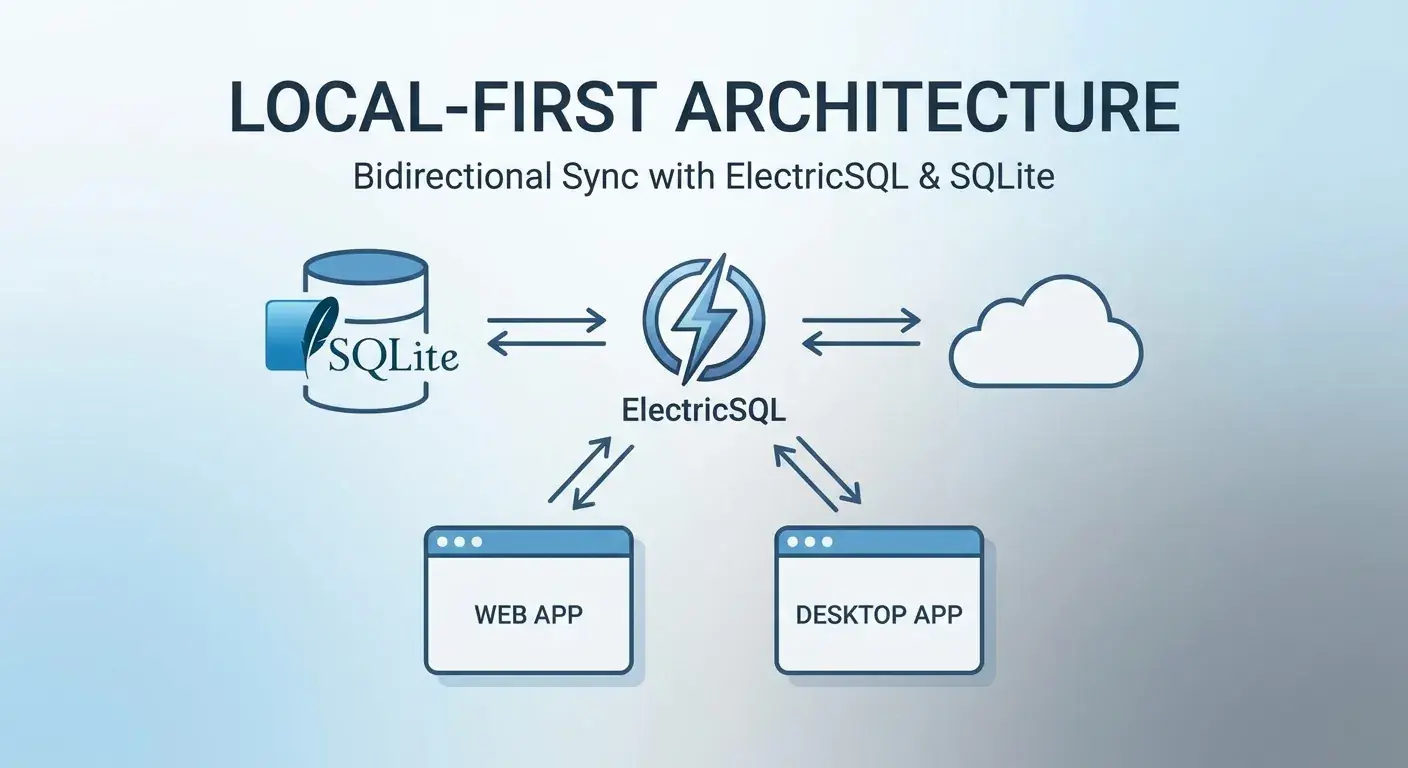
ElectricSQL is an open-source sync layer that transforms your PostgreSQL database into a real-time, local-first data platform. It bridges the gap between your server-side PostgreSQL and client-side SQLite instances, enabling seamless bidirectional synchronization and real-time updates across all connected clients.
How ElectricSQL Works:
- PostgreSQL as the Source of Truth: Your primary data resides in a PostgreSQL database.
- ElectricSQL Daemon: A server-side daemon connects to your PostgreSQL database. It monitors changes using PostgreSQL's logical replication features.
- Selective Replication: You configure which tables (or even specific rows/columns via Row-Level Security) from your PostgreSQL database should be "electrified" and thus replicated to clients.
- Client-Side SQLite: Each client (web browser, desktop app) embeds an SQLite database, which acts as a local replica of the relevant data from PostgreSQL.
- Bidirectional Sync:
- Downsync: Changes from PostgreSQL are streamed in real-time by the ElectricSQL daemon to all connected clients, updating their local SQLite databases.
- Upsync: Changes made locally by a client are captured by the ElectricSQL client library, sent to the ElectricSQL daemon, and then applied to the central PostgreSQL database.
- Conflict Resolution: ElectricSQL employs CRDTs to automatically resolve conflicts that arise when multiple clients make concurrent, offline edits to the same data.
This architecture provides a powerful abstraction: developers interact with the local SQLite database as if it were the only database, while ElectricSQL handles all the complexities of synchronization, real-time updates, and conflict resolution in the background.
4. Setting Up Your Development Environment
Let's get a basic ElectricSQL and PostgreSQL setup running using Docker Compose.
Step 1: Create docker-compose.yml
This file will define our PostgreSQL database and the ElectricSQL service.
# docker-compose.yml
version: '3.8'
services:
  db:
    image: postgres:15
    restart: always
    ports:
      - "5432:5432" # Expose PostgreSQL port
    environment:
      POSTGRES_DB: electric
      POSTGRES_USER: electric
      POSTGRES_PASSWORD: electric
    volumes:
      - db_data:/var/lib/postgresql/data # Persist database data

  electric:
    image: electricsql/electric:latest
    restart: always
    ports:
      - "5133:5133" # Expose ElectricSQL service port
    environment:
      DATABASE_URL: postgres://electric:electric@db:5432/electric
      ELECTRIC_HTTP_PORT: 5133
      ELECTRIC_BIND_ADDRESS: 0.0.0.0
      LOG_LEVEL: DEBUG # Optional: for detailed logs
    depends_on:
      - db # Ensure DB starts before ElectricSQL

volumes:
  db_data:
Step 2: Start the Services
Run Docker Compose to bring up your database and ElectricSQL service:
docker compose up -dStep 3: Define Your PostgreSQL Schema
Connect to your PostgreSQL database (e.g., using psql or a GUI tool) and create your application schema. For this example, we'll create a simple todos table.
-- Connect to your 'electric' database (e.g., psql -h localhost -p 5432 -U electric electric)

CREATE TABLE IF NOT EXISTS todos (
  id UUID PRIMARY KEY,
  title TEXT NOT NULL,
  completed BOOLEAN NOT NULL DEFAULT FALSE,
  created_at TIMESTAMP WITH TIME ZONE DEFAULT NOW()
);

-- Example of another table
CREATE TABLE IF NOT EXISTS users (
  id UUID PRIMARY KEY,
  name TEXT NOT NULL,
  email TEXT UNIQUE NOT NULL
);
Step 4: Electrify Your Tables
Now, we need to tell ElectricSQL which tables it should synchronize. This is done using the ElectricSQL CLI. First, install it:
npm install -g electric-sqlThen, electrify your tables. This command modifies your PostgreSQL schema to add the necessary replication triggers and columns that ElectricSQL uses to track changes.
electric-sql electrify -d postgres://electric:electric@localhost:5432/electric --service http://localhost:5133Follow the prompts to select the tables you want to electrify (e.g., todos, users). This command also generates client-side TypeScript types for your database schema, which we'll use next.
5. Integrating ElectricSQL into a Web Application (React Example)
Now that our backend is ready, let's integrate ElectricSQL into a simple React application. We'll use the @electric-sql/client library.
Step 1: Install Client Library
npm install electric-sql @electric-sql/reactStep 2: Initialize ElectricSQL Client
Create a file (e.g., src/electric.ts) to initialize the ElectricSQL client. The electrify command you ran earlier will have generated a src/generated/client directory with your schema types.
// src/electric.ts
import { ElectricClient, electrify } from 'electric-sql/client'
import { schema } from './generated/client' // Generated by electric-sql

export type Electric = ElectricClient<typeof schema>

const ELECTRIC_URL = import.meta.env.VITE_ELECTRIC_URL || 'http://localhost:5133'

export const Electric = await electrify(
  ELECTRIC_URL, // Electric service URL
  schema
)

export const { db } = Electric // Export the database client for easy access
Step 3: Use in a React Component
Now you can use the db client to interact with your local SQLite database, and ElectricSQL will automatically handle synchronization.
// src/App.tsx
import React, { useState } from 'react'
import { useLiveQuery } from 'electric-sql/react'
import { db } from './electric' // Our initialized ElectricSQL client

function App() {
  const [newTodoTitle, setNewTodoTitle] = useState('')

  // useLiveQuery automatically subscribes to changes and re-renders
  const { results } = useLiveQuery(db.todos.liveMany())

  const todos = results ?? [] // Handle initial null state

  const addTodo = async () => {
    if (newTodoTitle.trim()) {
      await db.todos.create({
        data: {
          id: crypto.randomUUID(), // Generate UUID client-side
          title: newTodoTitle,
          completed: false
        }
      })
      setNewTodoTitle('')
    }
  }

  const toggleTodo = async (id: string, completed: boolean) => {
    await db.todos.update({
      where: { id },
      data: { completed: !completed }
    })
  }

  const deleteTodo = async (id: string) => {
    await db.todos.delete({ where: { id } })
  }

  return (
    <div style={{ maxWidth: '600px', margin: '2rem auto', fontFamily: 'sans-serif' }}>
      <h1>ElectricSQL Todos</h1>

      <input
        type="text"
        value={newTodoTitle}
        onChange={(e) => setNewTodoTitle(e.target.value)}
        placeholder="Add a new todo"
        style={{ padding: '0.5rem', width: '70%', marginRight: '0.5rem' }}
      />
      <button onClick={addTodo} style={{ padding: '0.5rem 1rem' }}>Add</button>

      <ul style={{ listStyle: 'none', padding: 0 }}>
        {todos.length === 0 ? (
          <p>No todos yet! Add one above.</p>
        ) : (
          todos.map(todo => (
            <li
              key={todo.id}
              style={{
                display: 'flex',
                alignItems: 'center',
                padding: '0.75rem 0',
                borderBottom: '1px solid #eee'
              }}
            >
              <input
                type="checkbox"
                checked={todo.completed}
                onChange={() => toggleTodo(todo.id, todo.completed)}
                style={{ marginRight: '0.5rem' }}
              />
              <span style={{ flexGrow: 1, textDecoration: todo.completed ? 'line-through' : 'none' }}>
                {todo.title}
              </span>
              <button onClick={() => deleteTodo(todo.id)} style={{ background: 'red', color: 'white', border: 'none', padding: '0.3rem 0.6rem', cursor: 'pointer' }}>Delete</button>
            </li>
          ))
        )}
      </ul>
    </div>
  )
}

export default App
This example demonstrates how easy it is to perform CRUD operations against the local SQLite database. The useLiveQuery hook from @electric-sql/react ensures that your UI automatically updates whenever the local data changes, whether by a local user action or a remote sync from another client.
6. Bidirectional Synchronization in Action
The magic of ElectricSQL lies in its seamless bidirectional synchronization. When you interact with db.todos.create(), db.todos.update(), or db.todos.delete():
- Local Application: The change is immediately applied to the client's local SQLite database. This ensures instant UI updates and offline functionality.
- Change Tracking: ElectricSQL's client-side library captures these local changes by monitoring SQLite's Write-Ahead Log (WAL).
- Upsync: The captured changes are batched and sent to the ElectricSQL service (the daemon running in Docker).
- PostgreSQL Application: The ElectricSQL service applies these changes to your central PostgreSQL database. This process is transactional and ensures data integrity.
- Downsync: Once changes are committed to PostgreSQL, the ElectricSQL service broadcasts them in real-time to all other connected clients (including the client that initiated the change, to confirm success and resolve potential conflicts).
- Client-Side Update: Other clients receive these changes and apply them to their local SQLite databases, triggering
useLiveQueryto update their UIs.
This continuous loop ensures that all clients eventually converge to the same state, even after periods of disconnection or concurrent edits.
To observe this, open two browser tabs with the App.tsx running. Make a change in one tab (e.g., add a new todo), and you'll see it appear almost instantly in the other tab. Then, disconnect your internet connection, make a few changes, reconnect, and watch them sync.
7. Conflict Resolution with CRDTs
One of the most complex challenges in distributed systems, especially local-first applications, is handling conflicts when multiple users concurrently modify the same data, especially while offline. ElectricSQL addresses this elegantly using Convergent Replicated Data Types (CRDTs).
The Problem of Conflicts:
Consider two users, Alice and Bob, both offline:
- Alice renames a todo item from "Buy Milk" to "Get Milk".
- Bob renames the same todo item from "Buy Milk" to "Purchase Milk".
When both come online and sync, what should the final name be? A naive "last write wins" strategy might pick one arbitrarily, potentially losing one user's intention. Manual conflict resolution often means complex UI/UX and developer burden.
How CRDTs Help:
CRDTs are data structures that can be replicated across multiple machines, allowing concurrent updates without requiring complex centralized coordination. They have a mathematical property that ensures that all replicas will eventually converge to the same state, regardless of the order in which updates are applied, and without requiring any explicit conflict resolution logic.
ElectricSQL uses CRDTs to automatically merge changes at the column level. For example, if Alice changes the title and Bob changes the completed status of the same todo item, ElectricSQL can merge these changes without conflict, as they affect different fields. If they both change the same field (e.g., title), ElectricSQL typically applies a "Last Write Wins" (LWW) strategy based on the timestamp of the edit. While LWW is simple, it's a common and acceptable default for many applications.
ElectricSQL's approach significantly reduces the complexity for developers, as they don't need to write explicit conflict resolution logic for most scenarios. For more advanced cases, you might design your schema to avoid direct conflicts (e.g., by appending changes rather than overwriting) or implement custom logic at the application layer if specific merging behaviors are required.
8. Handling Authentication and Authorization
Securely synchronizing data requires robust authentication and authorization. ElectricSQL integrates smoothly with existing authentication systems and provides powerful authorization capabilities through PostgreSQL's Row-Level Security (RLS).
Authentication (Who is the user?)
ElectricSQL clients can pass an authentication token (e.g., a JWT) during connection. This token is then validated by the ElectricSQL service, which extracts user identity information.
// src/electric.ts (updated for auth)
import { ElectricClient, electrify } from 'electric-sql/client'
import { schema } from './generated/client'

export type Electric = ElectricClient<typeof schema>

const ELECTRIC_URL = import.meta.env.VITE_ELECTRIC_URL || 'http://localhost:5133'

async function getAuthToken(): Promise<string> {
  // In a real application, you would fetch a JWT from your backend
  // For demonstration, let's use a placeholder or retrieve from localStorage
  const token = localStorage.getItem('auth_token') || 'YOUR_JWT_TOKEN_HERE';
  // You might also refresh the token here if it's expired
  return token;
}

export const Electric = await electrify(
  ELECTRIC_URL,
  schema,
  {
    auth: {
      token: getAuthToken() // Pass a function that returns the JWT
    }
  }
)

export const { db } = Electric
Authorization (What can the user access?)
Once authenticated, ElectricSQL leverages PostgreSQL's Row-Level Security (RLS) policies to control which data a user can read or write. The user ID extracted from the JWT is made available to PostgreSQL via current_setting('electric.user_id', true), allowing you to write fine-grained RLS policies.
First, ensure your tables have a user_id column to link data to users:
ALTER TABLE todos ADD COLUMN user_id UUID;
-- You might also want to set this for existing todos if they belong to a specific user
-- UPDATE todos SET user_id = 'your-default-user-uuid' WHERE user_id IS NULL;
Then, enable RLS and create policies:
-- Enable RLS for the todos table
ALTER TABLE todos ENABLE ROW LEVEL SECURITY;

-- Create a policy that allows users to access their own todos
CREATE POLICY user_access_todos ON todos
FOR ALL -- Applies to SELECT, INSERT, UPDATE, DELETE
USING (
  -- 'electric.user_id' is set by ElectricSQL from the JWT 'sub' claim (or similar)
  user_id = current_setting('electric.user_id', true)::UUID
)
WITH CHECK (
  -- For INSERT/UPDATE, ensure the user can only create/update their own todos
  user_id = current_setting('electric.user_id', true)::UUID
);

-- If you want to allow anonymous read access but authenticated write access:
-- CREATE POLICY anonymous_read_todos ON todos
-- FOR SELECT
-- USING (TRUE);

-- CREATE POLICY authenticated_write_todos ON todos
-- FOR INSERT, UPDATE, DELETE
-- USING (user_id = current_setting('electric.user_id', true)::UUID)
-- WITH CHECK (user_id = current_setting('electric.user_id', true)::UUID);
With these policies, ElectricSQL will automatically filter the data synchronized to each client based on their authenticated identity, ensuring that users only see and modify data they are authorized for.
9. Real-World Use Cases and Patterns
Local-first architecture with ElectricSQL and SQLite is incredibly versatile and can power a wide range of applications:
- Field Service Applications: Technicians can access work orders, update status, and log data while in remote areas with no internet, syncing changes once they return to coverage.
- Collaborative Document Editors: While ElectricSQL's CRDTs handle basic field-level conflicts, for truly complex rich-text collaboration, you might combine it with specialized CRDT libraries for text, but ElectricSQL provides the underlying sync for metadata and overall document structure.
- Inventory Management Systems: Warehouse staff can scan items, update stock levels, and fulfill orders offline, with changes reflecting across the system in real-time once connected.
- Personal Productivity Tools: Note-taking apps, task managers, and journaling applications benefit from instant access and offline capabilities, syncing across devices seamlessly.
- Point-of-Sale (POS) Systems: Retailers can process sales and manage inventory even if their internet connection drops, preventing business interruptions.
- Healthcare Applications: Doctors and nurses can access patient records and input data securely, even in areas with poor network coverage, ensuring critical information is always available.
Common Patterns:
- Optimistic UI Updates: The default behavior with local-first. UI updates instantly, then syncs in the background.
- Progressive Web Apps (PWAs): Local-first is a natural fit for PWAs, enhancing their offline capabilities and native-like feel.
- Event Sourcing: While ElectricSQL is not an event sourcing system, the underlying replication mechanism can be seen as applying a stream of changes, which aligns conceptually with event sourcing principles.
10. Best Practices for Local-First Development
Building robust local-first applications requires careful consideration of several best practices:
- Design for eventual consistency: Embrace the fact that data might not be immediately consistent across all replicas. Design your UI and logic to handle this gracefully.
- Schema Design for CRDTs: While ElectricSQL handles many conflicts automatically, consider schema choices that minimize potential ambiguities. For example, prefer appending to lists over direct overwrites if order is critical, or use soft deletes instead of hard deletes.
- Thoughtful RLS Policies: Implement strict Row-Level Security policies to ensure data privacy and prevent unauthorized access. Test your RLS thoroughly.
- Error Handling and Reconnection Logic: Implement robust error handling for sync failures and reconnection attempts. Inform the user about sync status (e.g., "Syncing...", "Offline", "Sync Error").
- Initial Sync Strategy: For applications with large datasets, consider strategies for the initial data sync. ElectricSQL supports selective synchronization, but for very large databases, you might need to paginate or only sync essential data first.
- Local Data Lifecycle: Consider how local data is managed when a user logs out, switches accounts, or clears their data. ElectricSQL provides methods for clearing local state.
- Performance Tuning: Just like any database, ensure your local SQLite tables are properly indexed for frequently queried columns to maintain responsiveness.
- Testing Offline Scenarios: Rigorously test your application's behavior when offline, during network fluctuations, and upon reconnection.
11. Common Pitfalls and How to Avoid Them
Even with powerful tools like ElectricSQL, certain pitfalls can arise:
- Forgetting to
electrifyTables: If a table in your PostgreSQL database is not electrified, it won't be synchronized to clients. Always runelectric-sql electrifyafter creating new tables or columns that need to sync. - Incorrect RLS Policies: Misconfigured RLS can lead to data exposure (users seeing data they shouldn't) or data access issues (users unable to see their own data). Test RLS thoroughly with different user roles.
- Large Initial Syncs: If a user's initial dataset is enormous, the first sync can be slow. Consider strategies to fetch only necessary data initially or paginate large datasets. ElectricSQL allows specifying a subset of data to sync using RLS.
- Misunderstanding CRDT Behavior: While CRDTs are powerful, it's crucial to understand how they resolve conflicts for different data types. For example, a simple LWW on a
TEXTfield might not always align with user expectations if complex merging is needed. - Hard Deletes vs. Soft Deletes: Hard deleting records can be problematic in distributed systems if other clients still have references to that data. Consider implementing soft deletes (marking a record as
deleted: true) and archiving old data instead. - Network Latency Misconceptions: While local operations are fast, the initial sync and eventual consistency still depend on network latency. Don't assume real-time propagation for all operations in highly concurrent, globally distributed scenarios without understanding the underlying CRDTs and network conditions.
- Security Concerns with Client-Side SQL: While ElectricSQL provides RLS, be mindful of exposing raw SQL capabilities to the client, especially if not using an ORM. The ORM-like API provided by ElectricSQL's client is generally safer.
Conclusion
The local-first architecture, powered by tools like ElectricSQL and SQLite, represents a significant leap forward in building resilient, high-performance web and desktop applications. By placing data directly on the user's device, we can deliver experiences that are fast, reliable, and functional regardless of network conditions.
ElectricSQL abstracts away the complex challenges of bidirectional data synchronization, real-time updates, and conflict resolution using robust CRDTs. It empowers developers to leverage the familiarity of SQL and PostgreSQL while enjoying the benefits of an offline-first paradigm. This approach not only enhances user experience but also simplifies development by providing a consistent data model across client and server.
Embracing local-first with ElectricSQL means building applications that are inherently more robust, responsive, and user-centric. As the demand for seamless digital experiences grows, mastering these patterns will be crucial for the next generation of application development.
Ready to build your own local-first application? Dive into the ElectricSQL documentation and start electrifying your database today!
Enjoyed this deep dive? Buy me a coffee!
Every article on CodeWithYoha is 100% free, independent, and sponsor-free. If this guide saved you hours of debugging or helped you architect better software, consider supporting future guides with a coffee ($5, $10, or any amount of your choice).
Written by
CodewithYohaFull-Stack Software Engineer with 7+ years of experience in Java, Spring Boot, and cloud architecture across AWS, Azure, and GCP. Writing production-grade engineering patterns for developers who ship real software.