Rust Tokio Deep Dive: Async Runtime, Work-Stealing, and Reactor Internals

Introduction
Asynchronous programming has become a cornerstone of modern high-performance systems, enabling applications to handle a multitude of concurrent operations without resorting to resource-heavy threads for every task. In the Rust ecosystem, Tokio stands out as the de facto standard for building reliable and extremely fast asynchronous applications. It provides the necessary runtime to execute Rust's async/await syntax, manage I/O operations, and orchestrate concurrent tasks efficiently.
While many developers use Tokio daily, understanding its underlying mechanisms – especially its work-stealing scheduler and reactor patterns – is crucial for writing truly optimized and robust applications. This deep dive will pull back the curtain on Tokio's internals, revealing how it achieves its remarkable performance and concurrency, allowing you to leverage its full power.
Prerequisites
To get the most out of this article, you should have a foundational understanding of:
- Rust Basics: Syntax, ownership, borrowing, and common data structures.
- Asynchronous Rust: Familiarity with
async/awaitkeywords, theFuturetrait, and the concept ofPinandWaker. - Basic Networking Concepts: Understanding of TCP/IP and common server-client models.
Rust's Asynchronous Model: Futures and Wakers
Before diving into Tokio, it's essential to briefly recap Rust's native asynchronous model. At its heart, asynchronous Rust is built around the Future trait:
pub trait Future {
    type Output;
    fn poll(self: Pin<&mut Self>, cx: &mut Context<'_>) -> Poll<Self::Output>;
}

pub enum Poll<T> {
    Ready(T),
    Pending,
}
A Future represents an asynchronous computation that may not be ready yet. The poll method is called by an executor (like Tokio) to check if the future has completed. If it returns Poll::Pending, it means the computation isn't finished, and the Waker provided in the Context should be used to notify the executor when it's ready to make progress again. If it returns Poll::Ready(T), the computation is complete, and T is its result.
async fn blocks and async closures compile down into state machines that implement the Future trait. The Waker is a crucial component: it's a mechanism for a future to signal to the executor that it has made progress and should be polled again. This is typically done when an I/O operation completes, or a timer expires.
What is Tokio? A High-Level Overview
Tokio is an asynchronous runtime for Rust. It's not just a library; it's a comprehensive ecosystem that provides:
- An
asynctask scheduler: Responsible for polling futures. - An event loop (reactor): For handling I/O events efficiently.
- A timer wheel: For scheduling time-based events.
- Asynchronous I/O primitives: Such as
TcpListener,TcpStream,UdpSocket, and file I/O. - Synchronization primitives: Async versions of mutexes, semaphores, channels.
- Utilities: For managing tasks, graceful shutdown, and more.
In essence, Tokio takes your async code, runs it on a pool of threads, and uses efficient OS-level mechanisms to manage when your tasks should be resumed, preventing blocking and maximizing CPU utilization.
Tokio's Architecture: The Core Components
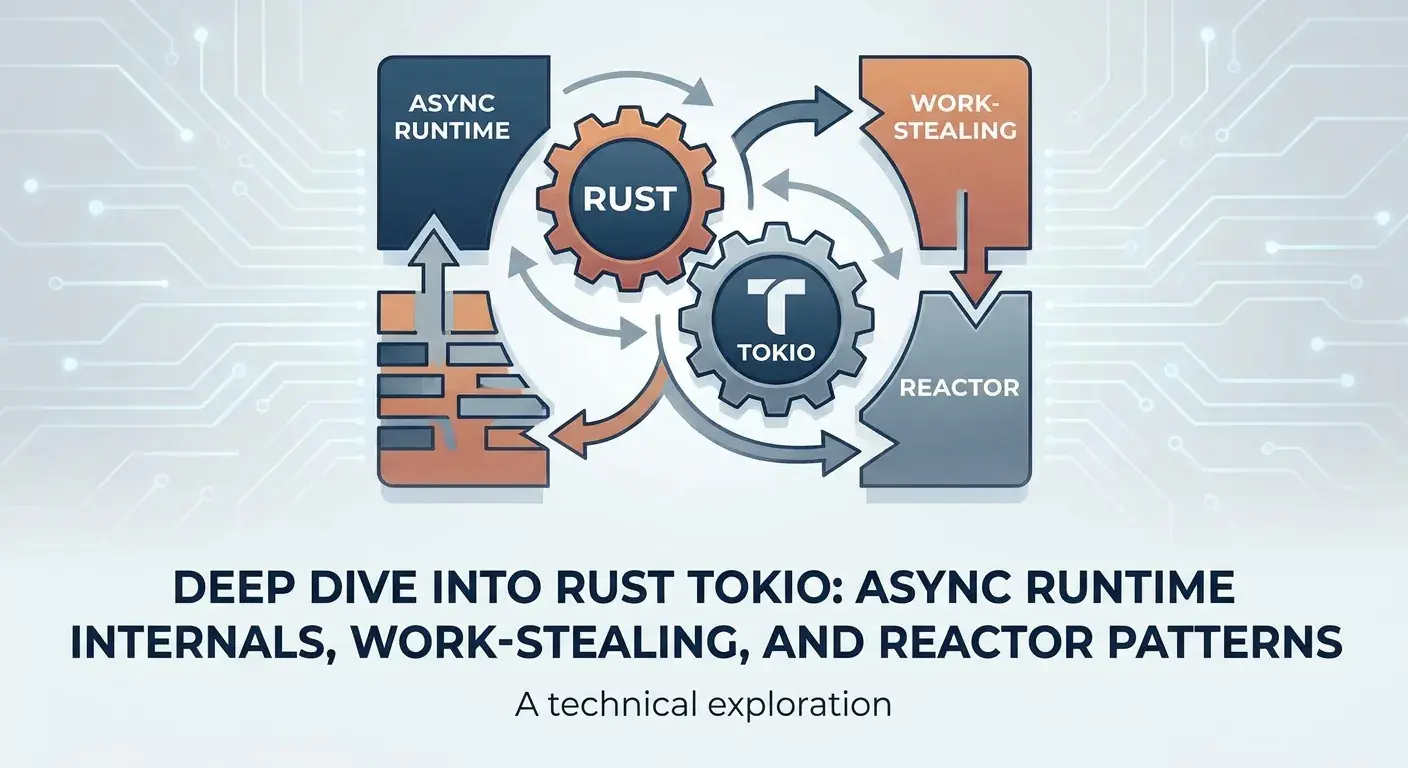
Tokio's architecture can be conceptually broken down into three primary components that work in concert:
- The Scheduler (Worker Threads): This is the brain that decides which
Futuretopollnext. Tokio typically runs a multi-threaded scheduler where each thread acts as a worker. - The Reactor (I/O Driver): This component interacts with the operating system's event notification facilities (like
epollon Linux,kqueueon macOS/FreeBSD, orIOCPon Windows). It monitors registered I/O resources (sockets, files) for readiness events (e.g., data available to read, socket ready to write). - The Timer: A specialized component for handling time-based events, such as
tokio::time::sleepor timeouts. It ensures futures waiting for a specific duration are woken up at the correct time.
These components are integrated into a single runtime that you initialize using #[tokio::main] or tokio::runtime::Runtime::new().
The MPSC Work-Stealing Scheduler
Tokio's default scheduler is a sophisticated multi-threaded, work-stealing design. This design is crucial for achieving high throughput and low latency in concurrent applications.
How it Works
Each worker thread in the Tokio runtime has its own local run queue, which is typically implemented as a lock-free deque (double-ended queue). When a task is spawned (tokio::spawn), it is initially pushed onto the current worker's local run queue.
Workers prioritize tasks from their local queue. When a task completes or yields (Poll::Pending), the worker picks the next task from its local queue. If a Waker for a task is invoked, indicating it's ready to be polled again, it's typically pushed back onto the local queue of the thread that owns it.
In addition to local queues, there's a global injection queue. Tasks that are spawned from outside the runtime (e.g., from a non-Tokio thread) or tasks that are explicitly spawned from within a tokio::task::spawn_blocking context are placed into this global queue. Worker threads will periodically check this global queue if their local queue is empty.
Work-Stealing Mechanism
The "work-stealing" aspect comes into play when a worker thread's local queue becomes empty. Instead of idling, an idle worker will attempt to "steal" tasks from the end of another busy worker's local queue. This is a highly effective load-balancing mechanism:
- Efficiency: Stealing from the end of a deque minimizes contention with the owner thread, which typically pops from the front.
- Load Balancing: Ensures that CPU resources are fully utilized, preventing some threads from being idle while others are overloaded.
- Locality: Tasks tend to stay on the same thread, benefiting from CPU cache locality, until stealing is necessary.
This design minimizes overhead, reduces latency, and maximizes throughput, making Tokio exceptionally good at managing a large number of concurrent, short-lived tasks.
Example: Spawning Tasks
use tokio::task;

#[tokio::main]
async fn main() {
    println!("Main task started.");

    // Spawn multiple tasks
    let handles: Vec<_> = (0..5).map(|i| {
        task::spawn(async move {
            // Simulate some asynchronous work
            tokio::time::sleep(tokio::time::Duration::from_millis(100 * i)).await;
            println!("Task {} completed.", i);
            format!("Result from task {}", i)
        })
    }).collect();

    // Await all spawned tasks to complete
    for handle in handles {
        let result = handle.await.expect("Task panicked");
        println!("Received: {}", result);
    }

    println!("All tasks finished.");
}
When this code runs, Tokio's scheduler will distribute these 5 tasks across its worker threads. The work-stealing mechanism ensures that if one thread finishes its initial tasks quickly, it can pick up tasks from other busy threads, leading to efficient parallel execution.
The Reactor Pattern and Asynchronous I/O
The Reactor is the component responsible for driving asynchronous I/O. It's an implementation of the Reactor design pattern, a key element in event-driven programming.
Event-Driven I/O
Traditional blocking I/O operations (like read() or write() on a socket) halt the entire thread until the operation completes. In an asynchronous context, this is unacceptable as it would block the executor and prevent other tasks from making progress.
Instead, asynchronous I/O relies on non-blocking operations and an event loop. When an application wants to read from a socket, it issues a non-blocking read call. If data isn't immediately available, the operation returns WouldBlock. The application then registers its interest in that socket with the Reactor.
Tokio's Reactor Implementation
Tokio's Reactor (often referred to as the I/O driver) leverages the most efficient event notification APIs provided by the operating system:
- Linux:
epoll - macOS/FreeBSD:
kqueue - Windows:
IOCP(I/O Completion Ports)
These APIs allow the Reactor to monitor thousands of I/O resources (file descriptors, sockets) efficiently. Instead of constantly checking each resource, the OS notifies the Reactor when an event occurs (e.g., a socket becomes readable or writable).
When a Tokio TcpStream (or any tokio::io type) is used, it internally registers itself with the thread's Reactor. When an async read() operation is called on it and data isn't ready, the future yields Poll::Pending. The Reactor then waits for the OS to signal that the socket is ready. Once the event occurs, the Reactor receives the notification, finds the corresponding Waker, and wakes up the task, pushing it back onto the scheduler's run queue for polling.
The driver Concept
Each worker thread in a multi-threaded Tokio runtime has its own Reactor instance (its I/O driver). This means I/O events are typically handled on the same thread that registered the I/O operation, further enhancing cache locality and reducing context switching overhead. The tokio::runtime::Builder::threaded_scheduler() creates a runtime where each worker thread runs both the scheduler and its own I/O driver.
Example: Asynchronous TCP Connection
use tokio::io::{AsyncReadExt, AsyncWriteExt};
use tokio::net::TcpStream;

#[tokio::main]
async fn main() -> Result<(), Box<dyn std::error::Error>> {
    println!("Attempting to connect to example.com:80");

    // Connect to a remote server asynchronously
    let mut stream = TcpStream::connect("example.com:80").await?;
    println!("Connected to example.com:80");

    // Send an HTTP GET request
    let request = b"GET / HTTP/1.1\r\nHost: example.com\r\nConnection: close\r\n\r\n";
    stream.write_all(request).await?;
    println!("Sent HTTP GET request.");

    // Read the response
    let mut buffer = vec![0; 1024];
    let bytes_read = stream.read(&mut buffer).await?;
    println!("Received {} bytes:", bytes_read);
    println!("{}", String::from_utf8_lossy(&buffer[..bytes_read]));

    Ok(())
}
In this example, TcpStream::connect, stream.write_all, and stream.read are all async operations. When connect is called, it registers interest with the Reactor. While the connection is being established, the worker thread can execute other tasks. Once the TCP handshake completes, the Reactor notifies the corresponding task, which is then re-polled to continue.
Task Spawning and Execution
Tokio's tokio::spawn function is the primary way to execute a Future concurrently on the runtime. When you call tokio::spawn(my_future), here's a simplified view of what happens:
- Task Creation:
my_futureis wrapped into aTaskobject, which essentially packages theFuturealong with itsWakerand other metadata needed by the scheduler. - Scheduling: The
Taskis then pushed onto the current worker thread's local run queue (or the global queue if no worker is active or it's from aspawn_blockingcontext). - Polling Loop: The worker thread, as part of its event loop, continuously pulls tasks from its run queue. For each
Task, it calls itspollmethod. Poll::Pending: IfpollreturnsPending, the task is temporarily suspended. TheWakerassociated with this task is stored by theFuture(e.g., by the Reactor for I/O, or by a timer forsleep). The task is removed from the run queue.WakerNotification: When an event occurs (I/O completion, timer expiration, channel message), the storedWakeris used to notify the scheduler. This typically involves pushing theTaskback onto a run queue.Poll::Ready: IfpollreturnsReady, the task has completed. Its resources are cleaned up, and its result is made available (e.g., through theJoinHandlereturned bytokio::spawn).
This cycle of spawning, polling, suspending, waking, and completing tasks is the fundamental loop of any asynchronous runtime.
Handling Blocking Operations with spawn_blocking
One of the most critical rules in async programming is: never block the async runtime. Blocking operations (like CPU-intensive computations, synchronous file I/O, or calling std::thread::sleep) will prevent the worker thread from polling other futures, effectively starving the runtime and negating the benefits of asynchronicity.
Tokio provides a solution for this: tokio::task::spawn_blocking.
Why spawn_blocking?
spawn_blocking moves the provided closure (which is allowed to contain blocking code) to a separate, dedicated thread pool managed by Tokio. This pool is distinct from the main async worker pool. When you call spawn_blocking, Tokio takes the blocking task, executes it on one of these dedicated threads, and returns a JoinHandle immediately. The async worker thread can then continue polling other futures.
Once the blocking operation completes on its dedicated thread, its result is sent back to the original JoinHandle, which then wakes up the async task that was awaiting it.
When to Use It
Use spawn_blocking for:
- CPU-bound computations: Heavy calculations that don't involve I/O but consume significant CPU cycles.
- Synchronous file I/O: Operations using
std::fs. - Calls to blocking third-party libraries: Crate functions that are not async-aware.
std::thread::sleep: If you absolutely need to pause a thread, use this inspawn_blocking(thoughtokio::time::sleepis preferred for async contexts).
Example: CPU-Bound Task
use tokio::task;
use tokio::time::{self, Duration};

async fn cpu_intensive_task(id: usize) -> u64 {
    println!("Task {}: Starting CPU-intensive work.", id);
    // Simulate a long-running, CPU-bound calculation
    let mut result = 0;
    for i in 0..1_000_000_000 {
        result = result.wrapping_add(i);
    }
    println!("Task {}: Finished CPU-intensive work.", id);
    result
}

#[tokio::main]
async fn main() {
    println!("Main: Starting.");

    // Spawn an async task that does some non-blocking work
    let non_blocking_handle = task::spawn(async {
        for i in 0..3 {
            tokio::time::sleep(Duration::from_millis(500)).await;
            println!("Non-blocking task: Iteration {}", i);
        }
        "Non-blocking work done!"
    });

    // Spawn a blocking task using spawn_blocking
    let blocking_handle = task::spawn_blocking(move || {
        // This closure will run on a dedicated blocking thread
        cpu_intensive_task(101) // Call the CPU-intensive function
    });

    // We can await both, and the non-blocking task won't be blocked by the CPU-intensive one
    let non_blocking_result = non_blocking_handle.await.expect("Non-blocking task failed");
    let blocking_result = blocking_handle.await.expect("Blocking task failed");

    println!("Main: Non-blocking result: {}", non_blocking_result);
    println!("Main: Blocking result: {}", blocking_result);
    println!("Main: Finished.");
}
In this example, cpu_intensive_task is called within spawn_blocking. While it's running, the non_blocking_handle continues to execute its tokio::time::sleep calls, demonstrating that the main async runtime thread is not blocked.
Building a Concurrent Echo Server with Tokio
Let's put some of these concepts together by building a simple, concurrent TCP echo server. This server will listen for incoming connections, and for each connection, it will echo back any data it receives.
use tokio::io::{self, AsyncReadExt, AsyncWriteExt};
use tokio::net::TcpListener;

#[tokio::main]
async fn main() -> io::Result<()> {
    let listener = TcpListener::bind("127.0.0.1:8080").await?;
    println!("Echo server listening on 127.0.0.1:8080");

    loop {
        let (mut socket, addr) = listener.accept().await?;
        println!("Accepted connection from: {}", addr);

        tokio::spawn(async move {
            let mut buf = vec![0; 1024];
            loop {
                match socket.read(&mut buf).await {
                    // Return value of `Ok(0)` signifies that the remote has closed
                    Ok(0) => {
                        println!("Client {} disconnected.", addr);
                        return;
                    }
                    Ok(n) => {
                        // Write the data back
                        if socket.write_all(&buf[..n]).await.is_err() {
                            // We encountered an error while writing, likely a disconnected client
                            println!("Error writing to client {}: connection reset.", addr);
                            return;
                        }
                        println!("Echoed {} bytes to {}.", n, addr);
                    }
                    Err(e) => {
                        eprintln!("Error reading from client {}: {}", addr, e);
                        return;
                    }
                }
            }
        });
    }
}
How it works:
TcpListener::bind("127.0.0.1:8080").await?: Binds to the specified address. This is anasyncoperation that registers the listener socket with the Tokio Reactor.listener.accept().await?: Waits for an incoming connection. When a client connects, the Reactor notifies this task, andacceptreturns aTcpStreamand the client's address. Thisawaitpoint allows other tasks to run while waiting for connections.tokio::spawn(async move { ... });: Crucially, for each new client connection, we spawn a new asynchronous task. This task will handle all communication with that specific client.- Inside the spawned task,
socket.read(&mut buf).awaitandsocket.write_all(&buf[..n]).awaitare non-blocking I/O operations. While one client's task is waiting for data, thetokio::spawnallows the main loop toacceptnew clients, and other client tasks can continue reading/writing. This demonstrates Tokio's ability to handle many concurrent connections with a small number of underlying OS threads.
Best Practices for Robust Tokio Applications
Building high-performance and reliable async applications with Tokio requires adhering to certain best practices:
1. Embrace Structured Concurrency
Avoid tokio::spawning tasks haphazardly without a plan for their lifecycle. Use tools like tokio::join!, tokio::select!, and tokio::task::JoinHandle to manage the relationships between tasks. Ensure parent tasks await or handle the completion/failure of their children to prevent orphaned tasks or resource leaks.
2. Handle Errors Gracefully
Asynchronous code can fail in various ways (network errors, task panics). Always use Result and the ? operator. For spawned tasks, the JoinHandle::await method returns a Result<T, JoinError>, where JoinError indicates if the task panicked. Implement robust error propagation and logging.
3. Graceful Shutdown
When your application needs to shut down, you should ideally allow ongoing operations to complete or be gracefully canceled. Tokio provides mechanisms like tokio::signal::ctrl_c() or tokio::signal::unix::signal() for trapping OS signals, which can then be used to signal tasks to shut down (e.g., via tokio::sync::broadcast channels or tokio::select! with a shutdown future).
4. Resource Management
Ensure that resources (sockets, files, database connections) are properly closed or dropped when tasks complete or are canceled. Rust's ownership system and Drop trait help with this, but be mindful in complex async scenarios.
5. Avoid block_on in Async Contexts
Never call tokio::runtime::Handle::block_on or tokio::runtime::Runtime::block_on from within an async function or a spawned task. This will block the current worker thread, defeating the purpose of asynchronicity. Use await for async operations and tokio::task::spawn_blocking for truly blocking code.
6. Monitor and Observe
Integrate logging (tracing crate is highly recommended for async Rust) and metrics (metrics crate) into your application. Understanding how your tasks are performing, how long I/O operations take, and identifying bottlenecks is critical for debugging and optimization.
Common Pitfalls and How to Avoid Them
Even with best practices, certain pitfalls are common when working with Tokio:
1. Blocking the Runtime (The Most Common Mistake)
As discussed, any synchronous, long-running operation will starve the runtime. This includes std::fs::read_to_string, std::thread::sleep, or any CPU-bound loop without await points. Always use tokio::fs, tokio::time::sleep, or tokio::task::spawn_blocking respectively.
2. Excessive Task Spawning
While spawning tasks is cheap, spawning millions of very short-lived tasks can introduce overhead from scheduling and context switching. If you have a large number of very small, independent computations, consider batching them or using a different concurrency model if appropriate. For I/O tasks, tokio::spawn is usually fine.
3. Deadlocks with std::sync::Mutex in Async Code
Using std::sync::Mutex within an async function can easily lead to deadlocks. If a task acquires a std::sync::Mutex lock and then awaits an operation, it will hold the lock while yielding control to the scheduler. If another task tries to acquire the same mutex, it will block, and if that blocking happens on the same worker thread, it's a deadlock. Always use tokio::sync::Mutex for synchronization in async contexts, as it's async-aware and will yield instead of blocking.
4. Not Handling JoinHandle Errors
Forgetting to await or handle the Result of a JoinHandle can lead to silent panics in spawned tasks that go unnoticed until your application behaves unexpectedly or crashes later. Always await your JoinHandles or at least log their errors.
// Pitfall: Unhandled task panic
tokio::spawn(async {
    panic!("Oh no, I crashed!");
});
// The panic is not seen by main, unless we awaited the handle.

// Correct approach:
let handle = tokio::spawn(async {
    panic!("Oh no, I crashed!");
});
if let Err(e) = handle.await {
    eprintln!("Task panicked: {:?}", e);
}
Real-World Use Cases
Tokio's robust and high-performance nature makes it suitable for a wide array of real-world applications:
- High-performance Web Servers and APIs: Frameworks like Axum and Warp are built on Tokio, enabling them to handle thousands of concurrent requests.
- Network Proxies and Load Balancers: Due to its efficient I/O handling, Tokio is excellent for building network infrastructure that processes large volumes of network traffic.
- IoT and Embedded Systems: Its low-resource overhead and control over concurrency make it a good fit for connected devices.
- Data Streaming and Processing: Applications that need to process continuous streams of data from various sources (e.g., Kafka consumers, log processors).
- RPC Frameworks: Building efficient inter-service communication layers.
Conclusion
Tokio is a powerhouse for asynchronous programming in Rust, providing a meticulously engineered runtime that balances performance, concurrency, and developer ergonomics. By understanding its internals – the clever work-stealing scheduler distributing tasks, and the efficient Reactor driving I/O – you gain a deeper appreciation for how your async code translates into highly concurrent and responsive applications.
Mastering these concepts will empower you to write more efficient, debuggable, and scalable Rust services. Continue to experiment with Tokio's rich set of features, delve into its documentation, and apply these best practices to build the next generation of high-performance systems.
Enjoyed this deep dive? Buy me a coffee!
Every article on CodeWithYoha is 100% free, independent, and sponsor-free. If this guide saved you hours of debugging or helped you architect better software, consider supporting future guides with a coffee ($5, $10, or any amount of your choice).
Written by
CodewithYohaFull-Stack Software Engineer with 7+ years of experience in Java, Spring Boot, and cloud architecture across AWS, Azure, and GCP. Writing production-grade engineering patterns for developers who ship real software.