Introduction
The landscape of Artificial Intelligence is rapidly evolving, moving beyond centralized data centers to the very edge of the network. While traditional cloud-based AI offers immense power, it often comes with inherent challenges: high latency, significant bandwidth consumption, data privacy concerns, and increased operational costs, especially for real-time applications. Imagine a scenario where an IoT device needs instant anomaly detection or a web application requires real-time content moderation without sending sensitive data halfway across the globe.
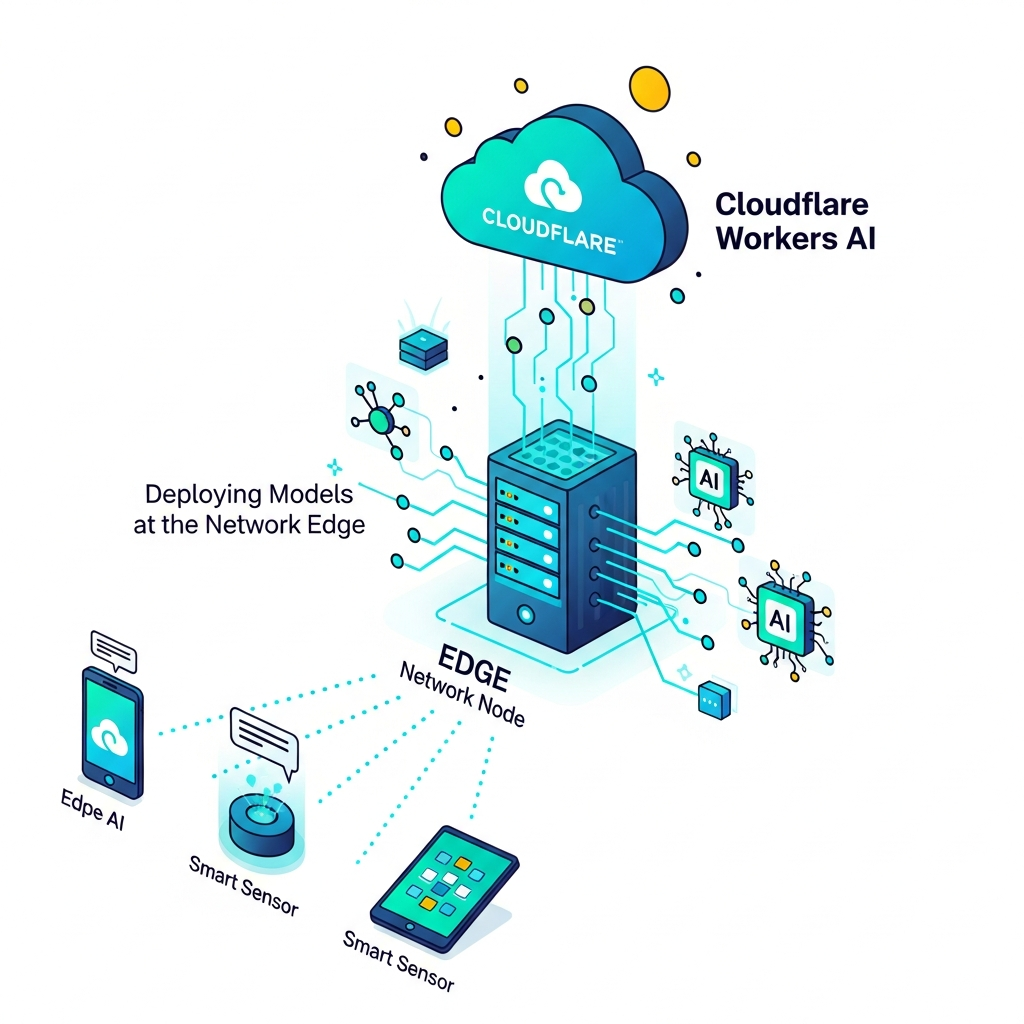
Enter Edge AI. This paradigm shifts AI inference closer to the data source, enabling faster responses, reduced network load, enhanced privacy, and greater resilience. Cloudflare, with its expansive global network spanning hundreds of cities, is uniquely positioned to revolutionize this space. Their Workers AI platform brings powerful machine learning models directly to the network edge, allowing developers to deploy AI inference tasks with unprecedented speed and simplicity.
This comprehensive guide will dive deep into Cloudflare Workers AI, exploring its architecture, demonstrating practical model deployment, outlining best practices, and showcasing real-world use cases. By the end of this article, you'll have a solid understanding of how to leverage Cloudflare's edge to build lightning-fast, privacy-preserving AI applications.
Prerequisites
To follow along with the examples and truly grasp the power of Cloudflare Workers AI, you'll need the following:
- A Cloudflare Account: Essential for deploying Workers and accessing Workers AI.
- Basic JavaScript/TypeScript Knowledge: Cloudflare Workers are primarily written in JavaScript or TypeScript.
wranglerCLI Installed: Cloudflare's command-line tool for developing and deploying Workers.- Install via npm:
npm install -g wrangler
- Install via npm:
- Familiarity with Serverless Concepts: Understanding event-driven functions and stateless execution will be beneficial.
- Node.js: Required for
wranglerand local development.
1. Understanding Edge AI and Its Benefits
Edge AI refers to the deployment of AI algorithms and machine learning models on edge devices or at the network edge, close to where data is generated. Instead of sending all raw data to a centralized cloud for processing, inference happens locally, dramatically altering the performance and economics of AI applications.
Why Edge AI Matters:
- Low Latency: Processing data closer to the source eliminates the round-trip delay to a distant cloud server, crucial for real-time applications like autonomous vehicles, industrial automation, or interactive user experiences.
- Reduced Bandwidth: Only processed insights or aggregated data need to be sent to the cloud, significantly cutting down on network traffic and associated costs.
- Enhanced Privacy and Security: Sensitive data can be processed and analyzed locally without ever leaving the device or the local network, complying with stricter data privacy regulations (e.g., GDPR, CCPA).
- Offline Capabilities: Edge AI applications can continue to function even without a persistent internet connection, making them robust for remote or intermittently connected environments.
- Cost Efficiency: By reducing data transfer and cloud compute time, edge AI can lead to substantial cost savings, especially at scale.
- Scalability: Distributing inference tasks across many edge locations can enhance overall system scalability and resilience.
2. Introducing Cloudflare Workers AI
Cloudflare Workers AI is a groundbreaking platform that allows developers to run AI inference models directly on Cloudflare's global network of over 300 data centers. It leverages the same serverless technology that powers Cloudflare Workers, bringing AI capabilities within milliseconds of billions of internet users.
How Cloudflare Workers AI Works:
Cloudflare Workers AI provides access to a catalog of pre-trained, open-source machine learning models (e.g., Llama 2, Stable Diffusion, Whisper, various embeddings models) that are optimized to run on Cloudflare's infrastructure. When a Worker makes a request to an AI model, Cloudflare intelligently routes that request to the nearest available GPU or CPU capable of running the model, minimizing latency.
Key Features:
- Global Distribution: Models are deployed across Cloudflare's vast network, ensuring low latency for users worldwide.
- Pay-per-use: You only pay for the inference requests you make, eliminating the need to provision or manage expensive GPU infrastructure.
- Simplified Deployment: Integrate AI models into your serverless Workers with just a few lines of JavaScript.
- Wide Model Support: Access to a growing library of models for text generation, embeddings, image classification, speech-to-text, and more.
- No Cold Starts (effectively): Cloudflare's architecture ensures that models are always ready to serve requests, avoiding the cold start issues common in many serverless AI platforms.
3. Setting Up Your Cloudflare Workers AI Environment
Before we deploy our first AI model, let's set up the development environment.
Step 1: Create a Cloudflare Account
If you don't have one, sign up at Cloudflare. Ensure you have a domain added to your account, even if you're just testing.
Step 2: Install wrangler
wrangler is the Cloudflare Workers CLI. Open your terminal and run:
npm install -g wranglerStep 3: Log in to Cloudflare with wrangler
wrangler loginThis command will open a browser window to authenticate your wrangler CLI with your Cloudflare account.
Step 4: Create a New Worker Project
Now, let's create a new Worker project. This will set up a basic Worker with a wrangler.toml configuration file.
wrangler init my-edge-ai-worker --ts
cd my-edge-ai-worker
This command initializes a new TypeScript Worker project named my-edge-ai-worker.
Step 5: Configure wrangler.toml for Workers AI
Open the wrangler.toml file in your project. You'll need to enable the AI bindings. Add the following to your wrangler.toml:
name = "my-edge-ai-worker"
main = "src/index.ts"
compatibility_date = "2024-01-01"

[ai]
binding = "AI"
The [ai] section with binding = "AI" exposes the AI client as env.AI (or c.env.AI in Hono) within your Worker code, allowing you to interact with the Workers AI platform.
4. Your First Edge AI Model: Text Generation
Let's start with a simple text generation task using a large language model (LLM) available through Workers AI. We'll deploy a Worker that takes a prompt and returns a generated response.
Open src/index.ts (or src/index.js if you didn't use --ts) and replace its content with the following:
import { Hono } from 'hono';
import { Env } from './types'; // Assuming you create a types.ts for Env

const app = new Hono<Env>();

app.get('/', (c) => {
  return c.text('Hello from Cloudflare Workers AI! Send a POST request to /generate with a prompt.');
});

app.post('/generate', async (c) => {
  try {
    const { prompt } = await c.req.json();

    if (!prompt) {
      return c.json({ error: 'Prompt is required' }, 400);
    }

    // Access the AI binding from the environment
    const ai = c.env.AI;

    // Run the text generation model
    const response = await ai.run(
      '@cf/meta/llama-2-7b-chat-int8',
      {
        prompt: prompt,
        max_tokens: 256,
      }
    );

    return c.json({ generated_text: response.response });
  } catch (error) {
    console.error('Error generating text:', error);
    return c.json({ error: 'Failed to generate text' }, 500);
  }
});

export default app;
And for src/types.ts (create this file if it doesn't exist):
import { Ai } from '@cloudflare/ai';

export type Env = {
  AI: Ai;
};
To deploy this Worker:
wrangler deployAfter deployment, wrangler will give you the URL of your Worker. You can test it with curl:
curl -X POST <YOUR_WORKER_URL>/generate \
  -H "Content-Type: application/json" \
  -d '{"prompt": "What is the capital of France?"}'
You should receive a JSON response containing the generated text, all processed at the edge!
5. Leveraging Embeddings for Semantic Search
Embeddings are numerical representations of text, images, or other data, capturing their semantic meaning. Models like text-embedding-ada-002 (OpenAI) or open-source alternatives available on Workers AI (e.g., bge-small-en-v1.5) can convert text into high-dimensional vectors. These vectors can then be used for tasks like semantic search, recommendation systems, or clustering.
Let's create a Worker endpoint that generates embeddings for a given text.
Modify your src/index.ts to add a new route:
// ... (previous imports and app setup)

app.post('/embed', async (c) => {
  try {
    const { text } = await c.req.json();

    if (!text || !Array.isArray(text) || text.length === 0) {
      return c.json({ error: 'An array of text strings is required' }, 400);
    }

    const ai = c.env.AI;

    // Use a text embedding model
    const embeddingsResponse = await ai.run(
      '@cf/baai/bge-small-en-v1.5',
      { text: text }
    );

    return c.json({ embeddings: embeddingsResponse.data });
  } catch (error) {
    console.error('Error generating embeddings:', error);
    return c.json({ error: 'Failed to generate embeddings' }, 500);
  }
});

// ... (export default app)
Deploy again with wrangler deploy and test with curl:
curl -X POST <YOUR_WORKER_URL>/embed \
  -H "Content-Type: application/json" \
  -d '{"text": ["hello world", "Cloudflare Workers AI is awesome"]}'
This will return an array of embedding vectors for each input text. You could then store these in a vector database (like Pinecone, Weaviate, or even Cloudflare D1 with a vector extension) and perform similarity searches.
6. Image Classification at the Edge
Workers AI also supports vision models, allowing for tasks like image classification. For this, you'll typically send image data (e.g., base64 encoded) to your Worker.
Let's add an image classification endpoint. Note that handling large base64 strings directly in the request body might hit Worker limits or be inefficient for very large images. For production, consider uploading images to R2 and passing a URL, or using a more optimized binary transfer.
Add this to your src/index.ts:
// ... (previous imports and app setup)

app.post('/classify-image', async (c) => {
  try {
    const { image } = await c.req.json(); // 'image' is expected to be a base64 string

    if (!image) {
      return c.json({ error: 'Base64 image string is required' }, 400);
    }

    const ai = c.env.AI;

    // Decode base64 image to Uint8Array
    const imageBytes = Uint8Array.from(atob(image), c => c.charCodeAt(0));

    // Use an image classification model
    const classification = await ai.run(
      '@cf/microsoft/resnet-50',
      { image: imageBytes }
    );

    return c.json({ classification: classification });
  } catch (error) {
    console.error('Error classifying image:', error);
    return c.json({ error: 'Failed to classify image' }, 500);
  }
});

// ... (export default app)
Note on atob: atob is typically available in browser environments. For Workers, ensure your environment supports it or use a polyfill/alternative for base64 decoding if needed (though Workers generally support it).
To test, you'd need to base64 encode an image. For example, using a small PNG or JPG:
# Example of how to base64 encode an image on Linux/macOS
# Replace 'my-image.jpg' with your image file
IMAGE_BASE64=$(base64 my-image.jpg)

curl -X POST <YOUR_WORKER_URL>/classify-image \
  -H "Content-Type: application/json" \
  -d "{\"image\": \"$IMAGE_BASE64\"}"
The response will contain predicted labels and scores for the image.
7. Integrating with Cloudflare KV for State Management
Cloudflare Workers KV (Key-Value) is a globally distributed, eventually consistent key-value store that's perfect for storing small pieces of data at the edge. It can be incredibly useful for Edge AI applications for caching model responses, storing user-specific AI preferences, or managing rate limits.
Let's enhance our text generation worker to cache recent prompts and their responses in KV.
Step 1: Create a KV Namespace
wrangler kv namespace create "AI_CACHE"This command will output an ID and a preview ID. Add the ID to your wrangler.toml under a [vars] or [kv_namespaces] section (preferably kv_namespaces):
# ... (existing wrangler.toml content)

[[kv_namespaces]]
binding = "AI_CACHE"
id = "<YOUR_KV_NAMESPACE_ID>"
Also, update src/types.ts to include the KV binding:
import { Ai } from '@cloudflare/ai';

export type Env = {
  AI: Ai;
  AI_CACHE: KVNamespace; // Add this line
};
Step 2: Modify the Worker to Use KV for Caching
Update the /generate route in src/index.ts:
// ... (previous imports and app setup)

app.post('/generate', async (c) => {
  try {
    const { prompt } = await c.req.json();

    if (!prompt) {
      return c.json({ error: 'Prompt is required' }, 400);
    }

    const ai = c.env.AI;
    const cache = c.env.AI_CACHE; // Access KV binding

    // Try to get response from cache first
    const cachedResponse = await cache.get(prompt);
    if (cachedResponse) {
      console.log('Serving from KV cache!');
      return c.json({ generated_text: cachedResponse, from_cache: true });
    }

    // If not in cache, run the model
    const response = await ai.run(
      '@cf/meta/llama-2-7b-chat-int8',
      {
        prompt: prompt,
        max_tokens: 256,
      }
    );

    const generatedText = response.response;

    // Store response in cache (e.g., for 1 hour = 3600 seconds)
    await cache.put(prompt, generatedText, { expirationTtl: 3600 });

    return c.json({ generated_text: generatedText, from_cache: false });
  } catch (error) {
    console.error('Error generating text:', error);
    return c.json({ error: 'Failed to generate text' }, 500);
  }
});

// ... (export default app)
Deploy with wrangler deploy. Now, repeated requests with the same prompt will be served instantly from KV, reducing AI inference costs and latency.
8. Advanced Model Deployment and Customization
Cloudflare Workers AI offers flexibility in how you interact with models. The ai.run() method accepts various parameters depending on the model type.
Model Parameters:
- Text Generation:
prompt,max_tokens,temperature,top_p,top_k,stream(for streaming responses). - Embeddings:
text(array of strings). - Image Classification:
image(Uint8Array). - Speech-to-Text:
audio(Uint8Array).
You can find the full list of supported models and their specific parameters in the Cloudflare Workers AI documentation.
Example: Streaming Text Generation
For chat applications, streaming responses are crucial. Workers AI supports this for certain models.
// ... (previous imports and app setup)

app.post('/generate-stream', async (c) => {
  try {
    const { prompt } = await c.req.json();

    if (!prompt) {
      return c.json({ error: 'Prompt is required' }, 400);
    }

    const ai = c.env.AI;

    const response = await ai.run(
      '@cf/meta/llama-2-7b-chat-int8',
      {
        prompt: prompt,
        max_tokens: 256,
        stream: true, // Enable streaming
      }
    );

    // Return a streaming response
    return new Response(response as ReadableStream, {
      headers: { 'Content-Type': 'text/event-stream' },
    });
  } catch (error) {
    console.error('Error generating streaming text:', error);
    return c.json({ error: 'Failed to generate streaming text' }, 500);
  }
});

// ... (export default app)
This endpoint will return a text/event-stream response, allowing clients to receive tokens as they are generated, providing a much better user experience for LLM interactions.
9. Real-World Use Cases for Edge AI with Workers AI
Cloudflare Workers AI unlocks a plethora of possibilities across various industries:
- Content Moderation: Instantly detect and filter inappropriate text or images uploaded by users, preventing harmful content from reaching your platform. This can be done before content even hits your origin server.
- Personalized Recommendations: Generate real-time product or content recommendations based on user behavior and preferences, without sending all user interaction data to a central processing unit.
- Real-time Data Processing (IoT): Process sensor data from IoT devices (e.g., temperature, pressure, movement) at the edge to detect anomalies or trigger alerts immediately, reducing reliance on cloud connectivity.
- Interactive Chatbots and Virtual Assistants: Power conversational AI experiences with ultra-low latency, making interactions feel more natural and responsive.
- Dynamic Content Generation: Create personalized headlines, ad copy, or social media posts on the fly, tailored to individual user segments or real-time events.
- Fraud Detection: Analyze transaction patterns or user login attempts at the edge to identify and flag suspicious activities in real-time, minimizing financial losses.
- Image Tagging and Search: Automatically tag uploaded images with relevant keywords or classify them into categories, making them searchable and manageable.
- Speech-to-Text Transcription: Transcribe short audio clips (e.g., voice commands, short voicemails) at the edge for immediate processing.
10. Performance Optimization and Monitoring
While Cloudflare Workers AI handles much of the heavy lifting for performance, there are still strategies you can employ:
- Caching: As demonstrated with KV, caching frequent AI responses can drastically reduce latency and cost. Utilize Cloudflare's built-in Cache API for HTTP responses or Workers KV for specific data.
- Batching Requests: If your application allows, batching multiple inference requests into a single call can be more efficient than many individual calls, especially for embedding generation.
- Choosing the Right Model: Select the smallest model that meets your accuracy requirements. Larger models consume more resources and might have slightly higher latency.
- Asynchronous Processing: For tasks that don't require an immediate response (e.g., background image processing), offload them using Durable Objects or other asynchronous patterns to avoid blocking the main request thread.
- Minimize Worker Size: Keep your Worker code lean. Smaller Workers load and execute faster.
- Monitoring: Cloudflare provides extensive analytics for Workers, including execution time, CPU time, and invocations. Monitor these metrics to identify bottlenecks and optimize your AI workloads.
11. Security and Privacy Considerations
Edge AI inherently offers advantages for privacy and security, but careful implementation is still key.
- Data Residency: By processing data at the edge, you can ensure that sensitive information remains within specific geographic regions, helping with GDPR, CCPA, and other compliance requirements.
- Input/Output Sanitization: Always validate and sanitize user inputs before passing them to AI models to prevent injection attacks or unexpected model behavior. Similarly, sanitize model outputs before displaying them to users.
- Authentication and Authorization: Implement robust authentication for your Workers endpoints. Use Cloudflare Access, API keys, JWTs, or other methods to ensure only authorized clients can trigger your AI inference tasks.
- Cloudflare's Built-in Security: Leverage Cloudflare's WAF, DDoS protection, and bot management, which automatically protect your Workers from common web threats.
- Rate Limiting: Implement rate limiting on your AI endpoints to prevent abuse and control costs. Cloudflare's rate limiting features can be configured at the edge.
12. Common Pitfalls and How to Avoid Them
Even with a powerful platform like Workers AI, developers can encounter common issues:
- Ignoring Rate Limits: Cloudflare Workers AI has usage limits. Hitting these without proper error handling can disrupt your application. Implement retries with exponential backoff and client-side rate limiting.
- Sending Overly Large Payloads: While Workers AI can handle binary data, sending very large images or audio files directly in the request body can be inefficient or hit Worker memory limits. Consider uploading large assets to Cloudflare R2 and passing the R2 URL to your Worker for processing.
- Lack of Error Handling: AI models can fail, return unexpected results, or be unavailable. Always wrap AI calls in
try...catchblocks and provide meaningful error messages or fallback mechanisms. - Not Leveraging Caching: For frequently requested prompts or data, not caching results is a missed opportunity for performance and cost savings.
- Attempting Model Training: Cloudflare Workers AI is designed for inference, not model training. Training models requires significant computational resources typically found in specialized cloud environments.
- Incorrect
wrangler.tomlConfiguration: Forgetting to add the[ai]binding or incorrect KV namespace IDs will lead to runtime errors whereenv.AIorenv.AI_CACHEis undefined. - Synchronous Blocking Operations: While Workers are single-threaded,
awaitallows for asynchronous operations without blocking. Avoid long-running synchronous tasks that can cause CPU time limits to be exceeded.
Best Practices
- Modularize Your Worker: Break down complex AI logic into smaller, testable functions.
- Use TypeScript: Leverage TypeScript for better code maintainability, type safety, and developer experience.
- Utilize Hono or Itty-router: For managing multiple routes and middleware in your Worker, frameworks like Hono or Itty-router simplify development.
- Test Thoroughly: Write unit and integration tests for your Worker logic, including AI model interactions.
- Monitor and Alert: Set up monitoring and alerts for Worker errors, latency, and AI usage to proactively address issues.
- Keep Up-to-Date: Cloudflare Workers AI is evolving rapidly. Regularly check the documentation for new models, features, and best practices.
Conclusion
Cloudflare Workers AI represents a significant leap forward in making AI accessible, performant, and cost-effective at scale. By bringing sophisticated machine learning models to the network edge, developers can build incredibly fast, privacy-conscious applications that were previously challenging or impossible.
From real-time content moderation and personalized recommendations to powering intelligent chatbots and IoT analytics, the possibilities are vast. With its seamless integration into the Cloudflare ecosystem, simplified deployment, and pay-per-use model, Workers AI empowers you to innovate without the overhead of managing complex GPU infrastructure.
The future of AI is distributed, and Cloudflare Workers AI puts you at the forefront of this revolution. Start experimenting today, deploy your first edge AI model, and unlock the true potential of intelligent applications closer to your users than ever before. The edge is now smarter, faster, and more powerful.

Written by
CodewithYohaFull-Stack Software Engineer with 7+ years of experience in Java, Spring Boot, and cloud architecture across AWS, Azure, and GCP. Writing production-grade engineering patterns for developers who ship real software.