Introduction
Node.js has revolutionized server-side JavaScript development by offering a high-performance, non-blocking I/O model. At the heart of this model lies the Event Loop, a seemingly simple concept that is often misunderstood, leading to performance bottlenecks and unexpected behavior in applications. Without a deep understanding of the Event Loop, developers might struggle to write truly efficient, scalable, and robust Node.js applications.
This comprehensive guide will demystify the Node.js Event Loop, exploring its architecture, phases, and the crucial distinction between microtasks and macrotasks. We'll delve into practical examples, common pitfalls, and best practices to help you master asynchronous programming in Node.js, enabling you to build applications that truly leverage its non-blocking power.
Prerequisites
To get the most out of this guide, you should have:
- A foundational understanding of JavaScript, including functions, objects, and basic syntax.
- Familiarity with Node.js and how to run simple scripts.
- A basic grasp of asynchronous concepts like callbacks (though we'll review them).
1. Understanding Asynchronous JavaScript Fundamentals
Before diving into the Event Loop, it's essential to solidify our understanding of asynchronous programming in JavaScript. Traditionally, JavaScript executes code synchronously, one line after another. However, operations like network requests, file I/O, or timers can take an unpredictable amount of time. If these operations blocked the main thread, the application would become unresponsive.
Asynchronous JavaScript allows these long-running operations to run in the background, executing a callback function once they complete, without blocking the main thread. This non-blocking nature is crucial for high-performance servers.
Callbacks
The oldest and most fundamental way to handle asynchronous operations is with callbacks. A callback is simply a function passed as an argument to another function, which is then executed once the asynchronous operation finishes.
// Example: Asynchronous file read using callbacks
const fs = require('fs');

console.log('1. Starting file read...');

fs.readFile('example.txt', 'utf8', (err, data) => {
  if (err) {
    console.error('Error reading file:', err);
    return;
  }
  console.log('3. File content:', data);
});

console.log('2. File read initiated, continuing execution...');
// Output order will be 1, 2, then 3 (after file read completes)
Promises
Callbacks can lead to "callback hell" (deeply nested callbacks) and make error handling difficult. Promises were introduced to address these issues, providing a cleaner way to handle asynchronous operations. A Promise represents the eventual completion (or failure) of an asynchronous operation and its resulting value.
// Example: Asynchronous file read using Promises
const fs = require('fs').promises; // Use the promise-based fs module

console.log('1. Starting file read with Promises...');

fs.readFile('example.txt', 'utf8')
  .then(data => {
    console.log('3. File content (Promise):', data);
  })
  .catch(err => {
    console.error('Error reading file (Promise):', err);
  });

console.log('2. Promise-based file read initiated, continuing execution...');
// Output order will be 1, 2, then 3
Async/Await
async/await is syntactic sugar built on top of Promises, making asynchronous code look and behave more like synchronous code, significantly improving readability and maintainability. An async function implicitly returns a Promise, and the await keyword can only be used inside an async function to pause its execution until the awaited Promise settles.
// Example: Asynchronous file read using async/await
const fs = require('fs').promises;

async function readFileAsync() {
  console.log('1. Starting file read with async/await...');
  try {
    const data = await fs.readFile('example.txt', 'utf8');
    console.log('3. File content (async/await):', data);
  } catch (err) {
    console.error('Error reading file (async/await):', err);
  }
  console.log('4. Async function finished.');
}

readFileAsync();
console.log('2. Async function called, continuing execution...');
// Output order will be 1, 2, then 3, then 4
2. The Node.js Event Loop: Core Architecture
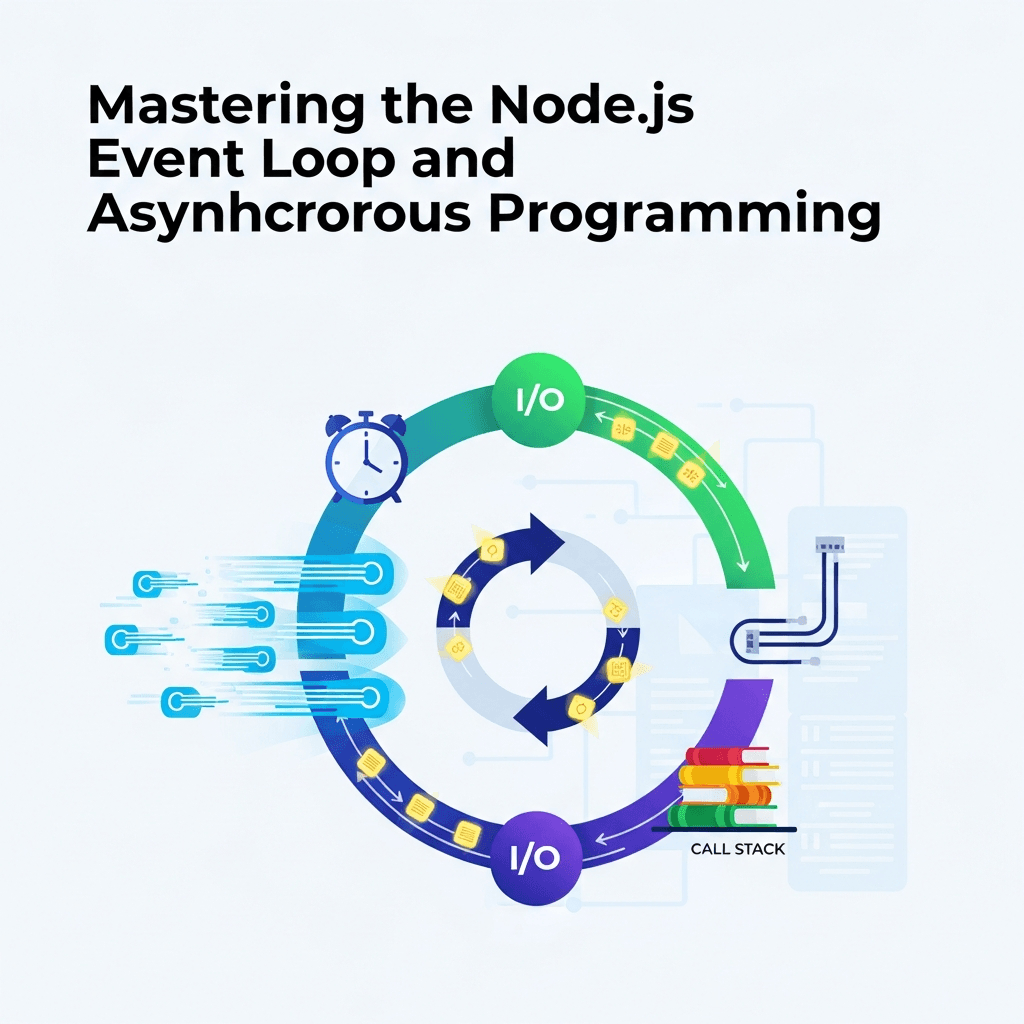
Node.js is often described as "single-threaded," which is true for the JavaScript execution thread. However, this doesn't mean it can only do one thing at a time. Node.js achieves its non-blocking I/O through a combination of the JavaScript Event Loop and a C++ library called Libuv.
Libuv provides cross-platform asynchronous I/O operations, including file system, networking, and timer functionality. It maintains a thread pool (typically 4 threads by default, configurable via UV_THREADPOOL_SIZE) to handle expensive, blocking operations (like heavy file I/O or CPU-bound tasks) off the main JavaScript thread.
The Event Loop is the orchestrator. It continuously checks if the call stack is empty. If it is, it picks up pending tasks (callbacks) from various queues and pushes them onto the call stack for execution. This cycle allows Node.js to handle many concurrent connections without creating a new thread for each, making it highly efficient.
3. Deep Dive into Event Loop Phases (Timers, Pending, Poll)
The Event Loop operates in distinct phases. Each phase has its own queue of callbacks to process. When the Event Loop enters a phase, it executes all callbacks in that phase's queue before moving to the next phase. This cycle repeats as long as there are pending asynchronous operations.
Let's break down the main phases:
a. Timers Phase
This phase executes callbacks scheduled by setTimeout() and setInterval(). These callbacks are executed after a specified minimum delay.
setTimeout(callback, delay): Executes thecallbackonce afterdelaymilliseconds.setInterval(callback, delay): Executes thecallbackrepeatedly everydelaymilliseconds.
It's important to note that the delay is a minimum delay, not a guaranteed execution time. The actual execution might be longer due to other operations blocking the Event Loop.
console.log('Start');

setTimeout(() => {
  console.log('setTimeout callback executed');
}, 0); // Scheduled for the next timers phase

console.log('End');
// Expected output: Start -> End -> setTimeout callback executed
b. Pending Callbacks Phase
This phase executes I/O callbacks that were deferred to the next loop iteration. This primarily includes system-related callbacks, such as TCP errors (e.g., if a TCP socket receives ECONNREFUSED when attempting to connect).
It's less common for application-level code to directly interact with this phase, but it's an essential part of the loop's internal consistency.
c. Poll Phase
This is the most critical phase for most Node.js applications. It has two main functions:
- Calculate how long it should block and poll for I/O: If there are timers scheduled for the future, the poll phase will wait for a short duration until the earliest timer expires.
- Process events in the poll queue: It retrieves new I/O events (e.g., incoming network connections, data from file reads, database results) and executes their respective callbacks. If there are callbacks in the
checkqueue (fromsetImmediate) or if a timer has expired, the poll phase will not block and will immediately move to thecheckphase.
If the poll queue is empty, and there are no setImmediate callbacks to run, the Event Loop will block in the poll phase, waiting for new I/O events to arrive. If there are setImmediate callbacks, it will proceed to the check phase. If there are timers, it will wait for the shortest timer to expire, then process the poll queue, and move to the timers phase.
4. Deep Dive into Event Loop Phases (Check, Close)
Continuing our journey through the Event Loop, let's look at the final two phases.
d. Check Phase
This phase executes callbacks scheduled by setImmediate(). setImmediate() is a special timer that schedules a callback to be executed immediately after the current poll phase completes.
setImmediate() is logically similar to setTimeout(callback, 0), but their execution order differs depending on where they are called and the current Event Loop phase.
- If
setImmediate()andsetTimeout(callback, 0)are called from within an I/O callback,setImmediate()will always execute first. - If they are called from the main module scope, their execution order is non-deterministic and depends on the performance of your system and other tasks.
const fs = require('fs');

console.log('Start of script');

fs.readFile('example.txt', 'utf8', () => {
  console.log('File read callback');

  setImmediate(() => console.log('setImmediate from I/O'));
  setTimeout(() => console.log('setTimeout from I/O'), 0);
});

setImmediate(() => console.log('setImmediate from main'));
setTimeout(() => console.log('setTimeout from main'), 0);

console.log('End of script');

/*
Expected output (illustrative, order of main setImmediate/setTimeout can vary):
Start of script
End of script
setTimeout from main (or setImmediate from main, non-deterministic)
setImmediate from main (or setTimeout from main, non-deterministic)
File read callback
setImmediate from I/O
setTimeout from I/O
*/
e. Close Callbacks Phase
This phase executes callbacks for close events. For example, if a socket or handle is unexpectedly closed, its close event listener will be fired in this phase.
const net = require('net');

const server = net.createServer((socket) => {
  // Client connected
});

server.listen(8080, () => {
  console.log('Server listening on port 8080');
  server.close(() => {
    console.log('Server closed callback'); // This runs in the close callbacks phase
  });
});

// If there were other pending operations, this close callback would run later.
5. Microtasks vs. Macrotasks: The Execution Order
Understanding the distinction between microtasks and macrotasks is crucial for predicting the execution order of asynchronous code. While the Event Loop phases are often called "macrotasks," there's a higher-priority queue for "microtasks" that gets processed between Event Loop phases.
Macrotasks
These are the tasks scheduled by the Event Loop phases themselves. Examples include:
setTimeout()callbackssetInterval()callbackssetImmediate()callbacks- I/O callbacks (from
fs,net, etc.)
Microtasks
These are tasks with higher priority than macrotasks. The microtask queue is drained completely after the current macrotask finishes and before the Event Loop moves to the next phase. This means all microtasks scheduled during a macrotask's execution will run immediately after that macrotask completes.
Examples of microtasks:
process.nextTick()callbacks- Promise callbacks (
.then(),.catch(),.finally(), and the resolution ofawaitexpressions) queueMicrotask()callbacks
console.log('1. Script start');

setTimeout(() => {
  console.log('6. setTimeout (macrotask)');
  Promise.resolve().then(() => {
    console.log('7. Promise.then inside setTimeout (microtask)');
  });
  process.nextTick(() => {
    console.log('8. process.nextTick inside setTimeout (microtask)');
  });
}, 0);

Promise.resolve().then(() => {
  console.log('3. Promise.then (microtask)');
});

process.nextTick(() => {
  console.log('2. process.nextTick (microtask)');
});

setImmediate(() => {
  console.log('9. setImmediate (macrotask)');
});

console.log('4. Script end');

/*
Expected output:
1. Script start
2. process.nextTick (microtask)
3. Promise.then (microtask)
4. Script end
6. setTimeout (macrotask)  <-- Event Loop moves to timers phase
7. Promise.then inside setTimeout (microtask)
8. process.nextTick inside setTimeout (microtask)
9. setImmediate (macrotask) <-- Event Loop moves to check phase
*/
Key Takeaway: Microtasks take precedence. Any microtasks created during the execution of a macrotask will be processed before the Event Loop proceeds to the next macrotask or the next phase.
6. process.nextTick(), setImmediate(), setTimeout(0): A Head-to-Head
These three functions are often confused due to their similar-sounding names and apparent purpose of scheduling tasks for "soon." However, their interaction with the Event Loop and microtask queue leads to distinct behaviors.
process.nextTick(callback)
- Type: Microtask.
- Execution: Executes its callback immediately after the current operation completes, but before the Event Loop continues to the next phase (or even the next macrotask within the current phase). It effectively drains its queue completely before any other asynchronous operation can proceed.
- Use Case: Deferring an action until the current stack is clear, but before any I/O or timers are processed. Useful for ensuring a function always returns a value before any callback is triggered, or breaking up a large synchronous task into smaller chunks to avoid stack overflow without yielding to the Event Loop phases.
setTimeout(callback, 0)
- Type: Macrotask (Timers phase).
- Execution: Schedules its callback to be executed in the timers phase of the next Event Loop iteration (or a subsequent one if the delay is longer). The
0delay means "as soon as possible after any currently running code and any microtasks have completed, and when the timers phase is reached." - Use Case: Deferring an action to allow the Event Loop to proceed, typically for non-critical tasks that don't need immediate attention.
setImmediate(callback)
- Type: Macrotask (Check phase).
- Execution: Schedules its callback to be executed in the check phase of the current or next Event Loop iteration. It runs immediately after the poll phase has completed.
- Use Case: Useful for breaking up long operations, especially within I/O callbacks, as it guarantees execution after I/O but before subsequent timer callbacks.
Comparison Table
| Feature | process.nextTick() | setTimeout(fn, 0) | setImmediate() |
|---|---|---|---|
| Queue Type | Microtask | Macrotask (Timers) | Macrotask (Check) |
| Priority | Highest (before phases) | Low (Timers phase) | Medium (Check phase) |
| When executed | After current stack, before any Event Loop phase | Next Timers phase | Next Check phase (after Poll) |
| Within I/O | Before any other async | After setImmediate | After current I/O, before setTimeout |
| Main Module | Deterministic (first) | Non-deterministic vs setImmediate | Non-deterministic vs setTimeout |
console.log('1. Script Start');

setTimeout(() => {
  console.log('4. setTimeout callback');
}, 0);

setImmediate(() => {
  console.log('5. setImmediate callback');
});

process.nextTick(() => {
  console.log('2. process.nextTick callback');
});

console.log('3. Script End');

/*
Expected output (on main module scope):
1. Script Start
2. process.nextTick callback
3. Script End
4. setTimeout callback (or 5, order here is non-deterministic)
5. setImmediate callback (or 4, order here is non-deterministic)
*/

// Example within an I/O callback:
const fs = require('fs');
fs.readFile(__filename, () => {
  console.log('\nInside I/O callback:');
  setTimeout(() => console.log('I/O: setTimeout'), 0);
  setImmediate(() => console.log('I/O: setImmediate'));
  process.nextTick(() => console.log('I/O: process.nextTick'));
});

/*
Expected output (for I/O section):
Inside I/O callback:
I/O: process.nextTick
I/O: setImmediate
I/O: setTimeout
*/
7. Practical Scenarios & Tracing Event Loop Behavior
Let's put our knowledge to the test with more complex scenarios that combine different asynchronous primitives.
Scenario 1: Interleaving Promises, Timers, and nextTick
console.log('A');

setTimeout(() => {
  console.log('B');
  Promise.resolve().then(() => console.log('C'));
}, 0);

Promise.resolve().then(() => {
  console.log('D');
  process.nextTick(() => console.log('E'));
});

process.nextTick(() => {
  console.log('F');
});

console.log('G');

/*
Expected Output Breakdown:
1. 'A' (sync)
2. 'G' (sync)
3. 'F' (process.nextTick, microtask queue drained)
4. 'D' (Promise.then, microtask queue drained)
5. 'E' (process.nextTick inside Promise, microtask queue drained again)
   -- Event Loop moves to Timers phase --
6. 'B' (setTimeout callback, macrotask)
7. 'C' (Promise.then inside setTimeout, microtask queue drained)
*/
// Final Order: A -> G -> F -> D -> E -> B -> C
Scenario 2: Blocking the Event Loop
This example demonstrates how a synchronous, CPU-intensive task can block the Event Loop, delaying all scheduled asynchronous operations.
console.log('1. Script Start');

setTimeout(() => {
  console.log('3. setTimeout callback (should be delayed)');
}, 0);

// Simulate a CPU-intensive synchronous task
const start = Date.now();
while (Date.now() - start < 2000) {
  // Do nothing for 2 seconds (synchronously blocking)
}

console.log('2. CPU-intensive task finished (took 2 seconds)');

/*
Expected Output:
1. Script Start
2. CPU-intensive task finished (took 2 seconds) -- this blocks the Event Loop
3. setTimeout callback (should be delayed) -- only runs AFTER the blocking task
*/
This clearly shows that even a setTimeout(fn, 0) will be delayed if the main thread is busy with synchronous work. The Event Loop cannot process its phases if the current execution stack is not empty.
8. Common Pitfalls & How to Avoid Them
Misunderstanding the Event Loop can lead to several common issues in Node.js applications:
a. Blocking the Event Loop
Pitfall: Performing long-running synchronous operations (e.g., complex calculations, large data transformations, synchronous file I/O) directly on the main thread.
Consequence: The Node.js server becomes unresponsive, unable to process new requests or handle existing I/O callbacks until the blocking task completes.
Avoidance:
- Asynchronous APIs: Always prefer asynchronous versions of I/O operations (e.g.,
fs.readFileoverfs.readFileSync). - Worker Threads: For CPU-bound tasks that cannot be made asynchronous (e.g., heavy data processing, image manipulation), use Node.js Worker Threads. These run in separate threads, preventing the main Event Loop from being blocked.
- Chunking: Break down large synchronous tasks into smaller, manageable pieces, deferring execution of subsequent pieces using
setImmediate()orprocess.nextTick()to yield control back to the Event Loop periodically.
b. Callback Hell (Pyramid of Doom)
Pitfall: Deeply nested callback functions for sequential asynchronous operations, making code hard to read, maintain, and debug.
// Example of Callback Hell
fs.readFile('file1.txt', (err, data1) => {
  if (err) return handleErr(err);
  db.query('SELECT * FROM users', (err, users) => {
    if (err) return handleErr(err);
    request.get('http://api.example.com/data', (err, res, body) => {
      if (err) return handleErr(err);
      // ... more nesting
    });
  });
});Avoidance:
- Promises: Refactor callbacks into Promises, using
.then()chains. async/await: The most elegant solution for sequential asynchronous operations, making them appear synchronous.
c. Ignoring Error Handling in Async Code
Pitfall: Forgetting to handle errors in asynchronous operations, leading to unhandled promise rejections or uncaught exceptions that can crash your application.
Avoidance:
- Callbacks: Always check the
errargument in callback functions. - Promises: Use
.catch()at the end of every Promise chain. async/await: Wrapawaitcalls intry...catchblocks.- Global Error Handlers: Implement
process.on('uncaughtException')andprocess.on('unhandledRejection')for graceful shutdown and logging, but these should be a last resort, not a primary error handling strategy.
d. Misunderstanding process.nextTick vs. setImmediate
Pitfall: Incorrectly using process.nextTick when setImmediate (or setTimeout) is more appropriate, leading to unexpected execution order or starvation of I/O.
Consequence: Overusing process.nextTick can starve the Event Loop, as it continuously drains its queue before any other phase can run. This can delay I/O, timers, and other critical operations.
Avoidance:
process.nextTick: Use sparingly, primarily for "deferring until the very next moment, but before any other async work." Ideal for error handling in synchronous constructors that might return an async result, or ensuring a consistent API where some paths are sync and others async.setImmediate: Prefer this for yielding to the Event Loop when you want to break up a task and allow I/O to run, especially inside I/O callbacks.setTimeout(fn, 0): Generally a good default for "run this as soon as you can, but don't block anything important."
9. Best Practices for High-Performance Async Node.js
Building on our understanding of the Event Loop, here are best practices to ensure your Node.js applications are performant and robust:
a. Embrace async/await for Readability and Maintainability
async/await dramatically improves the clarity of asynchronous code, making it easier to reason about control flow and error handling. It's the modern standard for writing async JavaScript.
// Bad: Nested callbacks
getUser(id, (err, user) => {
  if (err) return handleError(err);
  getOrders(user.id, (err, orders) => {
    if (err) return handleError(err);
    sendEmail(user.email, orders, (err) => {
      if (err) return handleError(err);
      console.log('Success!');
    });
  });
});

// Good: Using async/await
async function processUserOrders(id) {
  try {
    const user = await getUser(id);
    const orders = await getOrders(user.id);
    await sendEmail(user.email, orders);
    console.log('Success!');
  } catch (err) {
    handleError(err);
  }
}
b. Utilize Worker Threads for CPU-Bound Tasks
When faced with computationally intensive tasks that would block the Event Loop, offload them to Worker Threads. This keeps your main thread free to handle incoming requests and I/O.
// main.js (parent thread)
const { Worker, isMainThread, parentPort, workerData } = require('worker_threads');

if (isMainThread) {
  console.log('Main thread: Starting heavy computation...');
  const worker = new Worker(__filename, { workerData: { num: 40 } });

  worker.on('message', (result) => {
    console.log(`Main thread: Heavy computation finished: ${result}`);
  });

  worker.on('error', (err) => console.error(err));
  worker.on('exit', (code) => {
    if (code !== 0) console.error(`Worker stopped with exit code ${code}`);
  });

  console.log('Main thread: Still free to handle other requests!');
} else {
  // worker.js (worker thread)
  function fibonacci(n) {
    if (n <= 1) return n;
    return fibonacci(n - 1) + fibonacci(n - 2);
  }
  const result = fibonacci(workerData.num);
  parentPort.postMessage(result);
}
c. Implement Robust Error Handling
Proactive and consistent error handling is paramount. Every asynchronous operation should have a defined error path.
- Use
try...catchblocks withasync/await. - Attach
.catch()handlers to Promise chains. - Centralize error logging and reporting.
- Consider using
domainmodule (though largely deprecated in favor ofasync_hooksandcls-hookedfor context propagation) or well-structured middleware for HTTP requests.
d. Monitor and Profile for Event Loop Blockages
Tools like clinic.js (specifically clinic doctor and clinic bubbleprof) or the built-in Node.js inspector can help identify where your Event Loop is being blocked or spending too much time. Monitoring Event Loop delay in production (e.g., using perf_hooks.monitorEventLoopDelay()) can provide valuable insights into application health.
const { monitorEventLoopDelay } = require('perf_hooks');

const histogram = monitorEventLoopDelay({
  resolution: 20 // 20ms resolution
});
histogram.enable();

setInterval(() => {
  console.log(`Event Loop Delay (ms): ${histogram.mean.toFixed(2)}`);
  // Reset histogram for next interval
  histogram.reset();
}, 5000);

// Simulate a blocking operation occasionally
setInterval(() => {
  if (Math.random() < 0.2) { // 20% chance to block
    console.log('Simulating a block...');
    const start = Date.now();
    while (Date.now() - start < 500) {}
    console.log('Block finished.');
  }
}, 1000);
e. Modularize Asynchronous Code
Break down complex asynchronous logic into smaller, reusable functions or modules. This improves readability, testability, and reduces complexity.
f. Be Mindful of Resource Leaks
Ensure that all asynchronous resources (file handles, network connections, database pools) are properly closed or released when no longer needed, especially in error scenarios. Forgetting to do so can lead to resource exhaustion and application instability.
Conclusion
Mastering the Node.js Event Loop and asynchronous programming is not just about understanding technical jargon; it's about gaining a profound insight into how Node.js truly operates. This knowledge empowers you to write performant, scalable, and resilient applications that fully leverage Node.js's non-blocking architecture.
We've covered the fundamentals of asynchronous JavaScript, delved into the intricacies of the Event Loop's phases, dissected the critical difference between microtasks and macrotasks, and provided a head-to-head comparison of process.nextTick(), setImmediate(), and setTimeout(0). By avoiding common pitfalls and adopting best practices like async/await, Worker Threads, and robust error handling, you can build Node.js applications that stand up to the demands of modern web development.
Continue to experiment, trace execution flows, and profile your applications. The Event Loop is a dynamic system, and hands-on experience is the best teacher. With this guide, you now have the foundational knowledge to confidently tackle complex asynchronous challenges in Node.js.

Written by
CodewithYohaFull-Stack Software Engineer with 7+ years of experience in Java, Spring Boot, and cloud architecture across AWS, Azure, and GCP. Writing production-grade engineering patterns for developers who ship real software.