Introduction
Next.js has become the de-facto framework for building modern, high-performance React applications, offering powerful features like server-side rendering (SSR), static site generation (SSG), and API routes. However, as applications grow in complexity and team size, even the most robust frameworks can lead to tightly coupled, hard-to-maintain codebases.
Enter Clean Architecture. Conceived by Robert C. Martin (Uncle Bob), Clean Architecture provides a systematic way to organize code, separating concerns and making applications independent of frameworks, databases, and UI. While often associated with backend systems, its principles are profoundly beneficial for frontend applications, especially those built with Next.js, where business logic can reside on both client and server.
This comprehensive guide will demystify Clean Architecture within the Next.js ecosystem. We'll explore its core tenets, understand how to map its layers to Next.js project structures, provide practical code examples, and discuss best practices to build scalable, testable, and maintainable applications that stand the test of time.
Prerequisites
Before diving in, a basic understanding of the following is recommended:
- React and Next.js: Familiarity with components, hooks, pages, and API routes.
- TypeScript: All code examples will be in TypeScript.
- Object-Oriented Programming (OOP) concepts: Interfaces, classes, and dependency injection.
- Basic architectural patterns: Exposure to concepts like separation of concerns.
Understanding Clean Architecture Fundamentals
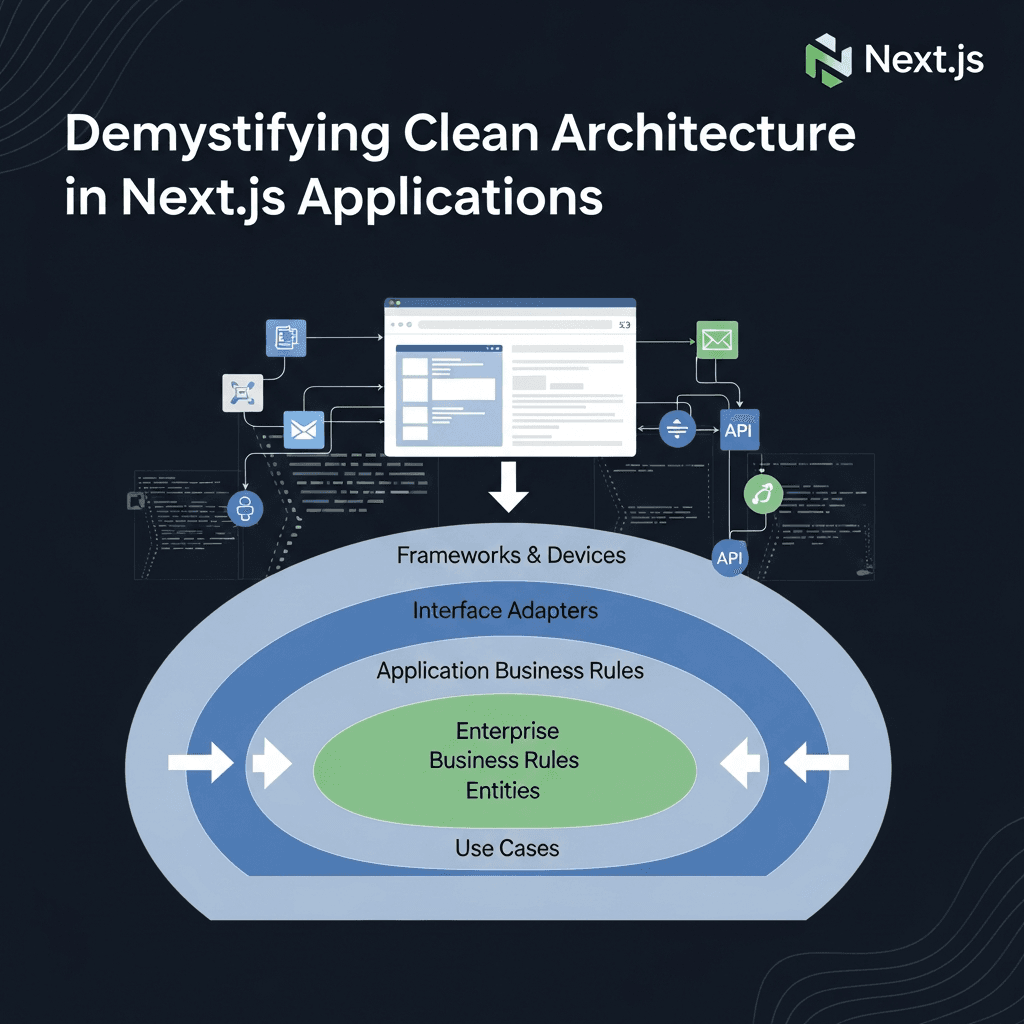
Clean Architecture is visualized as a set of concentric circles, each representing a different layer of the application. The most crucial rule is the Dependency Rule: dependencies can only flow inward. Inner circles should never know anything about outer circles.
The Four Core Layers:
- Entities (Domain Layer): The innermost circle. These encapsulate enterprise-wide business rules. They are pure, framework-agnostic objects or data structures that represent the core business concepts. They should have no external dependencies.
- Use Cases (Application Layer): These contain application-specific business rules. They orchestrate the flow of data to and from the Entities and define the application's behavior. Use Cases should not know about the UI or database details but define interfaces (ports) for them.
- Interface Adapters (Infrastructure/Presentation Layer): This layer adapts data from the format most convenient for the Use Cases and Entities to the format most convenient for some external agency (e.g., the database or the web). This includes Controllers, Presenters, and Gateways (Repositories).
- Frameworks & Drivers (External Layer): The outermost circle. This layer consists of frameworks (e.g., Next.js, React), databases (e.g., Prisma, PostgreSQL), external libraries, and UI components. These are the "details" that can be easily swapped without affecting the inner layers.
The primary goal is to isolate the core business logic (Entities and Use Cases) from external concerns. This makes your application robust against changes in UI frameworks, databases, or external services.
Why Clean Architecture for Next.js?
Next.js applications often grow beyond simple static sites. When dealing with complex business logic, user authentication, data fetching, and state management, a lack of architectural discipline can lead to:
- Tight Coupling: Business logic mixed directly with UI components or data fetching logic, making changes difficult and risky.
- Poor Testability: Components become hard to unit test without mocking large parts of the application.
- Scalability Challenges: Onboarding new developers becomes harder due to intertwined logic; scaling features becomes a nightmare.
- Framework Lock-in: Migrating to a different UI framework or data layer becomes a monumental task.
Clean Architecture addresses these issues by:
- Enhancing Testability: Each layer can be tested independently, especially the core business logic, which becomes pure functions.
- Improving Maintainability: Clear separation of concerns makes the codebase easier to understand, debug, and modify.
- Boosting Scalability: New features can be added with minimal impact on existing code, and teams can work on different layers concurrently.
- Achieving Framework Independence: Your core business logic remains oblivious to Next.js specifics, allowing for easier migrations or multi-platform support.
- Better Code Organization: Provides a consistent and predictable structure for your project.
Mapping Clean Architecture to Next.js
Applying Clean Architecture to a Next.js project requires understanding how Next.js's unique features fit into the layered model.
- Next.js Pages/Components: Primarily belong to the Frameworks & Drivers layer, interacting with Interface Adapters (Presenters/Controllers).
- Next.js API Routes: Act as Controllers within the Interface Adapters layer, receiving requests, calling Use Cases, and returning responses.
getServerSideProps/getStaticProps: These functions also reside in the Interface Adapters or Frameworks & Drivers layer, responsible for orchestrating data fetching by interacting with Use Cases.
The key is to ensure that your core business logic (Entities and Use Cases) never directly imports anything from next, react, or any data fetching library like axios or prisma.
Core Layers in Next.js Context
Let's break down each layer with examples relevant to a Next.js application.
1. Entities (Domain Layer)
This is the heart of your application. Entities define the fundamental data structures and business rules that are independent of any specific application. They are typically plain TypeScript interfaces or classes.
Example: User Entity
// src/domain/entities/User.ts

export interface User {
  id: string;
  email: string;
  username: string;
  createdAt: Date;
  updatedAt: Date;
}

// You might also define domain-specific errors here
export class UserAlreadyExistsError extends Error {
  constructor(email: string) {
    super(`User with email "${email}" already exists.`);
    this.name = "UserAlreadyExistsError";
  }
}
Notice the lack of any framework or database-specific code. This is pure business logic.
2. Use Cases (Application Layer)
Use Cases (also known as Interactors) encapsulate the application's specific business logic. They orchestrate the flow of data to and from the Entities and define the application's behavior. They define input and output ports (interfaces) for data access and presentation.
Example: CreateUserUseCase
// src/application/use-cases/CreateUserUseCase.ts

import { User, UserAlreadyExistsError } from '../../domain/entities/User';
import { IUserRepository } from '../ports/IUserRepository';

// Input Port: Defines what the Use Case expects as input
export interface CreateUserRequest {
  email: string;
  username: string;
  passwordHash: string; // Password should already be hashed by an external service/adapter
}

// Output Port: Defines what the Use Case returns
export interface CreateUserResponse {
  user: User;
}

// The Use Case interface itself
export interface ICreateUserUseCase {
  execute(request: CreateUserRequest): Promise<CreateUserResponse>;
}

// The Use Case implementation
export class CreateUserUseCase implements ICreateUserUseCase {
  constructor(private readonly userRepository: IUserRepository) {}

  async execute(request: CreateUserRequest): Promise<CreateUserResponse> {
    const existingUser = await this.userRepository.findByEmail(request.email);
    if (existingUser) {
      throw new UserAlreadyExistsError(request.email);
    }

    const newUser: Omit<User, 'id' | 'createdAt' | 'updatedAt'> = {
      email: request.email,
      username: request.username,
      // In a real app, password hashing would happen before this layer
      // For simplicity, we assume passwordHash is already provided.
    };

    const createdUser = await this.userRepository.create(newUser);

    return { user: createdUser };
  }
}
Here, CreateUserUseCase depends on IUserRepository, an interface defined within the application layer (a port). It doesn't know how the user data is stored, only that it can be stored via this interface.
3. Interface Adapters (Infrastructure/Presentation Layer)
This layer acts as a bridge between the core business logic and external systems. It contains implementations of the interfaces defined in the Use Cases layer.
Gateways (Repositories)
These implement the data access interfaces (ports) defined in the application layer. They interact with databases or external APIs.
Example: IUserRepository (Port) and PrismaUserRepository (Adapter)
// src/application/ports/IUserRepository.ts

import { User } from '../../domain/entities/User';

export interface IUserRepository {
  findByEmail(email: string): Promise<User | null>;
  create(user: Omit<User, 'id' | 'createdAt' | 'updatedAt'>): Promise<User>;
  findById(id: string): Promise<User | null>;
  // ... other user-related data operations
}// src/infrastructure/database/PrismaUserRepository.ts
import { PrismaClient } from '@prisma/client';
import { IUserRepository } from '../../application/ports/IUserRepository';
import { User } from '../../domain/entities/User';
export class PrismaUserRepository implements IUserRepository {
constructor(private readonly prisma: PrismaClient) {}
async findByEmail(email: string): Promise<User | null> {
const user = await this.prisma.user.findUnique({
where: { email },
});
return user ? this.mapPrismaUserToDomain(user) : null;
}
async create(userData: Omit<User, 'id' | 'createdAt' | 'updatedAt'>): Promise<User> {
const user = await this.prisma.user.create({
data: {
email: userData.email,
username: userData.username,
// In a real app, password would be hashed here before storing or handled by an auth service
// For simplicity, we assume passwordHash is part of userData if needed.
},
});
return this.mapPrismaUserToDomain(user);
}
async findById(id: string): Promise<User | null> {
const user = await this.prisma.user.findUnique({
where: { id },
});
return user ? this.mapPrismaUserToDomain(user) : null;
}
private mapPrismaUserToDomain(prismaUser: any): User {
// Map Prisma's database model to your domain entity
return {
id: prismaUser.id,
email: prismaUser.email,
username: prismaUser.username,
createdAt: prismaUser.createdAt,
updatedAt: prismaUser.updatedAt,
};
}
}Controllers (Next.js API Routes / getServerSideProps)
These receive input from the outermost layer (HTTP requests, UI events), translate it into a format suitable for the Use Cases, call the appropriate Use Case, and then translate the Use Case's output back into a format suitable for the outermost layer (HTTP responses, UI state).
Example: Next.js API Route for User Creation
// src/presentation/api/users.ts

import type { NextApiRequest, NextApiResponse } from 'next';
import { CreateUserRequest, ICreateUserUseCase } from '../../application/use-cases/CreateUserUseCase';
import { UserAlreadyExistsError } from '../../domain/entities/User';
import { container } from '../../lib/dependencies'; // Our simple DI container

// We'll define the container in the `lib` folder later

export default async function handler(req: NextApiRequest, res: NextApiResponse) {
  if (req.method === 'POST') {
    const { email, username, password } = req.body; // Assuming password is raw here, hash it below

    // Input validation (can be a separate helper)
    if (!email || !username || !password) {
      return res.status(400).json({ message: 'Email, username, and password are required.' });
    }

    // Hash password (this could be a dedicated 'AuthService' in infrastructure)
    const passwordHash = `hashed_${password}`; // Placeholder for actual hashing

    const request: CreateUserRequest = {
      email,
      username,
      passwordHash,
    };

    try {
      const createUserUseCase = container.resolve<ICreateUserUseCase>('ICreateUserUseCase');
      const response = await createUserUseCase.execute(request);
      return res.status(201).json(response.user);
    } catch (error) {
      if (error instanceof UserAlreadyExistsError) {
        return res.status(409).json({ message: error.message });
      }
      console.error('Error creating user:', error);
      return res.status(500).json({ message: 'Internal Server Error' });
    }
  } else {
    res.setHeader('Allow', ['POST']);
    res.status(405).end(`Method ${req.method} Not Allowed`);
  }
}
4. Frameworks & Drivers (External Layer)
This is where Next.js, React components, CSS frameworks, database drivers (like the PrismaClient instance), and other third-party libraries live. These are the "details" that the inner layers should not depend on.
Example: Next.js Page interacting with an API route or getServerSideProps
// src/presentation/pages/signup.tsx

import React, { useState } from 'react';
import { useRouter } from 'next/router';

export default function SignUpPage() {
  const [email, setEmail] = useState('');
  const [username, setUsername] = useState('');
  const [password, setPassword] = useState('');
  const [error, setError] = useState<string | null>(null);
  const [loading, setLoading] = useState(false);
  const router = useRouter();

  const handleSubmit = async (e: React.FormEvent) => {
    e.preventDefault();
    setLoading(true);
    setError(null);

    try {
      const response = await fetch('/api/users', {
        method: 'POST',
        headers: {
          'Content-Type': 'application/json',
        },
        body: JSON.stringify({ email, username, password }),
      });

      if (!response.ok) {
        const errorData = await response.json();
        throw new Error(errorData.message || 'Failed to sign up');
      }

      router.push('/dashboard'); // Redirect on success
    } catch (err: any) {
      setError(err.message);
    } finally {
      setLoading(false);
    }
  };

  return (
    <div>
      <h1>Sign Up</h1>
      <form onSubmit={handleSubmit}>
        {error && <p style={{ color: 'red' }}>{error}</p>}
        <div>
          <label htmlFor="email">Email:</label>
          <input
            type="email"
            id="email"
            value={email}
            onChange={(e) => setEmail(e.target.value)}
            required
          />
        </div>
        <div>
          <label htmlFor="username">Username:</label>
          <input
            type="text"
            id="username"
            value={username}
            onChange={(e) => setUsername(e.target.value)}
            required
          />
        </div>
        <div>
          <label htmlFor="password">Password:</label>
          <input
            type="password"
            id="password"
            value={password}
            onChange={(e) => setPassword(e.target.value)}
            required
          />
        </div>
        <button type="submit" disabled={loading}>
          {loading ? 'Signing up...' : 'Sign Up'}
        </button>
      </form>
    </div>
  );
}
Practical Implementation: Directory Structure
A typical Clean Architecture structure for a Next.js project might look like this:
src/
├── application/                  # Use Cases (Application-specific business rules)
│   ├── ports/                    # Interfaces (Input/Output Ports) for external dependencies
│   │   ├── IUserRepository.ts
│   │   └── ...
│   └── use-cases/                # Use Case implementations
│       ├── CreateUserUseCase.ts
│       └── GetUserByIdUseCase.ts
├── domain/                       # Entities (Enterprise-wide business rules)
│   ├── entities/                 # Core business objects
│   │   ├── User.ts
│   │   └── Product.ts
│   └── services/                 # Domain services (if any, for complex domain logic)
├── infrastructure/               # Interface Adapters (Gateways for external services)
│   ├── database/                 # Database implementations of repositories
│   │   ├── PrismaClient.ts       # Centralized Prisma client instance
│   │   └── PrismaUserRepository.ts
│   ├── services/                 # External service integrations (e.g., email, auth)
│   │   └── EmailService.ts
│   └── dtos/                     # Data Transfer Objects (for external data)
│       ├── UserDTO.ts
│       └── ...
├── presentation/                 # Interface Adapters (Controllers/Presenters & Frameworks/Drivers)
│   ├── api/                      # Next.js API Routes (Controllers)
│   │   ├── users.ts
│   │   └── products.ts
│   ├── components/               # React components (UI Framework)
│   │   ├── UserForm.tsx
│   │   └── ...
│   ├── pages/                    # Next.js pages (UI Framework)
│   │   ├── index.tsx
│   │   ├── users/[id].tsx
│   │   └── ...
│   └── hooks/                    # Custom React hooks for UI logic
│       └── useUserForm.ts
└── lib/                          # Utilities and Dependency Injection
    ├── dependencies.ts           # DI container setup
    ├── errors.ts                 # Custom application-wide errors
    └── utils.ts
Dependency Injection (DI) Example
To wire up the dependencies without tightly coupling the layers, we use Dependency Injection. Here's a simple manual DI container for our example:
// src/lib/dependencies.ts

import { PrismaClient } from '@prisma/client';
import { IUserRepository } from '../application/ports/IUserRepository';
import { PrismaUserRepository } from '../infrastructure/database/PrismaUserRepository';
import { ICreateUserUseCase, CreateUserUseCase } from '../application/use-cases/CreateUserUseCase';

interface DependencyContainer {
  [key: string]: any;
}

class Container {
  private dependencies: DependencyContainer = {};

  public register<T>(name: string, dependency: T): void {
    this.dependencies[name] = dependency;
  }

  public resolve<T>(name: string): T {
    if (!this.dependencies[name]) {
      throw new Error(`Dependency "${name}" not found.`);
    }
    return this.dependencies[name] as T;
  }
}

export const container = new Container();

// Initialize and register dependencies
const prisma = new PrismaClient();

const userRepository: IUserRepository = new PrismaUserRepository(prisma);
container.register<IUserRepository>('IUserRepository', userRepository);

const createUserUseCase: ICreateUserUseCase = new CreateUserUseCase(userRepository);
container.register<ICreateUserUseCase>('ICreateUserUseCase', createUserUseCase);

// You might want to register other use cases and services here
// For instance, in a real application, you'd handle Prisma client initialization carefully
// to avoid multiple instances in development and ensure it's properly closed.
// A good practice is to export a single global Prisma client instance.

// Example of how to get the Prisma client (optional, but useful for consistency)
container.register<PrismaClient>('PrismaClient', prisma);
This dependencies.ts file is then imported into presentation/api/users.ts to resolve the ICreateUserUseCase instance.
Best Practices for Clean Next.js Architecture
- Strict Dependency Rule Enforcement: Always ensure dependencies flow inward. Inner layers should never import from outer layers.
- Use TypeScript Interfaces for Contracts: Define clear contracts (ports) between layers using interfaces. This promotes loose coupling and makes mocking for testing easier.
- Dependency Injection (DI): Use DI to provide dependencies to your classes, especially Use Cases and Repositories. This can be manual (as shown) or with a library like InversifyJS for larger projects.
- Separate DTOs (Data Transfer Objects): Use DTOs to transfer data between the presentation layer and the application layer, and between the infrastructure layer and the application layer. This prevents leaking internal data structures.
- Test Each Layer in Isolation: Design your architecture to facilitate easy unit testing of Entities and Use Cases, and integration testing of Interface Adapters.
- Keep Entities Pure: Entities should be simple data structures or objects with core business logic, free from framework or database concerns.
- Error Handling: Centralize error handling and define custom domain-specific errors (as shown with
UserAlreadyExistsError). - Avoid Premature Optimization/Over-engineering: For very small projects, Clean Architecture might introduce overhead. Assess your project's complexity and growth potential.
Common Pitfalls to Avoid
- Leaking Framework Details: Accidentally importing
next/routerorprismadirectly into yourdomainorapplicationlayers. This immediately violates the Dependency Rule. - Tight Coupling: Creating direct instances of concrete repository implementations within your Use Cases instead of relying on interfaces and DI.
- Over-engineering Small Projects: Applying Clean Architecture to a simple blog or static website might add unnecessary complexity. It shines in complex, evolving applications.
- Ignoring the Dependency Rule: The most critical mistake. If an inner layer depends on an outer layer, you lose the benefits of isolation.
- Anemic Domain Model: If your Entities are just data bags with no behavior, you might be pushing too much logic into your Use Cases, leading to less cohesive domain objects.
- Not Using Interfaces: Skipping interfaces for repositories or use cases makes mocking for testing difficult and reduces flexibility.
Conclusion
Clean Architecture, when thoughtfully applied, transforms Next.js applications into robust, scalable, and maintainable systems. By strictly separating concerns into distinct layers and enforcing the Dependency Rule, you gain unparalleled flexibility to evolve your application's UI, database, or external services without disrupting its core business logic.
While it introduces an initial learning curve and a more verbose folder structure, the long-term benefits in terms of testability, maintainability, and developer experience are immense. Embrace these principles, start small, and gradually integrate Clean Architecture into your Next.js projects to build applications that are truly built to last.
Next Steps:
- Experiment with different dependency injection libraries (e.g., InversifyJS).
- Explore how to integrate authentication and authorization within this structure.
- Deep dive into testing strategies for each layer.
- Consider how to handle shared UI state management (e.g., Zustand, Redux) in a Clean Architecture context.

Written by
CodewithYohaFull-Stack Software Engineer with 7+ years of experience in Java, Spring Boot, and cloud architecture across AWS, Azure, and GCP. Writing production-grade engineering patterns for developers who ship real software.