Introduction
For years, SQLite has been widely regarded as the go-to database for local development, mobile applications, and embedded systems. Its simplicity, zero-configuration nature, and file-based operation make it incredibly convenient. However, the prevailing wisdom in the industry has often been: "SQLite is great, but not for production." This sentiment typically stems from concerns around scalability, concurrency, and, critically, robust backup and disaster recovery strategies.
But what if we told you that SQLite is not only viable but thriving in production environments for a growing number of applications? Modern web frameworks, serverless architectures, and the need for edge computing have brought SQLite back into the spotlight. The challenge then shifts to ensuring its data is as durable and recoverable as any traditional client-server database.
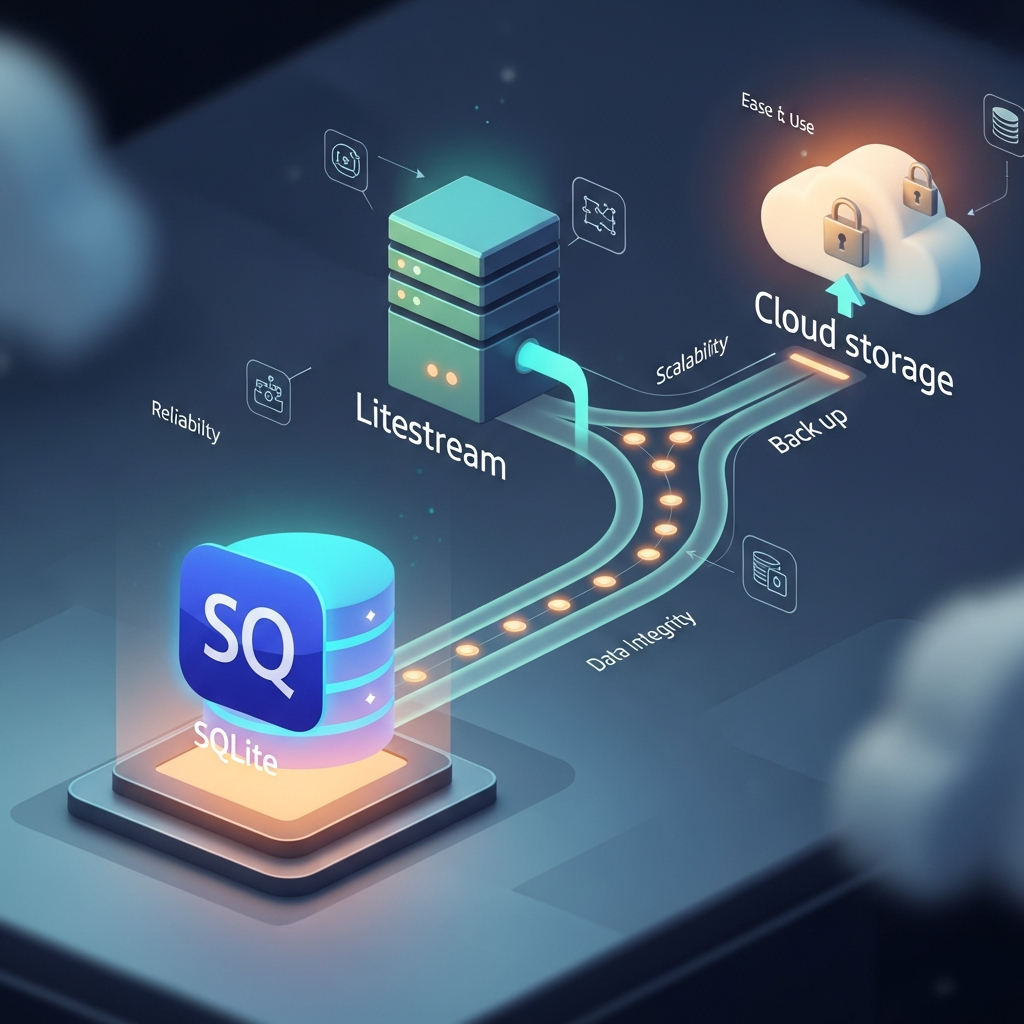
This is where Litestream shines. Litestream is an open-source tool that provides continuous, asynchronous replication of SQLite databases to cloud storage like S3, R2, or compatible services. It transforms SQLite from a local, potentially fragile data store into a robust, continuously backed-up, and highly available solution, complete with point-in-time recovery. This guide will deep dive into why SQLite is making a comeback in production and, more importantly, how Litestream empowers you to use it confidently.
Prerequisites
To get the most out of this guide, a basic understanding of the following is recommended:
- SQLite: Familiarity with its basic operations and concepts.
- Linux Command Line: Comfort with shell commands and system administration.
- Cloud Storage: Basic knowledge of S3-compatible object storage (e.g., AWS S3, DigitalOcean Spaces, MinIO).
- Systemd: Understanding how to manage services on Linux systems (optional, but helpful for production deployment).
The Resurgence of SQLite in Production
SQLite's traditional limitations (single writer, file-based) are often misconstrued as fundamental blockers for production use. However, for many applications, these are non-issues or even advantages:
- Simplicity and Zero-Configuration: No separate server process, no complex networking, no user management. Just a file. This drastically reduces operational overhead.
- Embeddable: It lives within your application's process, eliminating network latency and simplifying deployment.
- Transactional Guarantees: SQLite is fully ACID compliant, ensuring data integrity even during crashes.
- Performance: For read-heavy workloads or applications with moderate write concurrency, SQLite can be incredibly fast, often outperforming client-server databases due to zero network overhead.
- Cost-Effectiveness: Eliminating a dedicated database server reduces infrastructure costs significantly.
- Modern Use Cases:
- Edge Computing: Data processing closer to the user.
- Serverless Functions: Quick startup times, local data for short-lived functions.
- Small to Medium Web Applications: Many web apps don't require the scale of PostgreSQL or MySQL.
- Caching Layers: Local, persistent caches.
- Local Data for Distributed Systems: Each node manages its own data, reducing central database load.
The key is understanding when SQLite is the right tool. For applications that don't require massive write concurrency across multiple servers, or those where data can be sharded or eventually consistent, SQLite offers a compelling alternative.
The Backup Conundrum for SQLite
While SQLite excels in many areas, its file-based nature presents a unique challenge for backups in a production environment. Simply copying the database file (.db) can lead to corruption if the application is actively writing to it. Traditional database backup strategies often involve:
- Logical Backups:
pg_dumpormysqldump, which export data as SQL statements. These are slow for large databases and require a database server. - Physical Backups: Copying underlying data files, often requiring the database to be shut down or put into a special backup mode (e.g., PostgreSQL's base backups with WAL archiving).
SQLite, being a single file, doesn't have an integrated, robust mechanism for continuous, non-blocking backups to remote storage out-of-the-box. While you can use the sqlite3 .backup command, it creates a snapshot, not continuous replication. To achieve point-in-time recovery and ensure durability against instance failure or accidental deletion, a more sophisticated solution is needed. This is precisely the gap Litestream fills.
Introducing Litestream: Continuous Replication for SQLite
Litestream is an open-source tool developed by Ben Johnson that provides continuous, asynchronous replication of SQLite databases. It monitors changes to your SQLite database and streams them to a configured S3-compatible object storage bucket. Its core features include:
- Continuous Replication: It doesn't just take snapshots; it streams changes as they happen, minimizing data loss.
- Point-in-Time Recovery: You can restore your database to any transaction point in time, not just the last backup.
- Asynchronous Operation: It runs in the background, minimizing impact on your application's performance.
- Zero-Configuration for SQLite: It leverages SQLite's built-in Write-Ahead Log (WAL) mode.
- Self-Healing: Designed to handle network interruptions and resume replication seamlessly.
- Lightweight: A single static binary with minimal resource consumption.
Litestream effectively brings enterprise-grade backup and disaster recovery capabilities to SQLite, making it a viable and robust option for production workloads.
How Litestream Works Under the Hood
To understand Litestream, you first need to grasp SQLite's Write-Ahead Log (WAL) mode. By default, SQLite operates in rollback-journal mode. In WAL mode, writes are appended to a separate WAL file, while reads can still access the main database file. This allows for higher concurrency (readers don't block writers, writers don't block readers). Periodically, the changes from the WAL file are 'checkpointed' (merged) back into the main database file.
Litestream leverages this WAL mechanism:
- Monitors WAL: Litestream continuously monitors the SQLite WAL file (the
.db-walfile) for new transactions. - Segments and Compresses: It reads new pages from the WAL file, segments them into smaller chunks, and compresses them.
- Uploads to Storage: These compressed segments are then uploaded to your configured S3-compatible bucket.
- Snapshots: Periodically, Litestream also performs a full snapshot of the main database file (
.db) and uploads it. This ensures that the recovery process doesn't have to replay an excessively long chain of WAL segments. - Pruning: Litestream manages old WAL segments and snapshots in the remote storage, pruning them according to your retention policies.
When you need to restore, Litestream first downloads the latest full snapshot, and then replays the WAL segments from that point up to the desired recovery time. This entire process is efficient and robust, providing near real-time recovery capabilities.
Setting Up Litestream: Installation
Litestream is distributed as a single static binary, making installation straightforward.
1. Download the Binary
The easiest way is to download the latest release directly from GitHub:
# Check the latest version on GitHub releases: https://github.com/benbjohnson/litestream/releases
LITESTREAM_VERSION="0.3.10" # Replace with the latest stable version
curl -LO "https://github.com/benbjohnson/litestream/releases/download/v${LITESTREAM_VERSION}/litestream-${LITESTREAM_VERSION}-linux-amd64.tar.gz"
tar -xzf "litestream-${LITESTREAM_VERSION}-linux-amd64.tar.gz"
sudo mv litestream /usr/local/bin/
rm "litestream-${LITESTREAM_VERSION}-linux-amd64.tar.gz"
2. Verify Installation
litestream versionYou should see the installed version number.
Configuring Litestream for Basic Replication
Litestream can be configured via a YAML file (litestream.yml) or command-line flags. Using a configuration file is recommended for production environments.
1. Create a litestream.yml Configuration File
This file typically resides in /etc/litestream.yml or a similar system-wide location.
# /etc/litestream.yml
addr: ":9090" # Optional: HTTP server for metrics/health checks

dbs:
  - path: /path/to/your/database.db # Required: Absolute path to your SQLite database file
    replicas:
      - type: s3
        url: s3://your-bucket-name/database-backups/ # Required: S3-compatible URL
        access-key-id: YOUR_AWS_ACCESS_KEY_ID # Required: AWS Access Key ID
        secret-access-key: YOUR_AWS_SECRET_ACCESS_KEY # Required: AWS Secret Access Key
        region: us-east-1 # Required: S3 region
        # endpoint: https://s3.us-east-1.amazonaws.com # Optional: Specify custom S3 endpoint (e.g., for MinIO, DigitalOcean Spaces)
        # sync-interval: 1s # Optional: How often to check for new WAL data (default: 1s)
        # retention: 24h # Optional: How long to retain old WAL segments/snapshots (default: 24h)
Important Notes:
path: Must be the absolute path to your SQLite database file.url: The S3 URL dictates where backups are stored. The path after the bucket name (e.g.,/database-backups/) acts as a prefix for your database's backups.- Credentials: Store your AWS credentials securely. Environment variables (
AWS_ACCESS_KEY_ID,AWS_SECRET_ACCESS_KEY) are generally preferred over hardcoding them in the config file. If using environment variables, you can omitaccess-key-idandsecret-access-keyfrom thelitestream.yml. - WAL Mode: Ensure your application uses SQLite in WAL mode. If not, Litestream cannot perform continuous replication. Most modern ORMs and SQLite drivers enable WAL mode by default or offer configuration options.
2. Initiate Replication
Once configured, you can start Litestream. For initial setup, you might run it manually to observe its behavior.
litestream replicate -config /etc/litestream.ymlLitestream will start monitoring /path/to/your/database.db and begin uploading changes to your S3 bucket. You should see output indicating segments being uploaded.
Integrating Litestream with Your Application
For production, Litestream should run as a background service, typically managed by systemd on Linux systems.
1. Create a Systemd Service File
Create a file like /etc/systemd/system/litestream.service:
[Unit]
Description=Litestream continuous replication for SQLite
Documentation=https://litestream.io/
After=network-online.target

[Service]
User=litestream # Or the user your application runs as
Group=litestream # Or the group your application runs as
ExecStart=/usr/local/bin/litestream replicate -config /etc/litestream.yml
Restart=always
RestartSec=5s

[Install]
WantedBy=multi-user.target
Explanation:
UserandGroup: It's best practice to run Litestream under a dedicated, unprivileged user. Ensure this user has read/write permissions to your SQLite database file and directory.ExecStart: Points to the Litestream binary and your configuration file.Restart=always: Ensures Litestream restarts automatically if it crashes or the server reboots.
2. Create the Litestream User and Group
sudo groupadd --system litestream
sudo useradd --system --no-create-home --gid litestream litestream

# Ensure Litestream user can access the database file
# Adjust permissions as necessary, e.g., if your app runs as 'webappuser'
sudo chown webappuser:litestream /path/to/your/database.db
sudo chmod g+rwx /path/to/your/database.db
sudo chown webappuser:litestream /path/to/your/database.db-wal
sudo chmod g+rwx /path/to/your/database.db-wal
sudo chown webappuser:litestream /path/to/your/database.db-shm
sudo chmod g+rwx /path/to/your/database.db-shm
3. Enable and Start the Service
sudo systemctl daemon-reload
sudo systemctl enable litestream
sudo systemctl start litestream

sudo systemctl status litestream
Verify that the service is running correctly. You can also check its logs:
sudo journalctl -u litestream -fYour application can now continue to interact with the SQLite database normally, and Litestream will handle continuous replication in the background.
Disaster Recovery: Restoring Your Database
The true value of Litestream becomes apparent during a disaster. You can restore your database to a new instance or recover from accidental data loss.
1. The litestream restore Command
The litestream restore command allows you to download a database from your remote replica.
# Basic restore to the original path
litestream restore -config /etc/litestream.yml -replica-url s3://your-bucket-name/database-backups/ /path/to/your/database.db

# Restore to a different path (e.g., for testing or new instance)
litestream restore -replica-url s3://your-bucket-name/database-backups/ /tmp/restored.db

# Point-in-time recovery (restore to a specific timestamp)
# Format: YYYY-MM-DDTHH:MM:SSZ (e.g., 2023-10-27T10:30:00Z)
litestream restore -replica-url s3://your-bucket-name/database-backups/ -timestamp "2023-10-27T10:30:00Z" /path/to/your/database.db
Important Considerations for Restoration:
- Stop Your Application: Before restoring, ensure your application (or any process accessing the SQLite file) is stopped to prevent conflicts and data corruption.
- New Instance: When setting up a new server, you'd typically run
litestream restorefirst to populate the database, and then start your application and Litestream'sreplicateprocess. - Permissions: Ensure the user running
litestream restorehas appropriate write permissions to the destination directory. - Timestamp Precision: Litestream can restore to the nearest second. This provides excellent granularity for recovery.
Best Practices for Production Deployment
To maximize reliability and performance when using SQLite with Litestream in production, consider these best practices:
- Always Use WAL Mode: This is non-negotiable for Litestream. It provides concurrency and is the foundation for Litestream's continuous replication. Ensure your application's SQLite driver or ORM is configured to use WAL mode.
- Monitor Litestream: Implement monitoring for the Litestream service. Check its logs for errors and ensure it's actively replicating. Litestream also exposes Prometheus metrics on its HTTP server (if configured via
addrinlitestream.yml). - Secure Your S3 Bucket: Implement strong IAM policies for your S3 bucket. The Litestream user should only have permissions to
GetObject,PutObject,DeleteObject, andListBucketwithin its designated prefix. Enable S3 bucket versioning for an extra layer of protection against accidental deletion of backup objects. - Test Your Restores Regularly: Disaster recovery plans are only as good as their last test. Periodically perform a
litestream restoreto a test environment and verify data integrity. This builds confidence in your backup strategy. - Consider Read Replicas (if needed): While Litestream doesn't create traditional read replicas, you can achieve read-scaling by running multiple instances, each with its own Litestream process restoring from the same S3 bucket. These instances would be read-only, potentially using a tool like
rqliteor a custom application layer to manage writes to the primary and reads from replicas. For simple read-only data, alitestream restoreto an ephemeral instance can provide a fresh copy. - Encryption at Rest: Ensure your S3 bucket has server-side encryption enabled (SSE-S3, SSE-KMS). This encrypts your backups while they are stored in the cloud.
- Resource Allocation: While lightweight, ensure the server running Litestream has sufficient network bandwidth to upload changes, especially during periods of high write activity.
Common Pitfalls and Troubleshooting
Even with a robust tool like Litestream, issues can arise. Knowing common pitfalls helps in quicker troubleshooting:
- Permissions Issues: The user running Litestream must have read/write access to the
.db,.db-wal, and.db-shmfiles. If not, Litestream won't be able to monitor or access the database. Checksystemdlogs (journalctl -u litestream) for permission-denied errors. - Network Connectivity Problems: Litestream needs consistent access to your S3 bucket. Firewall rules, network outages, or incorrect S3 endpoint configurations can prevent uploads. Check connectivity and S3 credentials.
- Not Using WAL Mode: If your application is not using WAL mode, Litestream will not be able to perform continuous replication. It might still take snapshots, but the continuous streaming won't work. Check your application's SQLite configuration.
- Conflicting File Access: If another process or application tries to open the SQLite database in a way that conflicts with Litestream (e.g., trying to lock the database exclusively without WAL mode), it can cause issues. Ensure only your application and Litestream are interacting with the database files.
- Incorrect S3 Bucket/Path: Double-check the
url,region, and credentials in yourlitestream.yml. A common mistake is a typo in the bucket name or an incorrect region, leading to authentication or not-found errors. - High Storage Costs: If your database has very high write activity and you have a very long retention policy, S3 storage costs can accumulate. Monitor your S3 usage and adjust
retentioninlitestream.ymlif necessary. - Time Synchronization: Ensure your server's clock is synchronized (e.g., using NTP). Incorrect time can cause issues with S3 authentication and point-in-time recovery.
Conclusion
SQLite, when paired with Litestream, offers a compelling solution for many production database needs. It shatters the myth that SQLite is solely for development or embedded systems, proving its viability for web applications, serverless functions, and edge deployments where simplicity, performance, and cost-effectiveness are paramount.
Litestream provides the missing piece: a robust, continuous backup and disaster recovery mechanism that ensures your data is durable and recoverable to any point in time. By embracing SQLite's strengths and leveraging Litestream's capabilities, developers and operations teams can build more resilient, efficient, and easier-to-manage applications.
So, the next time you're considering a database for your project, don't dismiss SQLite for production. With Litestream, it's not just an option; it's a powerful and reliable choice.

Written by
CodewithYohaFull-Stack Software Engineer with 7+ years of experience in Java, Spring Boot, and cloud architecture across AWS, Azure, and GCP. Writing production-grade engineering patterns for developers who ship real software.