Observability-Driven Development: Shifting Left with OpenTelemetry

Introduction
In the complex landscape of modern software systems, particularly microservices architectures, understanding an application's behavior in production has become paramount. Traditional monitoring often falls short, providing only superficial insights into the health of individual components. This is where Observability-Driven Development (ODD) emerges as a transformative paradigm. ODD advocates for integrating observability as a first-class citizen throughout the entire software development lifecycle (SDLC), rather than an afterthought.
At the heart of enabling ODD lies OpenTelemetry, a vendor-agnostic set of APIs, SDKs, and tools designed to standardize the generation and collection of telemetry data (traces, metrics, and logs). By "shifting left" with OpenTelemetry, developers gain the power to instrument their code from the outset, embedding the necessary hooks for deep introspection long before issues arise in production. This proactive approach not only accelerates debugging and root cause analysis but also fosters a culture of building more resilient and understandable systems.
This comprehensive guide will delve into the principles of ODD, illuminate the "shift left" philosophy, and provide a practical roadmap for leveraging OpenTelemetry to achieve true observability in your applications.
Prerequisites
To fully grasp the concepts discussed in this article, a basic understanding of the following is recommended:
- Software Development Life Cycle (SDLC) concepts.
- Distributed Systems and Microservices Architectures.
- Fundamental concepts of Application Performance Monitoring (APM) and System Monitoring.
- Familiarity with at least one programming language (e.g., Python, Node.js, Java).
What is Observability-Driven Development (ODD)?
Observability-Driven Development is a development methodology where the ability to understand the internal state of a system from its external outputs is prioritized from the very beginning of the development process. Unlike traditional development, which might focus on testing for known failure modes, ODD focuses on ensuring that when an unknown failure or unexpected behavior occurs, the system provides enough telemetry to diagnose the issue effectively.
Why ODD is Crucial Today:
- Complexity Management: Modern systems are inherently complex, with numerous interconnected services, asynchronous operations, and third-party integrations. ODD provides the tools to navigate this complexity.
- Faster Debugging and Resolution: By embedding observability from the start, developers can quickly pinpoint the root cause of issues, reducing mean time to resolution (MTTR).
- Proactive Problem Identification: Rich telemetry allows for the creation of sophisticated alerts and dashboards that can detect anomalies before they impact users.
- Improved System Understanding: Developers gain a deeper understanding of how their services behave under various conditions, leading to better design decisions and performance optimizations.
- Enhanced Collaboration: A shared understanding of system health and behavior across development, operations, and SRE teams fosters better collaboration.
ODD shifts the mindset from merely knowing if something is broken to understanding why it broke and what led up to it.
The "Shift Left" Paradigm in Observability
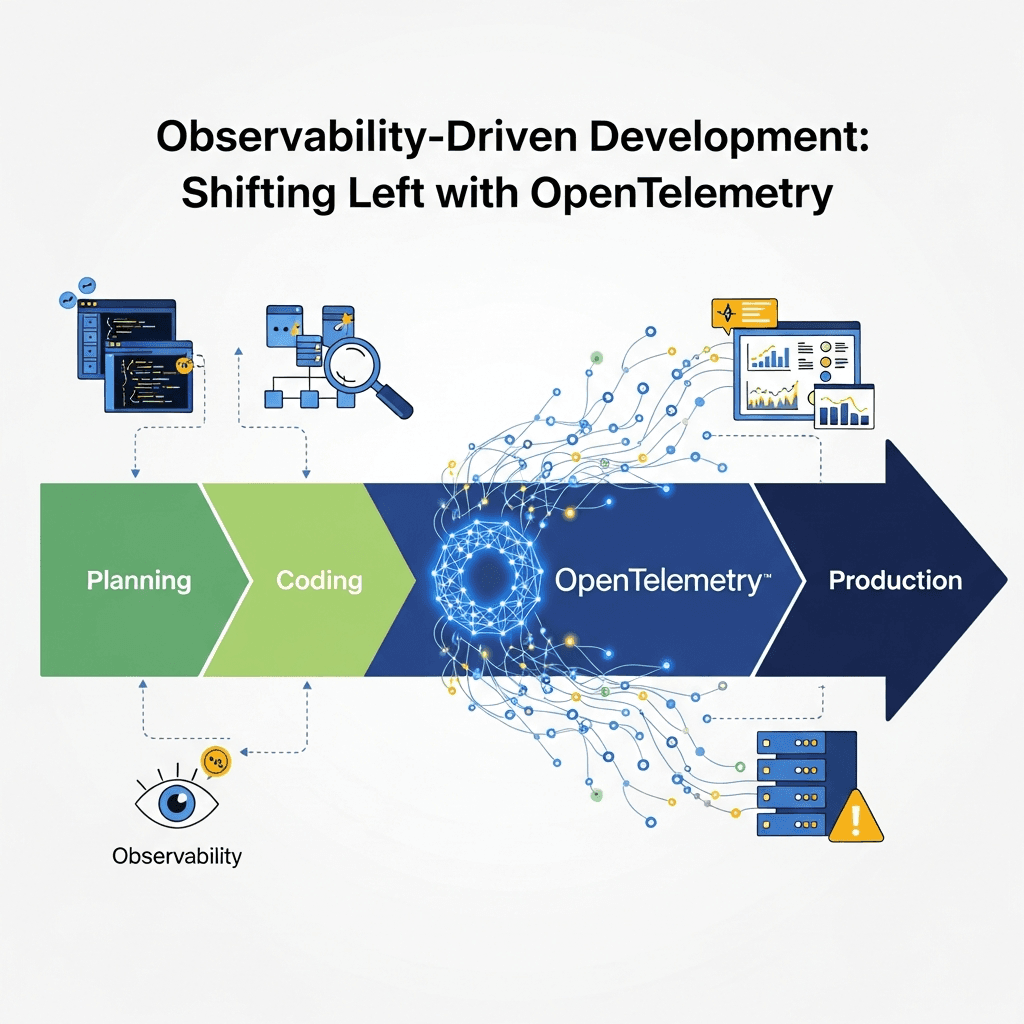
"Shifting left" means moving activities earlier in the SDLC. In the context of observability, it means integrating instrumentation and observability concerns into the design, development, and testing phases, rather than deferring them to deployment or post-production monitoring.
Traditional Approach (Shift Right):
- Observability is an afterthought, often implemented by operations teams after deployment.
- Instrumentation is added reactively when production issues arise.
- Developers might not be aware of monitoring requirements during coding.
- Leads to reactive firefighting and high MTTR.
Shift Left with ODD:
- Design Phase: Consider observability requirements (what needs to be traced, measured, logged) as part of architectural design.
- Development Phase: Developers instrument their code proactively using tools like OpenTelemetry, ensuring rich telemetry is generated from day one.
- Testing Phase: Observability data is used during testing (unit, integration, end-to-end) to validate system behavior, performance, and identify potential blind spots.
- Deployment Phase: The system is deployed with robust, pre-configured observability, ready for production monitoring.
By embracing "shift left," observability becomes an integral part of the development process, much like testing or security. This proactive stance significantly improves the overall quality, reliability, and maintainability of software systems.
Introducing OpenTelemetry
OpenTelemetry is an open-source project under the Cloud Native Computing Foundation (CNCF) that provides a single set of APIs, SDKs, and data specifications for instrumenting, generating, collecting, and exporting telemetry data. Its primary goal is to make observability a built-in feature of cloud-native software by providing a consistent, vendor-neutral way to collect traces, metrics, and logs.
Key Components of OpenTelemetry:
- APIs (Application Programming Interfaces): Language-specific interfaces for instrumenting code (e.g., creating spans, recording metrics).
- SDKs (Software Development Kits): Implementations of the APIs that provide mechanisms for processing and exporting telemetry data.
- Collector: A vendor-agnostic proxy that receives, processes, and exports telemetry data to various backends (e.g., Jaeger, Prometheus, commercial APMs).
- Semantic Conventions: Standardized naming and schema for common attributes (e.g.,
http.method,db.statement) to ensure consistency across different services and languages.
Why OpenTelemetry?
- Vendor Neutrality: Avoids vendor lock-in; you can switch observability backends without re-instrumenting your code.
- Unified Telemetry: Provides a single standard for traces, metrics, and logs, enabling better correlation.
- Community-Driven: Backed by a large and active community, ensuring continuous development and broad language support.
- Extensibility: Highly configurable and extensible to meet specific needs.
OpenTelemetry is the cornerstone for implementing ODD, providing the practical means to gather the necessary data.
Core Concepts of OpenTelemetry
OpenTelemetry unifies three pillars of observability:
Traces and Spans
Traces represent the end-to-end journey of a request or transaction through a distributed system. A trace is composed of one or more spans.
Spans are individual operations within a trace. Each span represents a unit of work (e.g., an HTTP request, a database query, a function call) and contains:
- Name: A human-readable description of the operation.
- Start and End Timestamps: When the operation began and finished.
- Attributes: Key-value pairs providing contextual information (e.g., HTTP status code, database table name, user ID).
- Events: Timed annotations within a span (e.g., log messages, specific points in execution).
- Links: References to other spans or traces.
- Parent-Child Relationship: Spans are nested to show causality, forming a directed acyclic graph (DAG).
Trace Context Propagation: This is critical for connecting spans across service boundaries. When a service makes a call to another service, the trace context (containing trace ID and span ID) is propagated via HTTP headers or message queues. This allows the receiving service to create a new child span that correctly links back to the originating trace.
Metrics
Metrics are aggregations of numerical data points captured over time, used to quantify system behavior. OpenTelemetry defines several metric instruments:
- Counter: A cumulative, monotonically increasing value (e.g., number of requests, errors).
- Asynchronous Counter: Similar to Counter but reported periodically by the application.
- Gauge: A value that goes up and down, representing a current measurement (e.g., CPU utilization, queue size, memory usage).
- Asynchronous Gauge: Similar to Gauge but reported periodically.
- Histogram: Records the distribution of observed values, allowing for calculations of percentiles (e.g., request latencies, response sizes).
- Asynchronous Histogram: Similar to Histogram but reported periodically.
Metrics are typically associated with attributes (labels) that provide dimensions for aggregation and filtering (e.g., http.method='GET', service.name='checkout-service').
Logs
Logs are timestamped text records of discrete events that happen within an application. While OpenTelemetry started with traces and metrics, it now also encompasses logs, aiming to provide a unified approach to all telemetry.
Key aspects of OpenTelemetry logs:
- Structured Logging: Encourages logging data in a structured format (e.g., JSON) with key-value pairs, making it easier to parse and query.
- Correlation: The most significant benefit is the ability to correlate logs with traces and metrics. By embedding
trace_idandspan_idinto log records, you can jump directly from a problematic log entry to the full trace that caused it, or vice-versa.
Implementing ODD with OpenTelemetry - A Practical Guide
Integrating OpenTelemetry into your application involves a few key steps.
Instrumentation Strategy
Before writing code, consider what you want to observe. Ask questions like:
- What are the critical business transactions?
- Which service boundaries are important to trace?
- What are the key performance indicators (KPIs)?
- Where are potential bottlenecks or error points?
- What context is needed to debug an issue (e.g., user ID, transaction ID)?
Start with automatic instrumentation where available (e.g., for popular web frameworks, databases), then add custom instrumentation for business logic and critical code paths.
Code Example 1: Basic Tracing (Python)
This example demonstrates instrumenting a simple Python function with a custom span and adding attributes.
# app.py
from opentelemetry import trace
from opentelemetry.sdk.resources import Resource
from opentelemetry.sdk.trace import TracerProvider
from opentelemetry.sdk.trace.export import (BatchSpanProcessor, ConsoleSpanExporter)

# 1. Configure TracerProvider
# Resource defines attributes about the entity producing telemetry (e.g., service name)
resource = Resource.create({"service.name": "my-python-app"})

tracer_provider = TracerProvider(resource=resource)

# For demonstration, export spans to console. In real apps, use OTLPSpanExporter.
span_processor = BatchSpanProcessor(ConsoleSpanExporter())
tracer_provider.add_span_processor(span_processor)

# Set the global tracer provider
trace.set_tracer_provider(tracer_provider)

# Get a tracer for your application
tracer = trace.get_tracer(__name__)

def process_data(data: str):
    # 2. Create a new span for the operation
    with tracer.start_as_current_span("process_data_operation") as span:
        # 3. Add attributes to the span for context
        span.set_attribute("input.length", len(data))
        span.set_attribute("data.processed_by", "analytics_module")

        # Simulate some work
        result = data.upper() + "-PROCESSED"

        # 4. Add an event to the span
        span.add_event("data_transformation_complete", {"transformed_length": len(result)})

        # Simulate a potential error condition
        if "error" in data.lower():
            span.set_status(trace.Status(trace.StatusCode.ERROR, "Input contained 'error'"))
            print("Error scenario detected!")
            return None

        print(f"Processing '{data}' -> '{result}'")
        return result

if __name__ == "__main__":
    print("\n--- Running with valid input ---")
    process_data("hello world")

    print("\n--- Running with error input ---")
    process_data("input with error")
To run this, you'll need the OpenTelemetry Python SDK:
pip install opentelemetry-sdk opentelemetry-api
Code Example 2: Custom Metrics (Node.js)
This example demonstrates creating a counter and a histogram in Node.js.
// app.js
const { metrics } = require('@opentelemetry/api');
const { MeterProvider, PeriodicExportingMetricReader } = require('@opentelemetry/sdk-metrics');
const { ConsoleMetricExporter } = require('@opentelemetry/sdk-metrics');
const { Resource } = require('@opentelemetry/resources');
const { SemanticResourceAttributes } = require('@opentelemetry/semantic-conventions');

// 1. Configure MeterProvider
const resource = new Resource({
  [SemanticResourceAttributes.SERVICE_NAME]: 'my-nodejs-app',
});

const meterProvider = new MeterProvider({ resource: resource });
const metricReader = new PeriodicExportingMetricReader({
  exporter: new ConsoleMetricExporter(), // For demonstration
  exportIntervalMillis: 1000, // Export every second
});
meterProvider.addMetricReader(metricReader);

// Set the global meter provider
metrics.setGlobalMeterProvider(meterProvider);

// 2. Get a meter for your application
const meter = metrics.getMeter('my-app-meter');

// 3. Create metric instruments
const requestCounter = meter.createCounter('http.requests_total', {
  description: 'Total number of HTTP requests',
  unit: '1',
});

const requestDurationHistogram = meter.createHistogram('http.request_duration_seconds', {
  description: 'Duration of HTTP requests in seconds',
  unit: 's',
  // Optional: Define explicit bucket boundaries for more meaningful histograms
  // boundaries: [0.005, 0.01, 0.025, 0.05, 0.075, 0.1, 0.25, 0.5, 0.75, 1, 2.5, 5, 10]
});

function handleRequest(path, status, durationSeconds) {
  const attributes = { 'http.route': path, 'http.status_code': status };

  // 4. Record metric values
  requestCounter.add(1, attributes);
  requestDurationHistogram.record(durationSeconds, attributes);

  console.log(`Handled request to ${path} with status ${status} in ${durationSeconds}s`);
}

// Simulate requests
setInterval(() => {
  handleRequest('/api/users', 200, Math.random() * 0.1); // Fast request
  handleRequest('/api/products', 200, Math.random() * 0.5 + 0.1); // Medium request
  handleRequest('/api/orders', 500, Math.random() * 2 + 0.5); // Slow error request
}, 500);

// Graceful shutdown
process.on('SIGTERM', () => {
  meterProvider.shutdown().then(() => console.log('Metrics shut down.'));
});
To run this, you'll need the OpenTelemetry Node.js SDK:
npm install @opentelemetry/api @opentelemetry/sdk-metrics @opentelemetry/sdk-node @opentelemetry/exporter-metrics-otlp-proto
Code Example 3: Context Propagation (Conceptual)
This is a conceptual illustration of how trace context is propagated across two services (Service A calls Service B) using HTTP headers. OpenTelemetry SDKs handle much of this automatically for common frameworks.
# --- Service A (Python) ---
from opentelemetry import trace
from opentelemetry.propagate import set_global_textmap, get_global_textmap
from opentelemetry.propagators.composite import CompositePropagator
from opentelemetry.sdk.trace import TracerProvider
from opentelemetry.sdk.trace.export import ConsoleSpanExporter, BatchSpanProcessor
from opentelemetry.trace.propagation.tracecontext import TraceContextTextMapPropagator
import requests

# Configure TracerProvider as in Example 1
# ... (setup omitted for brevity) ...

# Set the global text map propagator (important for context injection/extraction)
set_global_textmap(CompositePropagator([TraceContextTextMapPropagator()]))

tracer = trace.get_tracer(__name__)

def call_service_b():
    with tracer.start_as_current_span("call_service_b") as span:
        # Inject trace context into headers
        headers = {}
        get_global_textmap().inject(headers)

        print(f"Service A calling Service B with headers: {headers}")
        try:
            response = requests.get("http://localhost:8001/data", headers=headers)
            response.raise_for_status()
            print(f"Service B responded: {response.json()}")
            span.set_attribute("http.status_code", response.status_code)
        except requests.exceptions.RequestException as e:
            span.set_status(trace.Status(trace.StatusCode.ERROR, f"Service B call failed: {e}"))
            print(f"Service B call failed: {e}")

# --- Service B (Python/Flask, conceptual) ---
from flask import Flask, request
from opentelemetry import trace
from opentelemetry.propagate import set_global_textmap, get_global_textmap
from opentelemetry.propagators.composite import CompositePropagator
from opentelemetry.sdk.trace import TracerProvider
from opentelemetry.sdk.trace.export import ConsoleSpanExporter, BatchSpanProcessor
from opentelemetry.trace.propagation.tracecontext import TraceContextTextMapPropagator

# Configure TracerProvider as in Example 1
# ... (setup omitted for brevity) ...

# Set the global text map propagator
set_global_textmap(CompositePropagator([TraceContextTextMapPropagator()]))

tracer = trace.get_tracer(__name__)
app = Flask(__name__)

@app.route("/data")
def get_data():
    # Extract trace context from incoming headers
    headers = request.headers
    ctx = get_global_textmap().extract(headers)

    # Start a new span as a child of the propagated context
    with tracer.start_as_current_span("get_data_from_db", context=ctx) as span:
        span.set_attribute("http.path", request.path)
        # Simulate database call
        print("Service B processing request...")
        import time
        time.sleep(0.1)

        response_data = {"message": "Data from Service B", "trace_id": str(span.context.trace_id)}
        return response_data

# Note: In a real Flask app, you'd use Flask instrumentor for automatic context propagation.
This conceptual example highlights the manual steps. In reality, OpenTelemetry provides auto-instrumentation for popular web frameworks (like Flask, Express, Spring Boot) that automatically injects and extracts trace context from HTTP headers, significantly simplifying this process.
Integrating OpenTelemetry with Backend Systems
OpenTelemetry's strength lies in its ability to export data to virtually any observability backend.
OpenTelemetry Collector
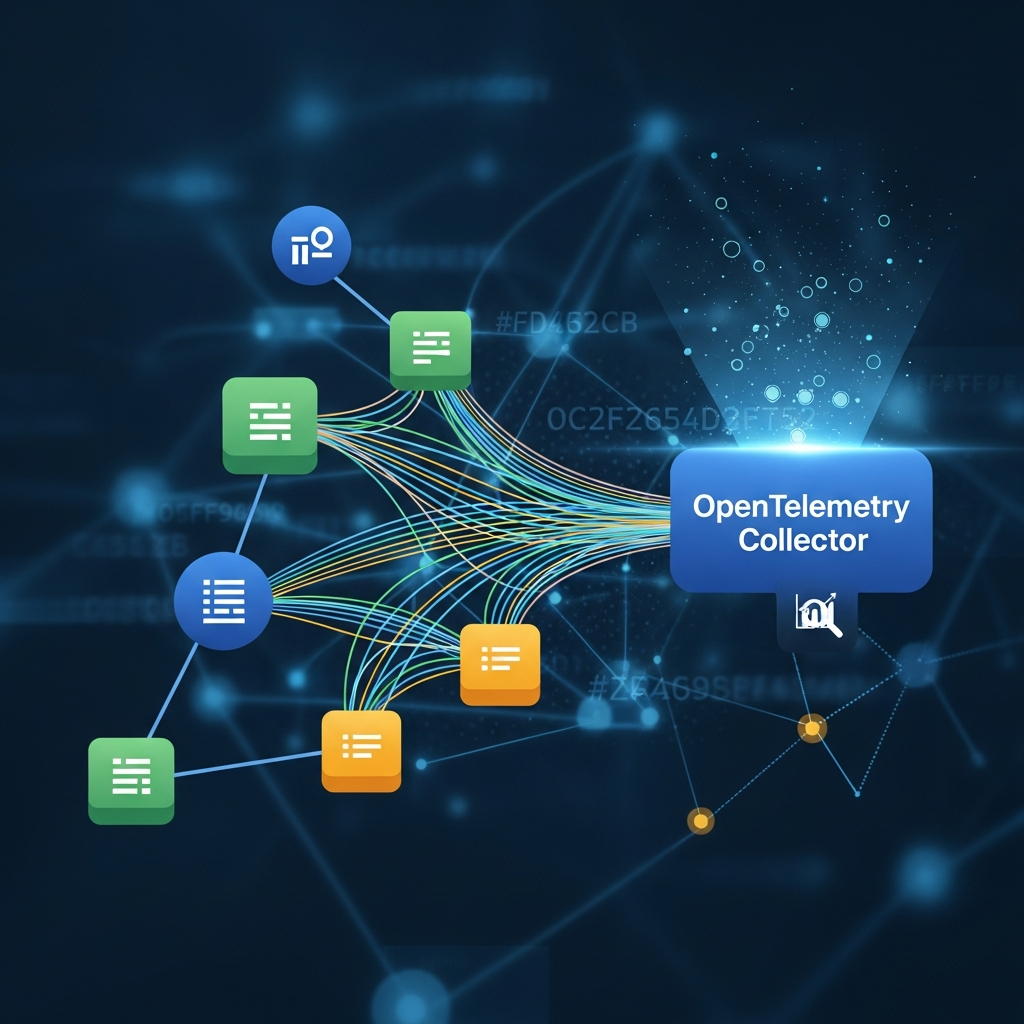
The OpenTelemetry Collector is a crucial component in most OpenTelemetry deployments. It's a vendor-agnostic proxy that can receive, process, and export telemetry data. Its benefits include:
- Decoupling: Applications send data to the Collector, which then forwards it to one or more backends, decoupling application instrumentation from backend specifics.
- Data Processing: The Collector can filter, sample, enrich, and transform telemetry data before exporting it.
- Buffering and Retries: Provides robust delivery guarantees, even if the backend is temporarily unavailable.
- Batching: Optimizes network usage by batching data before sending.
Example OpenTelemetry Collector Configuration (YAML):
This snippet shows a basic configuration for receiving OTLP (OpenTelemetry Protocol) data and exporting it to Jaeger (for traces), Prometheus (for metrics), and Loki (for logs).
# otel-collector-config.yaml
receivers:
  otlp:
    protocols:
      http:
      grpc:

processors:
  batch:
    send_batch_size: 1000
    timeout: 10s
  memory_limiter:
    limit_mib: 256
    spike_limit_mib: 64
    check_interval: 5s

exporters:
  logging:
    verbosity: detailed # For debugging, logs all received telemetry
  jaeger:
    endpoint: jaeger-all-in-one:14250 # Jaeger gRPC endpoint
    tls:
      insecure: true
  prometheus:
    endpoint: "0.0.0.0:8889" # Expose metrics for Prometheus to scrape
  loki:
    endpoint: http://loki:3100/loki/api/v1/push
    # Add common attributes as labels for Loki
    labels:
      resource:
        service.name: ""
        host.name: ""
      attribute:
        level: ""

service:
  pipelines:
    traces:
      receivers: [otlp]
      processors: [memory_limiter, batch]
      exporters: [logging, jaeger]
    metrics:
      receivers: [otlp]
      processors: [memory_limiter, batch]
      exporters: [logging, prometheus]
    logs:
      receivers: [otlp]
      processors: [memory_limiter, batch]
      exporters: [logging, loki]
Exporting Data
Applications typically export data to the OpenTelemetry Collector via the OTLP (OpenTelemetry Protocol). The Collector then forwards this data to various backends:
- Traces: Jaeger, Zipkin, DataDog, New Relic, Honeycomb, etc.
- Metrics: Prometheus, InfluxDB, DataDog, New Relic, Grafana Mimir, etc.
- Logs: Loki, Elastic Stack (Elasticsearch, Logstash, Kibana), Splunk, DataDog, etc.
This flexibility is a core tenet of OpenTelemetry, allowing organizations to choose or switch their observability backend solutions without re-instrumenting their code.
Real-World Use Cases for ODD
ODD with OpenTelemetry provides tangible benefits across various scenarios:
- Debugging Distributed Systems: When a request fails in a microservices environment, a trace can show the entire path of the request across all services, identifying exactly which service, function, or database call failed and why.
- Performance Optimization: Traces and metrics can pinpoint latency bottlenecks (e.g., a slow database query, an inefficient API call to a third-party service). Histograms for request durations help identify outliers and tail latencies.
- Understanding User Behavior: By associating user IDs or session IDs with traces and logs, you can track a user's journey through your application, understanding their interactions and identifying points of friction.
- Root Cause Analysis (RCA): When an alert fires (e.g., high error rate), correlated traces, metrics, and logs provide a holistic view, enabling engineers to quickly drill down from a high-level metric to specific problematic spans and log messages.
- Capacity Planning: Metrics like request rates, resource utilization (CPU, memory), and queue lengths inform capacity planning decisions, ensuring systems can scale effectively.
- A/B Testing and Feature Flag Analysis: Instrumenting feature flags with metrics allows you to compare the performance and behavior of different feature versions in real-time.
- SLA/SLO Monitoring: Define Service Level Objectives (SLOs) based on OpenTelemetry metrics (e.g.,
http.request_duration_secondsfor latency,http.requests_totaland error counts for availability) and set up alerts when these are violated.
Best Practices for ODD and OpenTelemetry
To maximize the benefits of ODD and OpenTelemetry, adhere to these best practices:
- Standardized Naming Conventions: Use OpenTelemetry's semantic conventions for span names, metric names, and attributes. For custom telemetry, establish clear internal conventions (e.g.,
service.operation.action). Consistency is key for queryability and understanding. - Strategic Instrumentation: Don't instrument everything. Focus on critical paths, service boundaries, database calls, external API calls, and business-critical logic. Over-instrumentation can lead to high cardinality, increased costs, and noise.
- Context Propagation Discipline: Ensure trace context is correctly propagated across all service boundaries, including HTTP headers, message queues, and asynchronous tasks. Auto-instrumentation helps, but manual checks are sometimes necessary.
- Leverage Attributes Effectively: Attributes are your best friends for filtering, aggregating, and adding context. Include relevant identifiers like
user.id,customer.id,request.id,deployment.environment,service.version. - Structured Logging with Correlation: Always include
trace_idandspan_idin your structured log messages. This links your logs directly to your traces, enabling powerful correlation in your observability backend. - Test Your Observability: Just as you test your application's functionality, test its observability. Verify that traces are flowing correctly, metrics are being recorded, and logs contain the expected context during development and testing.
- Use the OpenTelemetry Collector: Deploy the Collector to centralize telemetry processing, reduce overhead on applications, and provide flexibility in backend choices.
- Define SLOs and Alerting: Once you have rich telemetry, define meaningful Service Level Objectives (SLOs) and configure alerts based on them. This shifts you from reactive to proactive monitoring.
- Iterate and Refine: Observability is not a one-time setup. Continuously review your telemetry, identify blind spots, and refine your instrumentation as your system evolves.
Common Pitfalls and How to Avoid Them
Even with the best intentions, certain issues can undermine your ODD efforts:
- Ignoring Context Propagation: Forgetting to propagate trace context, especially in asynchronous operations or message queues, leads to broken traces and fragmented insights. Always verify propagation paths.
- Too Much or Too Little Data: Over-instrumentation can lead to excessive costs and overwhelming noise. Under-instrumentation leaves critical blind spots. Strive for a balance by focusing on business-critical paths and using sampling.
- Lack of Standardization: Inconsistent naming conventions or attribute usage across services makes querying and correlating data difficult. Enforce semantic conventions and internal standards rigorously.
- Not Integrating with Alert Systems: Collecting data is only half the battle. If you don't use it to define meaningful alerts, you're missing the proactive benefits of ODD.
- Forgetting About Cost: Telemetry data can be voluminous. Be mindful of storage and processing costs, especially with commercial backends. Implement sampling strategies (head-based, tail-based) in the Collector.
- Treating ODD as a Pure Ops Task: Observability is a shared responsibility. Developers must own instrumentation, while SRE/Ops teams focus on backend management and alert configuration.
- Ignoring Logs: While traces and metrics are powerful, logs still provide crucial granular detail. Ensure logs are structured and correlated with traces.
Conclusion
Observability-Driven Development, powered by OpenTelemetry, represents a fundamental shift in how we approach building and operating modern software. By embedding observability into the very fabric of our applications from the earliest development stages, we move beyond mere monitoring to truly understand the intricate behaviors of our distributed systems.
OpenTelemetry provides the universal language for this understanding, liberating developers from vendor lock-in and empowering them with a consistent, powerful toolset for generating traces, metrics, and logs. Embracing the "shift left" philosophy with OpenTelemetry doesn't just improve debugging; it fosters a culture of proactive system design, resilience, and continuous improvement.
The journey to full observability is iterative. Start by instrumenting your critical services, leverage the OpenTelemetry Collector for robust data handling, and continuously refine your approach based on the insights you gain. The investment in ODD with OpenTelemetry will pay dividends in reduced MTTR, increased system stability, and a deeper, more confident understanding of your software in production.
Written by
CodewithYohaFull-Stack Software Engineer with 7+ years of experience in Java, Spring Boot, and cloud architecture across AWS, Azure, and GCP. Writing production-grade engineering patterns for developers who ship real software.