Introduction
The advent of Large Language Models (LLMs) has revolutionized how we interact with information, enabling powerful generative capabilities. However, LLMs often suffer from inherent limitations: they can "hallucinate" (generate factually incorrect information), operate on outdated training data, and lack access to private or domain-specific knowledge. This is where Retrieval-Augmented Generation (RAG) steps in, transforming LLMs from general knowledge engines into highly accurate, domain-aware, and up-to-date conversational agents.
This comprehensive guide delves into implementing RAG using Embabel, a powerful framework designed to simplify LLM interactions, alongside the expressive and robust Kotlin programming language. We'll explore the core concepts of RAG, set up a Kotlin project, ingest data into a vector store, perform augmented queries, and discuss best practices for building reliable and effective RAG applications.
What is RAG (Retrieval-Augmented Generation)?
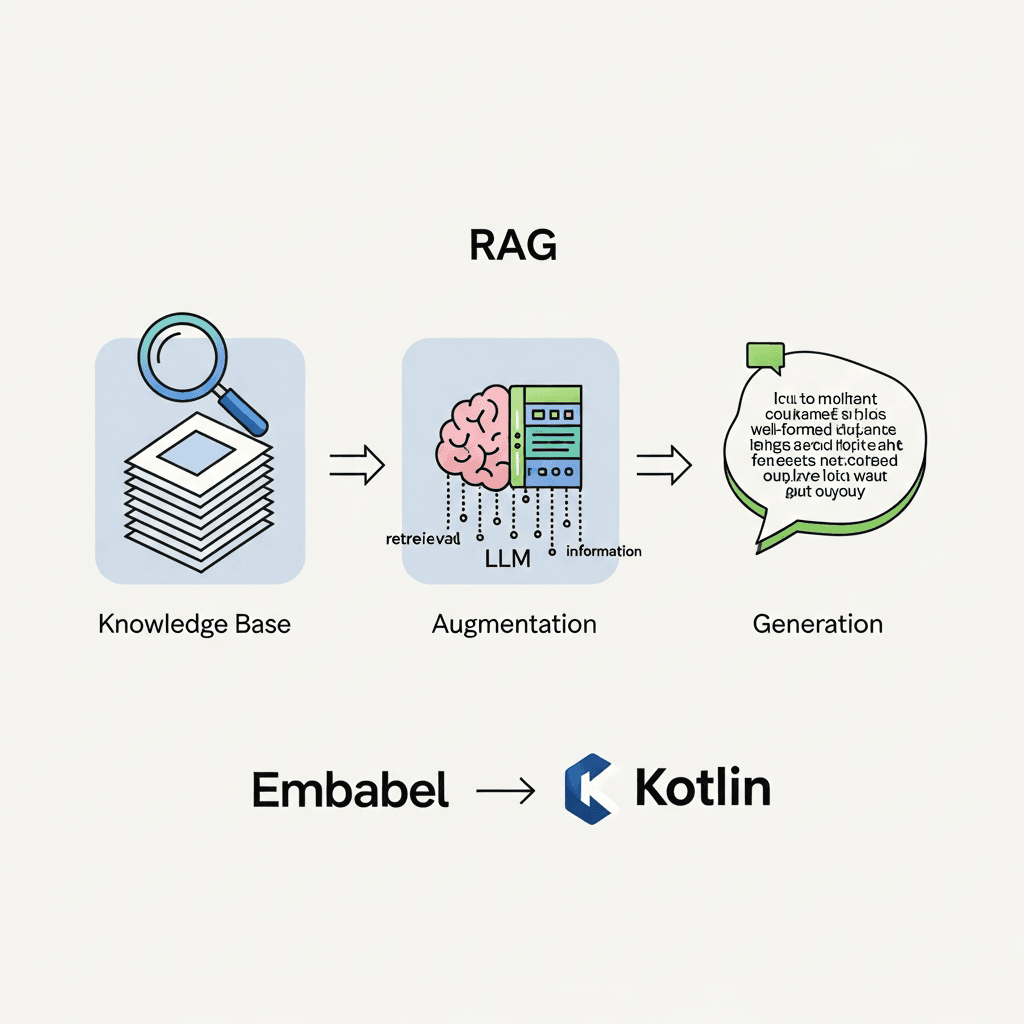
RAG is an architectural pattern that enhances the capabilities of LLMs by giving them access to external, up-to-date, and domain-specific information. Instead of relying solely on their internal knowledge, RAG systems retrieve relevant documents or data chunks from a knowledge base before generating a response.
The process typically involves two main phases:
- Retrieval: When a user asks a question, the system first queries a knowledge base (often a vector store containing embeddings of documents) to find the most relevant pieces of information. These retrieved "chunks" of data are semantically similar to the user's query.
- Augmentation & Generation: The retrieved information is then used to augment the original user prompt. This enriched prompt, containing both the user's query and the relevant context, is sent to the LLM. The LLM then generates a response based on this augmented input, leading to more accurate, grounded, and contextually relevant answers.
Why RAG is powerful:
- Reduces Hallucinations: LLMs are less likely to invent facts when provided with explicit context.
- Access to Current Data: RAG allows LLMs to use the latest information, bypassing their training data cutoff.
- Domain Specificity: Enables LLMs to answer questions about proprietary or niche data.
- Attribution & Explainability: Responses can often be traced back to the source documents, improving trust and verifiability.
- Cost-Effective: Avoids the need for expensive fine-tuning of LLMs for new knowledge.
Why Embabel for RAG with Kotlin?
Embabel is a JVM-based framework that provides a high-level abstraction layer for interacting with LLMs. It's designed to make building LLM-powered applications, especially those involving RAG, significantly easier and more maintainable. Here's why it's a fantastic choice for RAG with Kotlin:
- Simplified LLM Interactions: Embabel abstracts away the complexities of different LLM providers (OpenAI, Hugging Face, etc.), allowing you to switch between them with minimal code changes.
- Built-in RAG Support: Embabel has first-class support for RAG, offering dedicated components for managing knowledge contexts, vector stores, and retrievers.
- Kotlin Native: Being JVM-based, Embabel integrates seamlessly with Kotlin, leveraging its conciseness, null safety, and powerful features.
- Structured Approach: Embabel encourages a structured, declarative way of defining LLM interactions, improving code readability and maintainability.
- Testability: Its modular design makes it easier to test different components of your RAG pipeline.
Kotlin, with its modern syntax, excellent tooling, and strong JVM ecosystem, provides a robust and enjoyable development experience for building scalable backend services and AI applications. The synergy between Embabel's high-level abstractions and Kotlin's pragmatic design makes for a powerful RAG development environment.
Prerequisites
Before we dive into the code, ensure you have the following set up:
- Java Development Kit (JDK) 17+: Required for Kotlin JVM projects.
- Kotlin-enabled IDE: IntelliJ IDEA is highly recommended.
- Gradle or Maven: For project dependency management. We'll use Gradle Kotlin DSL.
- An LLM Provider API Key: For this guide, we'll primarily use OpenAI. You'll need an
OPENAI_API_KEYenvironment variable. - A Vector Store: Embabel supports various vector stores. For simplicity, we'll start with LanceDB as an embedded option, then mention ChromaDB.
Setting up Your Kotlin Project with Embabel
Let's create a new Gradle project and add the necessary dependencies. Create a new Kotlin JVM project in IntelliJ IDEA.
Your build.gradle.kts file should look something like this:
plugins {
    kotlin("jvm") version "1.9.22"
    application
}

group = "com.example"
version = "1.0-SNAPSHOT"

repositories {
    mavenCentral()
}

dependencies {
    implementation(kotlin("stdlib"))

    // Embabel core for LLM interactions
    implementation("com.debugs.llm:embabel-core:0.3.0")

    // OpenAI integration for Embabel
    implementation("com.debugs.llm:embabel-llm-openai:0.3.0")

    // LanceDB for local vector store (embedded)
    implementation("com.debugs.llm:embabel-knowledge-lancedb:0.3.0")

    // Or for ChromaDB (requires a running ChromaDB instance)
    // implementation("com.debugs.llm:embabel-knowledge-chroma:0.3.0")

    // SLF4J for logging
    implementation("org.slf4j:slf4j-simple:2.0.7")
}

application {
    mainClass.set("com.example.rag.AppKt") // Adjust to your main class
}

kotlin {
    jvmToolchain(17)
}
Create a file named App.kt (or similar) in your src/main/kotlin/com/example/rag directory.
package com.example.rag

import com.debugs.llm.embabel.Embabel
import com.debugs.llm.embabel.config.EmbabelConfig
import com.debugs.llm.embabel.llm.openai.OpenAILlm
import com.debugs.llm.embabel.knowledge.lancedb.LanceDbKnowledgeContext
import com.debugs.llm.embabel.knowledge.KnowledgeContext
import java.nio.file.Paths

fun main() {
    println("Starting Embabel RAG application...")

    // Ensure OPENAI_API_KEY environment variable is set
    val openAiApiKey = System.getenv("OPENAI_API_KEY")
        ?: error("OPENAI_API_KEY environment variable not set")

    // Configure Embabel
    val embabelConfig = EmbabelConfig(
        llms = mapOf("default" to OpenAILlm(openAiApiKey)),
        defaultLlm = "default"
    )
    val embabel = Embabel(embabelConfig)

    println("Embabel initialized successfully.")

    // Example: Use a temporary LanceDB directory
    val lancedbPath = Paths.get(System.getProperty("java.io.tmpdir"), "lancedb-rag-example").toString()
    println("Using LanceDB at: $lancedbPath")

    // The rest of our RAG logic will go here
    // ...

    embabel.close()
    println("Embabel application finished.")
}
Understanding Embabel's RAG Architecture
Embabel's RAG architecture is built around a few key concepts:
Embabel: The main entry point for all LLM operations. It manages LLM configurations and knowledge contexts.LlmKnowledgeContext: An interface representing a source of knowledge that an LLM can draw upon. This is where your vector store integration lives.KnowledgeContext: A more general interface for any source of knowledge, whichLlmKnowledgeContextextends.Retriever: An internal component responsible for fetching relevant information from theKnowledgeContextbased on a query.VectorStore: The underlying database that stores document embeddings and performs similarity searches.
Embabel simplifies the interaction by allowing you to associate a KnowledgeContext directly with an LLM interaction, and it handles the retrieval and prompt augmentation automatically.
Step 1: Ingesting Data into a Vector Store
The first crucial step in RAG is to populate your knowledge base with relevant data. This involves taking your raw documents, splitting them into manageable chunks, creating embeddings for these chunks, and storing them in a vector store. Embabel abstracts much of this complexity.
Let's add some example text data to a LanceDB knowledge context:
// Inside main function, after Embabel initialization

val knowledgeContext: KnowledgeContext = LanceDbKnowledgeContext(lancedbPath)

val documents = listOf(
    "Embabel is a Kotlin framework for building LLM applications.",
    "It simplifies interactions with various Large Language Models.",
    "RAG stands for Retrieval-Augmented Generation, enhancing LLMs with external data.",
    "Kotlin is a modern, concise, and safe programming language for the JVM.",
    "LanceDB is an open-source, embedded vector database built for AI applications.",
    "OpenAI provides powerful language models like GPT-3.5 and GPT-4."
)

println("Ingesting documents into LanceDB...")
knowledgeContext.addDocuments(documents.map { com.debugs.llm.embabel.knowledge.Document(it) })
println("Documents ingested.")

// Important: Cast to LlmKnowledgeContext to use with LLM operations
val llmKnowledgeContext = knowledgeContext as? com.debugs.llm.embabel.knowledge.LlmKnowledgeContext
    ?: error("Knowledge context is not an LlmKnowledgeContext")
Explanation:
- We create an instance of
LanceDbKnowledgeContext, pointing it to a directory where LanceDB will store its data. - A list of
Stringdocuments is prepared. In a real application, these would come from files, databases, or APIs. knowledgeContext.addDocuments()takes a list ofcom.debugs.llm.embabel.knowledge.Documentobjects. Embabel handles chunking (if necessary, though for these short strings it's less critical), embedding generation (using the default embedding model configured with Embabel, often OpenAI'stext-embedding-ada-002if using OpenAI LLM), and storing them in LanceDB.- We cast the
KnowledgeContexttoLlmKnowledgeContextbecause LLM interaction methods specifically expect this type for RAG.
Step 2: Defining a Retriever
In Embabel, the retriever is implicitly used when you provide an LlmKnowledgeContext to an LLM interaction. By default, Embabel will use a retriever that performs a similarity search on the vector store associated with the LlmKnowledgeContext.
While you don't explicitly define a Retriever object for basic RAG with Embabel, you can influence its behavior through configuration, for instance, by setting the number of documents to retrieve. For more advanced scenarios, Embabel allows implementing custom Retriever interfaces if you need highly specialized retrieval logic.
For most common RAG patterns, Embabel's default behavior is sufficient and highly effective, leveraging the underlying vector store's capabilities.
Step 3: Performing RAG Queries
Now that our knowledge base is populated, we can perform RAG queries. This is where Embabel truly shines, making it incredibly simple to combine LLM generation with retrieved context.
// Inside main function, after document ingestion

println("Performing RAG queries...")

// Query 1: Information directly from our documents
val query1 = "What is Embabel used for?"
val result1 = embabel.interact(query1, knowledgeContext = llmKnowledgeContext)
    .asChat()
    .send()

println("\nQuery: $query1")
println("Response: ${result1.output.value}")

// Query 2: Another question from our context
val query2 = "Tell me about Kotlin."
val result2 = embabel.interact(query2, knowledgeContext = llmKnowledgeContext)
    .asChat()
    .send()

println("\nQuery: $query2")
println("Response: ${result2.output.value}")

// Query 3: A question potentially requiring more synthesis or general knowledge, but still augmented
val query3 = "What are the benefits of using an embedded vector database like LanceDB?"
val result3 = embabel.interact(query3, knowledgeContext = llmKnowledgeContext)
    .asChat()
    .send()

println("\nQuery: $query3")
println("Response: ${result3.output.value}")

// A query that might be out of context for our small dataset
val query4 = "What is the capital of France?"
val result4 = embabel.interact(query4, knowledgeContext = llmKnowledgeContext)
    .asChat()
    .send()

println("\nQuery: $query4")
println("Response (out of context): ${result4.output.value}")

// Close the knowledge context when done
knowledgeContext.close()
Explanation:
embabel.interact(query, knowledgeContext = llmKnowledgeContext): This is the core RAG call. We pass our user query and theLlmKnowledgeContext. Embabel automatically:- Takes the
query. - Uses the
llmKnowledgeContextto retrieve relevant documents from LanceDB. - Constructs an augmented prompt, combining the original query with the retrieved context.
- Sends this augmented prompt to the underlying LLM (OpenAI in this case).
- Receives the LLM's generated response.
- Takes the
.asChat().send(): This specifies that we're performing a chat-style interaction and sends the request to the LLM.result.output.value: Extracts the generated text response from the LLM.- Notice how
query4might still get a correct answer from the LLM's pre-trained knowledge, but it wouldn't have been augmented by our specific LanceDB knowledge base for that query, demonstrating the selective nature of RAG.
Advanced RAG Techniques with Embabel
Embabel provides flexibility for more complex RAG scenarios:
Customizing the Retriever
While Embabel's default retriever works well, you might need to implement custom retrieval logic, perhaps combining multiple data sources or applying specific filtering. You can achieve this by implementing the Retriever interface and passing it to your LlmKnowledgeContext constructor or configuring it within EmbabelConfig.
For example, to specify the number of documents to retrieve:
// You can configure retriever options through the KnowledgeContext implementation
// For LanceDbKnowledgeContext, this might be a parameter during instantiation or a setter.
// Current Embabel versions usually manage this through the context itself or global config.
// Example (conceptual, exact API might vary slightly):
// val customKnowledgeContext = LanceDbKnowledgeContext(lancedbPath, retrieverConfig = RetrieverConfig(maxResults = 5))
Multiple Knowledge Contexts
In a complex application, you might have different knowledge bases for different domains (e.g., product documentation, HR policies, customer support logs). Embabel allows you to manage multiple LlmKnowledgeContext instances and switch between them dynamically based on the user's intent or the application's state.
// Example of creating another knowledge context
val salesDataPath = Paths.get(System.getProperty("java.io.tmpdir"), "lancedb-sales-data").toString()
val salesKnowledgeContext = LanceDbKnowledgeContext(salesDataPath)
salesKnowledgeContext.addDocuments(listOf(Document("Our Q1 sales increased by 15%."), Document("New product X launched in March.")))
val salesLlmKnowledgeContext = salesKnowledgeContext as LlmKnowledgeContext

// Later, based on user query:
val userQuery = "What were the Q1 sales figures?"
val relevantContext = if (userQuery.contains("sales")) salesLlmKnowledgeContext else llmKnowledgeContext
val salesResult = embabel.interact(userQuery, knowledgeContext = relevantContext).asChat().send()
println("\nSales Query: $userQuery")
println("Sales Response: ${salesResult.output.value}")

salesKnowledgeContext.close()
Prompt Engineering for RAG
The quality of the prompt sent to the LLM, even with retrieved context, is critical. Ensure your base prompts clearly instruct the LLM on how to use the provided context:
- "Use the following context to answer the question. If the answer is not in the context, state that you don't know."
- "Based on the retrieved documents, summarize the key points regarding X."
Embabel allows you to define these base prompts when initiating interactions or through more advanced PromptConfig objects.
Real-world Use Cases
RAG with Embabel and Kotlin can power a wide array of applications:
- Enterprise Search & Q&A: Build intelligent search engines that answer questions directly from internal company documents (HR manuals, technical specifications, legal documents) rather than just returning links.
- Customer Support Chatbots: Create highly accurate chatbots that can provide support based on product manuals, FAQs, and past support tickets, reducing reliance on human agents.
- Personalized Content Generation: Generate reports, summaries, or creative content grounded in specific user data or curated knowledge bases.
- Legal & Medical Research Assistants: Assist professionals in sifting through vast amounts of specialized literature, summarizing findings, and answering complex questions with verifiable sources.
- Intelligent Data Analysis: Provide natural language interfaces to query and summarize insights from structured and unstructured data, leveraging domain knowledge.
Best Practices for RAG Implementation
To build robust and effective RAG systems, consider these best practices:
- Chunking Strategy: This is paramount. Documents need to be split into chunks that are small enough to be relevant to a specific query but large enough to provide sufficient context. Experiment with different chunk sizes, overlaps, and splitting methods (e.g., sentence splitting, paragraph splitting, recursive splitting).
- Embedding Model Choice: The quality of your embeddings directly impacts retrieval performance. While OpenAI's
text-embedding-ada-002is a strong general-purpose choice, domain-specific embedding models can offer superior performance for niche topics. - Data Quality: "Garbage In, Garbage Out" applies strongly to RAG. Ensure your source documents are clean, accurate, and relevant. Irrelevant or noisy data will degrade retrieval quality.
- Evaluation Metrics: Establish metrics to evaluate both retrieval quality (e.g., recall, precision of retrieved chunks) and generation quality (e.g., factual accuracy, relevance, coherence, groundedness). Tools like RAGAS can help automate this.
- Hybrid Search: Combine vector similarity search with traditional keyword search (e.g., BM25) for more robust retrieval, especially for queries containing very specific terms.
- Security & Privacy: When dealing with sensitive data, ensure your vector store and LLM interactions comply with data privacy regulations (e.g., GDPR, HIPAA). Consider self-hosted LLMs or on-premise vector stores for highly sensitive applications.
- Caching: Implement caching for frequently asked questions or retrieved document chunks to reduce latency and API costs.
Common Pitfalls and How to Avoid Them
Even with a powerful framework like Embabel, RAG implementations can encounter issues:
- Poor Retrieval: If the retrieved documents are irrelevant or insufficient, the LLM will still hallucinate or provide generic answers. This is often due to bad chunking, a weak embedding model, or a noisy knowledge base.
- Avoid: Refine chunking, experiment with embedding models, preprocess data, consider hybrid retrieval.
- Context Window Limitations: LLMs have a maximum context window. If too many or too large documents are retrieved, the prompt might exceed this limit, leading to truncation or errors.
- Avoid: Optimize chunk size, limit the number of retrieved documents, implement summarization of retrieved chunks if necessary.
- Over-reliance on LLM: Simply providing context doesn't guarantee a perfect answer. The LLM might still misinterpret context or prioritize its internal knowledge. You might need to refine your prompts.
- Avoid: Stronger prompt engineering, few-shot examples within the prompt, post-processing of LLM output.
- Cost Overruns: LLM API calls and embedding generation can be expensive, especially at scale.
- Avoid: Implement caching, monitor usage, choose cost-effective LLMs or self-host where appropriate.
- Slow Performance: Latency can be introduced by both retrieval and LLM inference.
- Avoid: Optimize vector store queries, use faster LLMs, implement asynchronous processing, and caching.
- Lack of Freshness: If your knowledge base isn't regularly updated, the RAG system can still provide outdated information.
- Avoid: Implement robust data ingestion pipelines that regularly sync and update your vector store.
Conclusion
Retrieval-Augmented Generation is a game-changer for building intelligent applications with LLMs, addressing their core limitations regarding factual accuracy and access to proprietary information. With Embabel and Kotlin, you have a powerful and elegant stack to implement sophisticated RAG systems.
We've covered setting up your project, ingesting data into a vector store, performing augmented queries, and explored advanced techniques and critical best practices. By following this guide, you're well-equipped to leverage the full potential of RAG, creating more reliable, knowledgeable, and valuable AI applications.
Start experimenting with your own data, refine your chunking and retrieval strategies, and witness the transformative power of RAG with Embabel and Kotlin!

Written by
CodewithYohaFull-Stack Software Engineer with 7+ years of experience in Java, Spring Boot, and cloud architecture across AWS, Azure, and GCP. Writing production-grade engineering patterns for developers who ship real software.